
QR25DE engine
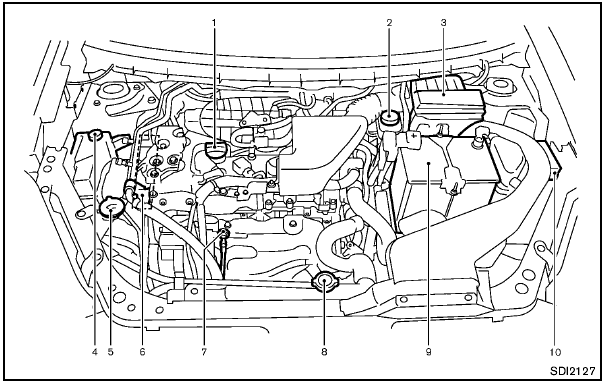
1. Engine oil filler cap
2. Brake fluid reservoir
3. Air cleaner
4. Engine coolant reservoir
5. Window washer fluid reservoir
6. Drive belt location
7. Engine oil dipstick
8. Radiator filler cap
9. Battery
10. Fuse/fusible link holder
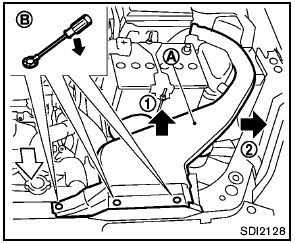
Removing the air duct
Remove the air duct A if necessary.
1. Remove the clips B with a suitable tool.
2. Pull the air duct upward 1 and then sideways 2 .
Install the air duct securely after any inspection or maintenance work is performed.
See also:
FM/AM radio operation
FM·AM button:
Press the FM·AM button to change the band as
follows:
AM → FM1 → FM2 → AM
If another audio source is playing when the
FM·AM button is pressed, the audio sourc ...
2010 Nissan Cube review
The Cube - which is a "mobile device," not a car, Nissan says, returns for
2010 with a base price of $13,999 (plus $720 freight), which is just $9 more
than the 2009 starting price.
Fo ...
Compatibility
The following models are compatible:
● iPod 5th Generation version 1.2.3
● iPod Classic - version 1.1
● iPod Touch - version 2.1*
● iPod Nano - 1st generation version 1 ...