
Dimensions and weights
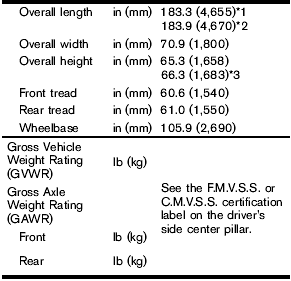
1: Without front license plate bracket 2: With front license plate bracket 3: With roof rail
See also:
How to read the displayed lines
Without Navigation System
Lines which indicate the vehicle clearance and
distances to objects with reference to the bumper
line A are displayed on the monitor.
They are indicated as reference ...
Touch screen operation
Touch screen operation
Selecting the item:
Touch an item to select. For example, to select
the “Audio” key, touch the “Audio” key 1 on the
screen.
Adjusting the item:
For screens w ...
How to use the SETTING button
When the SETTING button is pressed, the Settings
screen will appear on the display. You can
select and/or adjust several functions, features
and modes that are available for your vehicle. Use ...