
Rear audio controls (if so equipped)
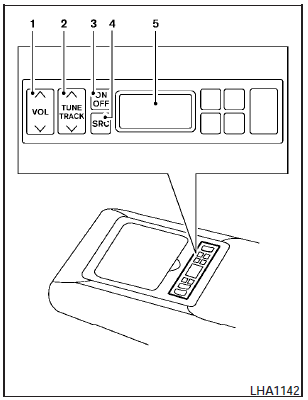
1. VOL (volume) control switch.
2. TUNE/TRACK switch.
3. ON/OFF button.
4. SRC (source) select button.
5. Display.
The audio system can also be operated using the rear controls.
For information on canceling the rear seat controller, see Rear control cancel switch (if so equipped) in the Instruments and controls section.
ON/OFF button:
With the ignition switch placed in the ACC or ON position, press the ON/OFF button to turn the audio system on or off.
VOL (volume) control switch:
Push the  side of the
switch to increase the
volume or push the
side of the
switch to increase the
volume or push the  side of
the switch to
decrease the volume.
side of
the switch to
decrease the volume.
SRC (source) button:
Press the SRC button to change the audio mode as follows:
Models without Navigation System:
AM > FM1 > FM2 > XM1 > XM2 > XM3 > USB* > CD/DVD* > Music Box** (if so equipped) > AUX* > AM.
Models with Navigation System:
AM > FM1 > FM2 > XM1 > XM2 > XM3 > CD/DVD* > Music Box** > USB/iPodT* > Bluetooth Audio > AUX* > AM.
* These modes are only available when compatible media storage is inserted into the device.
** This mode is only available when music has been downloaded into the Music Box system.
TUNE/TRACK control switch:
AM/FM:
- Push the or side of the switch to select the next or previous preset station.
- Push and hold the or side of the switch to select the next or previous station.
XM:
- Push the or side of the switch to select the next or previous preset station.
- Push and hold the or side of the switch to select the next or previous category.
CD:
- Push the or side of the switch to select the next track or the beginning of the current track.
CD/USB (if so equipped) with MP3/WMA:
- Push the or side of the switch to select the next track or the beginning of the current track.
- Push and hold the or side of the switch to change folders.
CD/DVD/USB (if so equipped) with compressed audio files:
- Push the or side of the switch to select the next track or the beginning of the current track.
- Push and hold the or side of the switch to change folders.
iPodT (if so equipped):
- Push the or side of the switch to select the next or previous track.
Music Box hard-disk drive audio system (if so equipped):
- Push the or side of the switch to select the next or the beginning of the current track.
- Push and hold the or side of the switch to change the playlist.
Bluetooth Audio (if so equipped):
- Push the or side of the switch to select the next track or beginning of the current track.
See also:
Safety, Features & Pricing
In crash tests by the Insurance Institute for Highway Safety, the Rogue
earned the top score, Good, in front, side and rear impacts. The crossover
earned just an Acceptable score in roof-strength ...
Inside mirror
Inside mirror
Adjust the height and the angle of the inside
mirror to the desired position.
Manual anti-glare type
The night position 1 will reduce glare from the
headlights of vehicles beh ...
FM/AM/SAT radio with compact disc (CD) player (Type A) (if so equipped)
Type A
1. SCAN button
2. Station select (1 - 6) buttons
3. CD insert slot
4. iPod MENU button
5. CD
eject button
6. TUNE/SCROLL knob/Setting control button
7. SEEK/CAT buttons
8. A ...