
“Recent Calls”
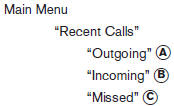
Use the Recent Calls command to access outgoing, incoming or missed calls.
“Outgoing” A
Use the Outgoing command to list the outgoing calls made from the vehicle.
“Incoming” B
Use the Incoming command to list the incoming calls made to the vehicle.
“Missed” C
Use the Missed command to list the calls made to the vehicle that were not answered.
See also:
Reporting safety defects (US only)
If you believe that your vehicle has a defect
which could cause a crash or could
cause injury or death, you should immediately
inform the National Highway Traffic
Safety Administration (NHTSA) ...
Audio main operation
VOL/ON·OFF control:
Place the ignition switch in the ACC or ON
position and push the VOL/ON·OFF control knob
while the system is off to call up the mode (radio
or CD) that was playing immedia ...
Maintenance requirements
Your NISSAN has been designed to have minimum
maintenance requirements with long service
intervals to save you both time and money.
However, some day-to-day and regular maintenance
is essential ...