



Nissan Versa: Monitor, climate, audio, phone and voice recognition systems - Control panel buttons
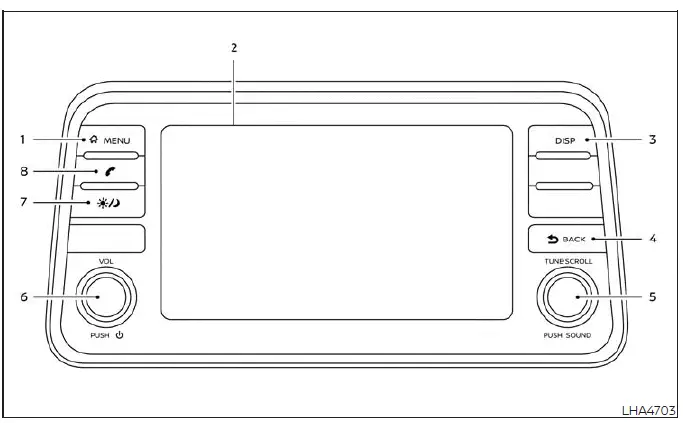
-
 MENU button
 - Display screen
- DISP button
-
 BACK button
 - TUNE-SCROLL knob / PUSH SOUND button
- VOL (volume) knob / PUSH (power) button
-
 (brightness control) button
 -
 button*
* For additional details, consult the comprehensive "Bluetooth Hands-Free Phone System" section regarding the operational characteristics of the Bluetooth Hands-Free Phone System control button.
When operating this interactive system, it is highly recommended to make sure the Nissan Versa engine is running to maintain optimal electrical system voltage.
If you operate the media system with the engine turned off for an extended period of time, the electronic components will slowly discharge the vehicle's 12V battery, eventually preventing the engine from starting.
Reference symbols: Words marked in quotes, such as "Example", refer specifically to an interactive key or tab shown on the high-resolution display. These virtual keys can be selected directly by touching the designated area on the screen.
How to use the touch-screen
CAUTION
- The high-resolution glass display screen is sensitive and may crack or break if hit with a hard, heavy, or sharp object. In the event that the glass screen breaks, immediately stop using it and do not touch the broken pieces to avoid cuts or personal injury.
- When cleaning the display surface, never use a rough abrasive cloth, alcohol, benzine, paint thinner, or any harsh solvents or paper towels pre-treated with chemical cleaning agents. Applying these products will scratch the surface, strip the protective coating, or permanently deteriorate the screen panel.
- Do not splash, spray, or spill any liquid, including water, car wash detergents, or oil-based car fragrances, onto the display housing.
Direct contact with liquid or chemical substances will seep into the internal circuitry and cause the entire infotainment system to malfunction.
To help ensure safe driving and prevent driver distraction, several advanced settings and non-essential features cannot be operated while the vehicle is in motion.
The specific on-screen functions and menu selections that are restricted while driving will be automatically "grayed out", locked, or muted on the Nissan Versa display.
WARNING
- ALWAYS give your full, undivided attention to the road and surrounding traffic conditions while driving.
- Avoid using any vehicle features, settings, or connected devices that could distract your attention from operating the vehicle. If you are distracted, you could easily lose control of your Nissan Versa and cause a serious accident.
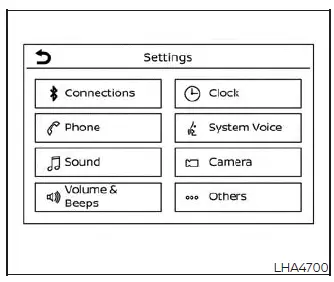
Touch-screen operation

Touch-screen maintenance
If you need to clean the display screen, gently wipe the surface with a dry, soft, lint-free microfiber cloth. If additional cleaning is required to remove fingerprints or smudges, apply a small amount of neutral detergent diluted with water to a soft cloth. Never spray water, glass cleaner, or liquid detergent directly onto the screen. Always dampen the microfiber cloth first and then gently wipe the screen surface clean.
How to use the MENU
 button
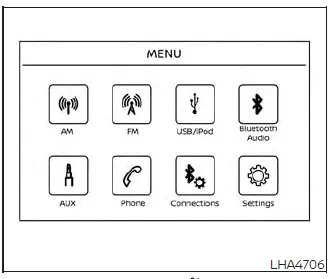
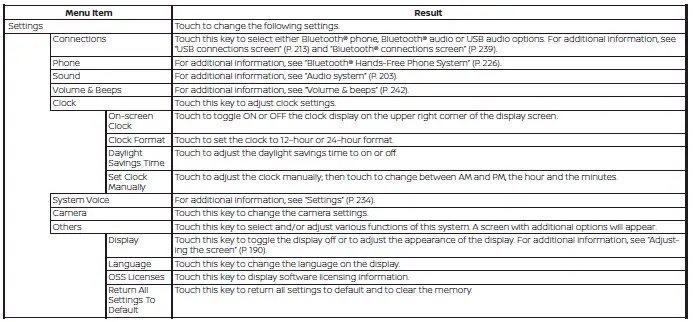
To view, select, or customize the various operational functions, system preferences, and comfort modes that are available for your vehicle:
1. Press the physical
 MENU button located on the control panel.
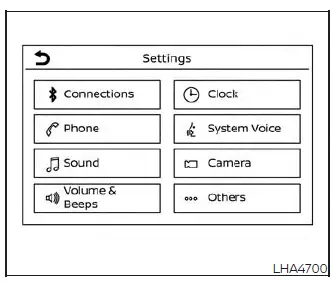
2. Touch the "Settings" key displayed on the touch-screen.
3. Touch the desired category or feature item you wish to adjust.
 (brightness control) button
To adjust the display brightness to suit ambient lighting, press the
 button. Pressing this button repeatedly will manually toggle the display back and forth between the high-visibility day display and the dimmed night display modes.
Press and hold the
 button for more than 2 seconds to completely turn off the display screen backlight. Press the button once again to turn the display back on.
How to use the VOL (volume) knob / PUSH (power)
 button
Press the physical PUSH
 (power) button on the control panel to instantly turn your Nissan Versa audio system on or off. Turn the VOL (volume) knob clockwise to increase the sound output or counterclockwise to decrease the volume.
Selecting menu from launch bar
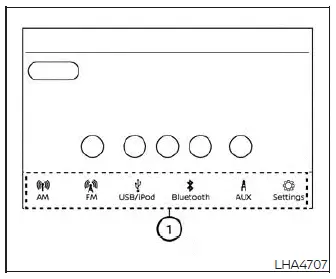
A variety of primary system functions can be accessed quickly by touching the shortcut items located on the Launch Bar (labeled 1) which is conveniently displayed along the bottom of most main menu screens. Please note that the Launch Bar will not appear on specialized screens where full-screen view is required, such as text entry keyboards, camera displays, or diagnostic screens. Simply touch any key on the Launch Bar to switch instantly to that menu screen.
The following primary media and navigation items are readily available on the Launch Bar:
- AM (AM Radio)
- FM (FM Radio)
- USB/iPod (Connected Media Devices)
- Bluetooth (Wireless Audio Streaming)
- AUX (Auxiliary Audio Input)
- Settings (System Configuration Menu)
Tire Pressure Monitoring System (TPMS) Nissan Versa third generation
To ensure optimal safety, handling, and longevity for your Nissan Versa, each tire, including the spare (if provided), should be checked monthly when cold and carefully inflated to the exact manufacturer-recommended specifications. You can easily find these guidelines on the vehicle placard or the designated tire inflation pressure label located on the driver’s side door jamb. (Should your Nissan Versa be fitted with tires of a different dimension than the original factory sizing indicated on the placard, it remains critical to determine the proper tire inflation pressure specifically matched to those alternative tires.) As an advanced and reliable safety feature, your Nissan Versa is equipped with an integrated Tire Pressure Monitoring System (TPMS) designed to illuminate a distinct low tire pressure warning light (telltale) the moment one or more of your tires drops significantly below the ideal operating pressure.
Accordingly, the very second you notice the low tire pressure telltale illuminate on your dashboard, you should safely pull over and inspect all four tires on your Nissan Versa as soon as possible, inflating them back to their proper PSI levels. Driving on a significantly under-inflated tire generates excessive internal friction, causing the tire to overheat dangerously and potentially leading to sudden, catastrophic tire failure. Furthermore, chronic under-inflation severely compromises your vehicle's fuel efficiency, accelerates tire tread wear, and negatively impacts both braking performance and overall handling stability.
Please note that while high-tech, the TPMS in your Nissan Versa is never a substitute for routine, hands-on tire maintenance. It remains the sole responsibility of the driver to regularly check and maintain correct tire pressure, even if ongoing air loss or under-inflation has not yet reached the strict threshold required to trigger the automated TPMS low tire pressure telltale.
To ensure total reliability, your Nissan Versa has also been equipped with a dedicated TPMS malfunction indicator designed to alert you immediately whenever the monitoring system itself is not operating properly.
This vital TPMS malfunction indicator is intelligently integrated directly with the low tire pressure telltale.
When the sophisticated onboard diagnostics detect a system malfunction, the associated telltale will flash rhythmically for approximately one minute upon ignition before remaining continuously illuminated.
This warning sequence will continue automatically upon every subsequent vehicle start-up for as long as the underlying system malfunction persists. Whenever this malfunction indicator is actively illuminated, your Nissan Versa system may temporarily lose the ability to accurately detect or signal low tire pressure conditions as originally intended. Such TPMS malfunctions can occur due to various common factors, including the physical installation of replacement or alternate aftermarket tires or wheels that are incompatible with the system's sensors.
Always remember to thoroughly check the TPMS malfunction telltale immediately after having one or more tires or wheels replaced on your Nissan Versa, ensuring that your newly installed hardware allows the TPMS sensors to continue communicating and functioning seamlessly.
Additional information:
- When using a temporary wheel or any standard replacement wheel completely devoid of a TPMS sensor—such as a compact spare tire—the Nissan Versa TPMS cannot monitor the pressure of that specific spare tire.
- The active TPMS on your Nissan Versa will only activate and update its readings when the vehicle is driven at consistent speeds above 16 mph (25 km/h). Additionally, please keep in mind that this monitoring network may not instantaneously detect a sudden, catastrophic drop in tire pressure, such as an immediate blowout or flat tire occurring while driving at highway speeds.
- The low tire pressure warning light does not automatically extinguish the moment you finish pumping air into your tires. After every tire on your Nissan Versa is successfully inflated to the recommended placard pressure, the vehicle must be driven continuously at speeds above 16 mph (25 km/h) to reactivate the sensors, reset the system, and turn off the low tire pressure warning light. Always double-check your work using a reliable manual tire pressure gauge.
- The descriptive text notification reading "Tire Pressure Low - Add Air" or the shorthand "CHECK TIRE PRES" warning will flash or appear persistently each time the ignition switch of your Nissan Versa is placed in the ON position for as long as the low tire pressure warning light remains actively illuminated.
- The "Tire Pressure Low-Add Air" warning will appear clearly within the digital vehicle information display, or the alternative "CHECK TIRE PRES" warning will show up on the trip computer whenever the low tire pressure warning light is illuminated and low pressure is actively detected.
The "Tire Pressure Low - Add Air" or "CHECK TIRE PRES" warning message will turn off automatically once the underlying low tire pressure warning light is cleared.
- The specific "Tire Pressure Low - Add Air" or "CHECK TIRE PRES" warning message will not populate on your display if the low tire pressure warning light has illuminated strictly to indicate a deeper system-level TPMS malfunction.
- Natural tire pressure fluctuates continuously, rising and falling in direct response to the internal heat generated by normal vehicle operation and changes in ambient outside temperature. Never bleed air or reduce your tire pressure immediately after driving your Nissan Versa, as normal friction naturally elevates hot tire pressures.
Low ambient outside temperatures can naturally reduce the temperature and volume of the air inside your tires, which directly results in a lower tire inflation pressure. When winter weather or cold snaps hit, this natural pressure drop may cause the low tire pressure warning light on your Nissan Versa to illuminate unexpectedly. If this warning light activates, immediately check and verify the tire pressure across all four main tires.
WARNING
- Radio waves emitted nearby could potentially and adversely affect sensitive electric medical equipment. Individuals who rely on a pacemaker should always contact their specific electric medical equipment manufacturer to discuss potential influences and safety measures before operating or riding in the vehicle.
- Should the low tire pressure warning light illuminate unexpectedly while driving your Nissan Versa, immediately avoid any sudden, erratic steering maneuvers or abrupt, hard braking. Safely reduce your vehicle's speed, signal, and pull off the road to a secure location, bringing the vehicle to a complete stop as soon as possible.
Continued driving with severely under-inflated tires may permanently damage the internal tire construction and substantially increase the overall likelihood of sudden tire failure.
Serious structural vehicle damage could occur under these conditions, which may directly lead to a hazardous accident and result in severe personal injury.
Carefully check the current tire pressure across all four tires using an accurate gauge. Adjust the inflation to match the recommended COLD tire pressure values clearly displayed on the Tire and Loading Information label of your Nissan Versa to successfully turn the low tire pressure warning light off. If you encounter a flat tire, make sure to replace it with a functioning spare tire as soon as possible.
- When utilizing a replacement wheel entirely devoid of a TPMS sensor—such as a compact spare tire—or whenever a spare tire is mounted or a standard wheel is replaced on your Nissan Versa, the monitoring system will temporarily be unable to function, causing the low tire pressure warning light to flash continuously for approximately 1 minute before remaining solidly lit. Have your tires professionally serviced and/or the TPMS system reset as soon as possible. It is always recommended that you visit an authorized Nissan dealer for this specialized service.
- Replacing factory tires with alternative tires not originally specified or approved by Nissan could negatively affect the proper, seamless operation of the TPMS on your Nissan Versa.
- Never inject any chemical tire sealing liquids or aerosol-based tire puncture repair products into your tires, as these foreign substances can permanently coat the interior and cause a catastrophic malfunction of the delicate tire pressure sensors.
CAUTION
- The TPMS on your Nissan Versa may experience operational interruptions and fail to function properly when the drive wheels are wrapped in heavy tire chains or when the wheels are deeply buried in dense snow or mud.
- Avoid placing metallic window films, tinting with metallic content, or any aftermarket metallic parts (such as external antennas or transceivers) directly on or near the vehicle windows. This can cause poor reception and signal blocking of the radio frequencies transmitted by the tire pressure sensors, preventing the Nissan Versa TPMS from functioning correctly.
Certain external electronic devices and radio transmitters may temporarily interfere with the wireless operation of the TPMS on your Nissan Versa, occasionally triggering the low tire pressure warning light.
Common examples include:
- Industrial facilities or external electric devices operating on similar radio frequencies in close geographic proximity to the vehicle.
- Operating a handheld or vehicle-mounted radio transmitter set to matching frequencies inside or immediately next to your Nissan Versa.
- Using a portable computer, consumer electronics, or a DC/AC power inverter plugged in inside or near the passenger cabin of the vehicle.
The low tire pressure warning light on your Nissan Versa may also illuminate under the following specific circumstances:
- If the vehicle is currently fitted with an alternate wheel and tire assembly completely lacking a TPMS sensor.
- If the TPMS sensors have been replaced during maintenance and the unique sensor ID codes have not yet been properly programmed and registered into the vehicle's computer.
- If the installed wheel and rim combination was not originally specified or certified by Nissan for your specific model.
FCC Notice:
For USA:
This advanced communication device installed in your Nissan Versa complies fully with Part 15 of the Federal Communications Commission (FCC) Rules. Operation of this system is strictly subject to the following two essential conditions: (1) This device must not cause any harmful interference to other electronics, and (2) this device must gladly accept any external radio frequency interference received, including any erratic interference that might inadvertently cause undesired operation or performance.
NOTE:
Any unauthorized changes or mechanical modifications made to the electronics of your Nissan Versa that are not expressly approved and certified by the party responsible for compliance could instantly void the user's legal authority and operating privilege to handle the equipment.
For Canada:
This wireless device integrated into your Nissan Versa contains advanced licence-exempt transmitter(s) and receiver(s) that fully comply with Innovation, Science and Economic Development Canada's strict licence-exempt RSS standards. Operation within Canadian territory remains subject to the following two conditions: (1) This device must not cause harmful interference. (2) This device must accept any interference encountered, including unexpected interference that may cause undesired operation of the device.
TPMS with Easy-Fill Tire Alert
When you are pumping air into an under-inflated tire on your Nissan Versa, the innovative TPMS with Easy-Fill Tire Alert provides clear, helpful visual and audible cues right outside the vehicle to guide you effortlessly through the process, helping you inflate your tires precisely to the recommended COLD tire pressure limits.
Vehicle set-up:
1. Safely park your Nissan Versa in a secure, level, and well-lit area away from moving traffic.
2. Firmly apply the mechanical parking brake and ensure the transmission shift lever is securely placed in the P (Park) position (if your Nissan Versa is so equipped).
3. Turn the vehicle ignition switch over to the ON position to power the necessary electronic accessories.
Do not start or crank the engine during this setup phase.
Operation:
1. Connect your air compressor hose and begin adding compressed air directly to the target tire.
2. After just a few seconds of continuous air flow, the exterior hazard indicators on your Nissan Versa will begin flashing rhythmically to confirm system engagement.
3. The exact moment the designated target pressure level is successfully reached, the vehicle horn will emit a single crisp beep and the exterior hazard indicators will immediately stop flashing.
4. Repeat these simple, straightforward steps systematically for each individual tire on your Nissan Versa.
- If you accidentally over-inflate any tire beyond the target by more than approximately 4 psi (30 kPa), the horn will sound warning beeps and the hazard indicators will flash three distinct times. To correct this excess pressure and bring it back to spec, simply press down briefly on the center core of the tire valve stem to bleed off a small amount of air. The moment the pressure drops back down to the designated setting, the horn will sound a single confirmation beep.
- If the exterior hazard indicator fails to flash within approximately 15 seconds after you start pumping air into the tire, it serves as an immediate indicator that the Easy-Fill Tire Alert feature is temporarily not operating or communicating.
- Your Nissan Versa TPMS will not activate the Easy-Fill Tire Alert function under any of the following specific operating conditions:
- If there is severe radio frequency interference originating from a nearby external electronic device, power station, or wireless transmitter.
- If the compressed air pressure coming from your inflation device or portable pump is insufficient to properly inflate the tire.
- If there is an active internal malfunction detected within the main TPMS network.
- If there is an electrical or mechanical malfunction affecting the vehicle horn or the exterior hazard indicator lights.
- If the unique wireless identification code of the specific tire's pressure sensor has not been properly programmed and registered to the vehicle computer.
- If the internal coin cell battery powering the tire pressure sensor is depleted or running critically low.
- If the Easy-Fill Tire Alert feature fails to operate due to localized TPMS signal interference, simply move your Nissan Versa approximately 3 ft (1 m) forward or backward to alter the antenna reception field and try the procedure again.
If for any reason the automated Easy-Fill Tire Alert system is not functioning during your maintenance check, always revert to using a reliable, high-quality manual tire pressure gauge to ensure safety.
Avoiding collision and rollover Nissan Versa sedan
WARNING
Failure to operate your Nissan Versa in a safe, prudent, and attentive manner may result in a sudden loss of vehicle control, an unexpected slide, or a severe accident.
Always stay fully alert, practice defensive driving habits, and anticipate potential road hazards at all times.
Strictly obey all local traffic regulations and speed limits. Avoid excessive vehicle speed, high-speed cornering, or abrupt, aggressive steering maneuvers, because these unsafe driving practices could easily cause you to lose control of your Nissan Versa.
As with any passenger vehicle, losing control of your Nissan Versa could result in a dangerous collision with other vehicles, barriers, or fixed objects, or cause the vehicle to roll over, particularly if the loss of control forces the chassis to slide sideways across the asphalt.
Remain focused at all times behind the wheel, and never attempt to drive when fatigued or exhausted. Never drive when under the influence of alcohol, recreational substances, or any drugs—including prescription medications or common over-the-counter remedies that may induce drowsiness, dizziness, or impaired reflexes. Always properly wear your seat belt as outlined in the dedicated "Safety - Seats, seat belts and supplemental restraint system" section of this owner's manual, and actively instruct all of your passengers to buckle up as well before starting the engine.
Properly fastened seat belts help significantly reduce the risk and severity of personal injury in both sudden collisions and rollover accidents.
In a severe rollover crash, an unbelted occupant is significantly more likely to suffer fatal injuries than a passenger wearing a properly adjusted seat belt.
Off-road recovery
While navigating everyday roads in your Nissan Versa, the right-side or left-side wheels may occasionally and unintentionally drift off the paved road surface onto a soft or uneven shoulder. If this unexpected situation occurs, maintain composure and control of the vehicle by carefully following the recovery procedure outlined below.
Please keep in mind that these procedural steps serve only as a general guide. Your Nissan Versa must always be steered and controlled as appropriate based on the specific real-time conditions of the vehicle, the road surface, and surrounding traffic.
1. Remain calm, keep your composure, and do not overreact or panic.
2. Do not slam on or rapidly apply the brakes.
3. Maintain a secure, firm grip on the steering wheel using both hands and attempt to hold a straight, stable forward course.
4. When safe and appropriate, slowly release pressure on the accelerator pedal to gradually allow the Nissan Versa to slow down naturally.
5. If there are no obstacles in your immediate path, steer the vehicle smoothly to follow the contour of the road edge while your overall vehicle speed reduces. Do not attempt to yank or force the vehicle abruptly back onto the raised paved road surface until your vehicle speed has been significantly reduced.
6. When it is entirely safe to do so, gradually turn the steering wheel until both off-road tires climb smoothly back onto the paved road surface. Once all four tires are safely back on the asphalt, steer the Nissan Versa to stay securely centered within your appropriate driving lane.
If you determine through careful judgment that it is unsafe to attempt returning the vehicle to the road surface given the immediate vehicle dynamics, road conditions, or heavy traffic, gradually slow your Nissan Versa down and bring it to a complete, controlled stop in a safe area completely off the roadway.
Rapid air pressure loss
A rapid air pressure loss, commonly known as a tire "blow-out," can occur unexpectedly if a tire suffers a sharp puncture or sustains structural damage from impacting a deep curb, sharp object, or severe roadway pothole. Rapid air pressure loss can also be triggered over time by chronically driving on significantly under-inflated tires.
A sudden loss of tire air pressure can drastically impair the handling precision, directional stability, and braking response of your Nissan Versa, especially when traveling at higher highway speeds.
You can help prevent hazardous rapid air pressure loss by routinely maintaining the correct recommended air pressure across all tires and visually inspecting the tread and sidewalls for unusual wear, bulges, or foreign objects.
If a tire rapidly loses internal air pressure or suffers a blow-out while you are driving your Nissan Versa, maintain firm control of the vehicle by following the emergency procedure below. Please note that this procedure is only intended as a general guide.
The vehicle must always be handled and steered appropriately based on the unique conditions of your Nissan Versa, the road environment, and surrounding traffic.
WARNING
Performing any of the following erratic actions can dramatically increase the probability of losing control of your Nissan Versa if a sudden loss of tire air pressure occurs.
Losing directional control of your Nissan Versa may cause a severe collision and result in serious personal injury.
- The vehicle will naturally tend to pull or drift heavily toward the side corresponding to the deflated flat tire.
- Do not rapidly or aggressively apply the foot brakes.
- Do not rapidly or abruptly release the accelerator pedal.
- Do not rapidly or violently turn the steering wheel.
1. Remain calm, focus on the road, and do not overreact.
2. Maintain a firm, two-handed grip on the steering wheel and strive to hold a steady, straight forward course.
3. When appropriate, slowly ease off the accelerator pedal to allow your Nissan Versa to decelerate gradually.
4. Smoothly and gradually steer the vehicle toward a safe, designated location off the active roadway and well away from oncoming traffic if possible.
5. Lightly and progressively apply the brake pedal to bring your Nissan Versa to a controlled, safe stop.
6. Activate your exterior hazard warning flashers and immediately contact a professional roadside emergency service or assistance provider to inspect and change the damaged tire.
Drinking alcohol/drugs and driving
WARNING
Never operate your Nissan Versa under the influence of alcohol, illicit substances, or impairing drugs. Alcohol present in the human bloodstream diminishes neurological coordination, severely delays reaction times, and impairs critical judgment.
Driving after consuming alcoholic beverages substantially increases the likelihood of becoming involved in a catastrophic traffic accident that could injure yourself and innocent passengers or other motorists.
Additionally, if you happen to be involved in a crash, the presence of alcohol in your system can increase the severity and physiological impact of your injuries.
NISSAN maintains a steadfast commitment to promoting safe driving practices worldwide. However, the ultimate decision to never drive under the influence rests entirely with you. Every year, thousands of individuals suffer severe injuries or lose their lives in preventable alcohol-related collisions. Although local laws vary regarding precise legal blood alcohol concentration limits for intoxication, the biological reality is that alcohol affects every person differently, and most individuals dangerously underestimate its impairing effects on motor skills.
Always remember that drinking and driving never mix! This golden rule applies equally to legal over-the-counter medications, prescription drugs, and illegal substances alike. Never attempt to drive your Nissan Versa if your mental focus, physical coordination, or overall capability to operate a motor vehicle is impaired by alcohol, drugs, fatigue, or any other physical condition.