



Nissan Versa: Instruments and controls - Meters and gauges
Speedometer and odometer Nissan Versa 2020
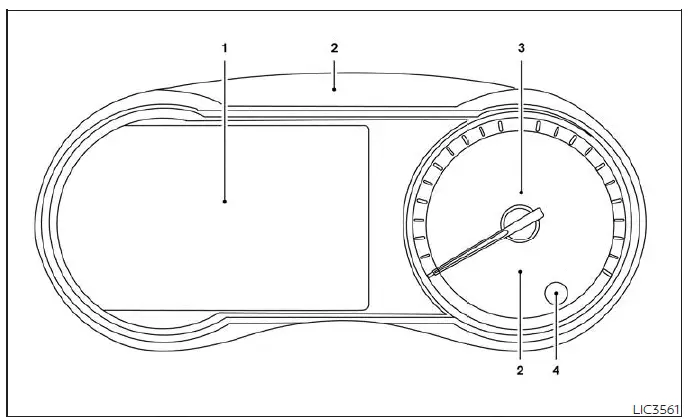
Type A (if so equipped)
- Tachometer, vehicle information display screen, main odometer, twin trip odometer, and fuel level gauge
- Warning and indicator light cluster
- Analog speedometer dial
- Trip odometer reset switch and instrument cluster brightness adjustment control knob
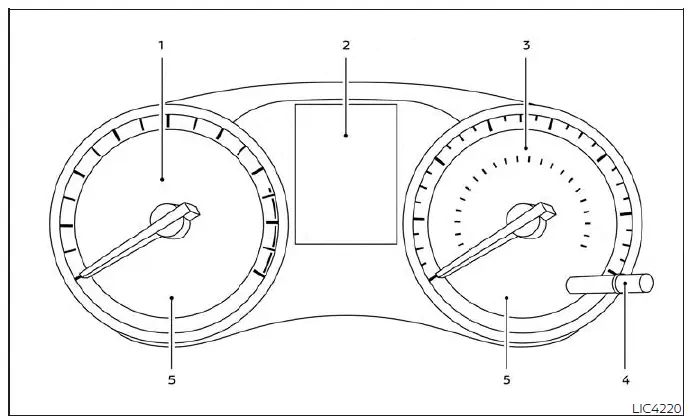
Type B (if so equipped)
- Analog tachometer dial (engine revolutions per minute)
- Central trip computer screen, main odometer, and twin trip odometer display
- Analog speedometer dial (vehicle velocity)
- Trip odometer reset switch and instrument brightness adjustment control knob
- Warning and indicator light icons
Your Nissan Versa is equipped with a highly accurate speedometer and odometer system. The analog speedometer dial is positioned on the right-hand side of the main instrument meter cluster.
The odometer is integrated within the multi-function vehicle information display (Type A - if so equipped) or the digital trip computer screen (Type B - if so equipped) located directly to the left of the speedometer dial.
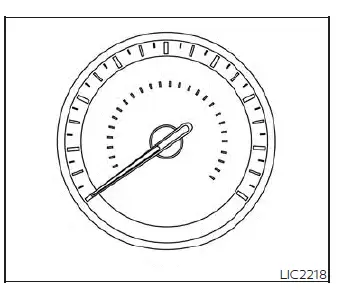
Speedometer
The speedometer indicates the current real-time traveling speed of the vehicle in miles per hour (mph) and kilometers per hour (km/h).
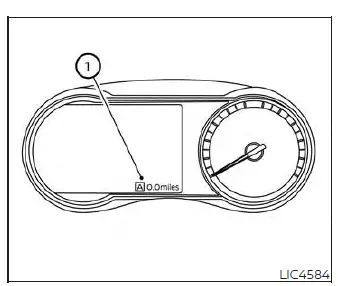
Type A (if so equipped)
Odometer/Twin trip odometer
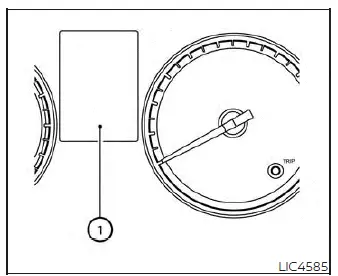
The main odometer and the twin trip odometer 1 are displayed within the customizable vehicle information display (Type A) or the central trip computer screen (Type B) of your Nissan Versa when the ignition switch is turned to the active ON position.
Type B (if so equipped)
The odometer continuously records and displays the total cumulative mileage/distance that the vehicle has been driven since its factory production.
The twin trip odometer allows you to record and track the distances of individual journeys (Trip A and Trip B) independently of the main odometer.
Loose fuel cap warning message (if so equipped)
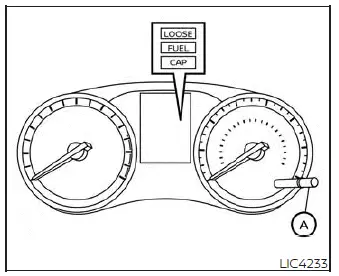
If the loose fuel cap warning message appears on the screen of your Nissan Versa, safely pull over, tighten the fuel filler cap until it clicks, and then press and hold the reset button A for more than 1 second to clear and reset the LOOSE FUEL CAP warning message from the display.
Check tire pressure warning message (if so equipped)
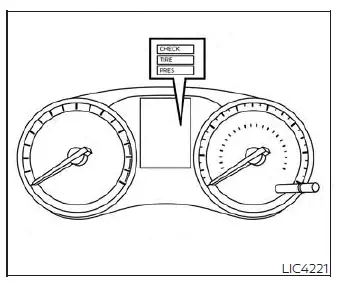
The CHECK TIRE PRES (pressure) warning message is automatically displayed when the yellow low tire pressure warning light illuminates on the dashboard, indicating that low inflation pressure has been detected in one or more tires. When this message appears, safely stop the vehicle to check all four tires and adjust their inflation level to the recommended COLD tire pressure specified on the Tire and Loading Information label (located on the driver's side B-pillar). The CHECK TIRE PRES warning message will clear and turn off once the low tire pressure warning light goes out.
The low tire pressure warning light remains lit on the instrument cluster of your Nissan Versa until you have inflated all affected tires to the recommended COLD tire pressure. Note that the CHECK TIRE PRES warning message will be displayed each time the ignition switch is placed in the ON position for as long as the low tire pressure warning light remains active.
Tachometer Nissan Versa
Type A (if so equipped)
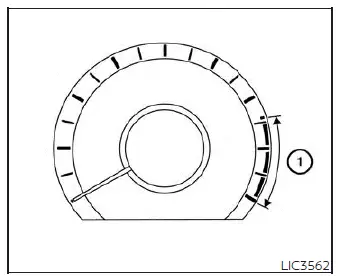
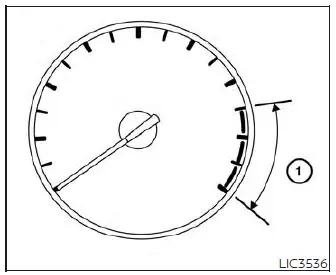
The tachometer displays the current engine speed measured in revolutions per minute (rpm). To keep your vehicle running efficiently, avoid revving the engine into the red warning zone 1.
Type A (if so equipped): To view the tachometer screen, use the left
 and right
 navigation buttons on the left side of your steering wheel to scroll through the menu until you reach the "Gauges" configuration. For additional information, see the section titled "How to use the vehicle information display".
Type B (if so equipped)
Type B (if so equipped): The analog tachometer is located permanently on the left side of the main meter cluster on your dashboard.
CAUTION
When the engine speed begins to approach the redline zone, manually shift to a higher gear or reduce your pressure on the accelerator pedal. Running the engine inside the red zone can lead to severe and costly engine damage.
Fuel gauge Nissan Versa
Type A (if so equipped)
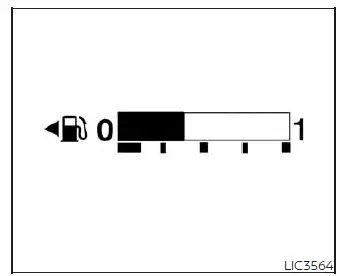
The fuel gauge indicates the approximate fuel level remaining inside the fuel tank of your Nissan Versa.
The digital or analog indicator may fluctuate slightly during heavy braking, sharp turning, rapid acceleration, or when driving up or down steep hills due to the fuel sloshing in the tank.
Type A (if so equipped): A low fuel warning message will automatically pop up on the multi-function vehicle information display screen when the calculated fuel volume in the tank drops to a low level.
Type B (if so equipped)
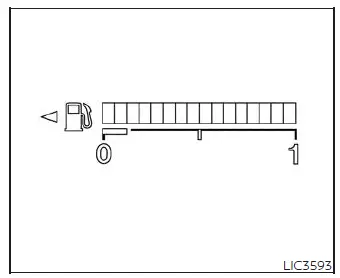
Type B (if so equipped): A dedicated, low-fuel warning light icon illuminates steadily on the instrument panel when the fuel tank level is getting low.
Refill the fuel tank immediately before the fuel gauge pointer reaches the 0 (Empty) mark.
The small arrow icon next to the pump symbol
 indicates that the fuel-filler door is located on the driver's side (left side) of the vehicle.
CAUTION
- If the vehicle is driven until it completely runs out of fuel, the
 Malfunction Indicator Light (MIL) may illuminate to protect the fuel system. Refuel your Nissan Versa as soon as possible.
After several driving trips with sufficient fuel, the
Malfunction Indicator Light (MIL) may illuminate to protect the fuel system. Refuel your Nissan Versa as soon as possible.
After several driving trips with sufficient fuel, the
 light should turn off automatically. If this warning light remains illuminated after completing several short trips, the vehicle's emissions control systems should be inspected. It is highly recommended that you visit a local authorized NISSAN dealer for this diagnostic service.
Distance To Empty (DTE)
The Distance To Empty (DTE) function displays the estimated remaining mileage your Nissan Versa can cover before you must refuel. This mileage projection is dynamically calculated by the onboard computer based on your recent driving habits, real-time fuel consumption, and the volume of fuel remaining in the tank.
Sudden changes in driving patterns, idling, or stop-and-go traffic conditions will cause the displayed DTE value to fluctuate. Because of this, the estimated distance shown may sometimes differ from the actual distance you can travel.
The DTE readout will change to "---" to warn you that the fuel level is extremely low well before the needle reaches the absolute 0 (Empty) mark.
NOTE:
- The DTE calculation immediately after refilling is an estimate based on your average fuel economy from recent driving cycles and the volume of fuel added during the fill-up.
- If you add only a small amount of fuel, or if the ignition remains switched to the ON position during refueling, the system may not register the change and the DTE display might not update immediately.
- Any external conditions that alter your real-world fuel economy will directly affect the estimated DTE projection (e.g., city idling, highway cruising, remote start run times, mountain terrain, cold winter weather, carrying heavy cargo, or installing aerodynamics-disrupting accessories like roof racks or window deflectors).
Trip computer Nissan Versa N18
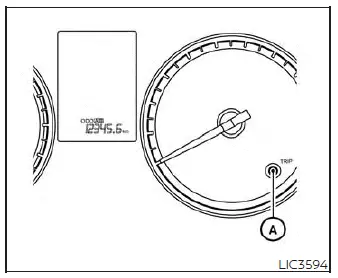
With the ignition switch of your Nissan Versa turned to the ON position, you can cycle through the various modes of the digital trip computer by pressing the physical TRIP RESET button A.
Each time you press the TRIP RESET button, the cluster display screen cycles through the main odometer configurations:
Trip A → Trip B → Odometer
The dedicated
 switch for the trip computer is conveniently located on the lower left side of the main instrument panel.
Each time you press this
 switch, the driving statistics display will change in the following order:
Average fuel economy → Average speed → Trip time → Trip Distance
Average fuel economy (mpg or km/l)
The average fuel economy screen displays your average fuel efficiency since the last manual reset. To reset this value, press and hold the change/reset switch for more than approximately 1 second. The calculation is refreshed every 30 seconds. For the first 1/3 mile (500 meters) driven immediately following a reset, the display will temporarily show blank dashes (----).
Average speed (mph or km/h)
The average speed screen shows the average speed your Nissan Versa has traveled since the last manual reset. You can reset this value by pressing and holding the change/reset button for more than approximately 1 second.
This calculation is refreshed every 30 seconds.
For the first 30 seconds following a reset, the display will temporarily read (----).
Trip time
The trip time display tracks the total engine run time since the last manual reset. The elapsed driving timer can be reset back to zero by pressing and holding the change/trip switch for more than approximately 1 second.
Trip distance
The trip distance screen shows the cumulative distance driven since the last manual reset. You can clear this value and start tracking a new route by pressing and holding the change/trip switch for more than approximately 1 second.
Shipping mode
An alert message regarding shipping mode may appear on the dashboard if the extended storage switch under the instrument panel is pulled out or not fully pushed in. When this alert appears, simply push in the extended storage switch to deactivate the warning and restore normal battery management functions.
Eco Drive Report
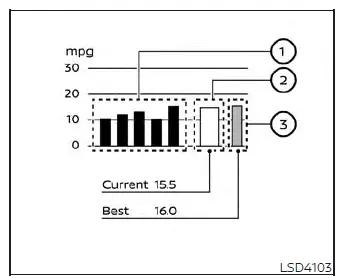
When you turn the ignition switch to the OFF position, the ECO management screen appears automatically to give you a summary of your driving efficiency.
- Previous 5 times (Your driving history and average scores)
- Current fuel economy (Your fuel mileage on the trip just completed)
- Best fuel economy (Your record high fuel economy score)
The final score of your ECO evaluation will display on the screen 30 seconds after the ignition switch of your Nissan Versa is turned to the ON position and the vehicle is driven for at least 1/3 of a mile (500 meters).
- The screen will display your average fuel economy from your previous 5 trips for easy comparison.
- The average fuel economy achieved since your last manual reset is shown in the middle section.
- The absolute best fuel economy achieved in your driving history is displayed as a benchmark.
The Eco Drive Report feature can be toggled ON or OFF in the system settings menu of your Nissan Versa.