
Backing up behind a projecting object
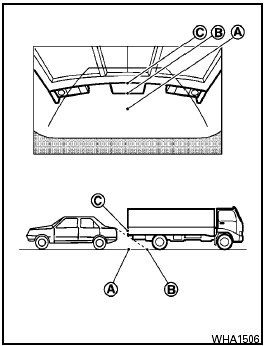
Backing up behind a projecting object
The position is shown farther than the position B in the display. However, the position C is actually at the same distance as the position A .
The vehicle may hit the object when backing up to the position A if the object projects over the actual backing up course.
See also:
Safety
At this time, the Sentra has not been crash tested by the Insurance Institute
for Highway Safety. Standard safety features include antilock brakes with
electronic brake-force distribution, active ...
Sun visors
Sun visors
To block out glare from the front, swing down the
sun visor 1 .
To block glare from the side, disconnect the sun
visor from the center mount and swing it to the
side 2 . ...
Vehicle Dynamic Control (VDC) system
The Vehicle Dynamic Control (VDC) system
uses various sensors to monitor driver inputs
and vehicle motion. Under certain driving conditions,
the VDC system helps to perform the
following funct ...