
FM/AM/SAT radio with compact disc (CD) player (Type A) (if so equipped)
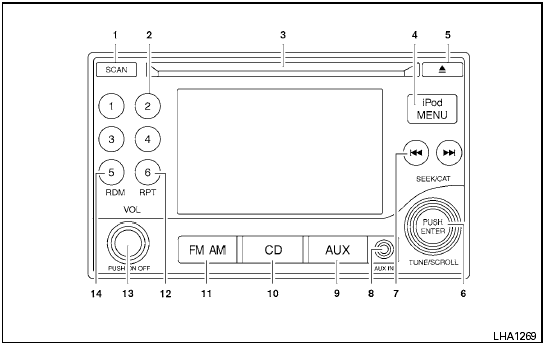
Type A
1. SCAN button
2. Station select (1 - 6) buttons
3. CD insert slot
4. iPod MENU button
5.  CD
eject button
CD
eject button
6. TUNE/SCROLL knob/Setting control button
7. SEEK/CAT buttons
8. AUX IN jack
9. AUX button*
10. CD button
11. FM-AM button
12. RPT button
13. POWER/VOLUME control knob
14. RDM button
*No satellite radio reception is available when the AUX button is pressed to access satellite radio stations unless optional satellite receiver and antenna are installed and an XM satellite radio service subscription is active. Satellite radio is not available in Alaska, Hawaii and Guam.
For all operation precautions, see Audio operation precautions in this section.
See also:
Dehumidified defogging
This mode is used to defog the windows and
dehumidify the air.
1. Turn the air flow control dial to the
position.
2. Turn the fan control dial to the desired position.
3. Push the button. The ...
Odometer/Twin trip odometer
The odometer/twin trip odometer is displayed
when the ignition switch is placed in the ON
position.
The odometer records the total distance the vehicle
has been driven.
The twin trip odometer rec ...
Precautions on child restraints
● Failure to follow the warnings and instructions
for proper use and installation
of child restraints could result in
serious injury or death of a child or
other passengers in a sudd ...