
CD care and cleaning
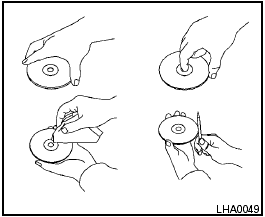
CD care and cleaning
● Handle a CD by its edges. Do not bend the disc. Never touch the surface of the disc.
● Always place the discs in the storage case when they are not being used.
● To clean a disc, wipe the surface from the center to the outer edge using a clean, soft cloth. Do not wipe the disc using a circular motion.
● Do not use a conventional record cleaner or alcohol intended for industrial use.
● A new disc may be rough on the inner and outer edges. Remove the rough edges by rubbing the inner and outer edges with the side of a pen or pencil as illustrated.
See also:
2011 Nissan Sentra review
Some cars get all the attention, and the Nissan Sentra isn't one of them. Its
name isn't always uttered in the same sentences as models like the Honda Civic
and Toyota Corolla, but after driving o ...
Vanity mirrors
To access the vanity mirror, pull the sun visor
down and flip open the mirror cover. The vanity
mirror will illuminate when the mirror cover is
open. ...
Washing
Wash dirt off with a wet sponge and plenty of
water. Clean the vehicle thoroughly using a mild
soap, a special vehicle soap or general purpose
dishwashing liquid mixed with clean, lukewarm
(never ...