
Booster seats
Precautions on booster seats

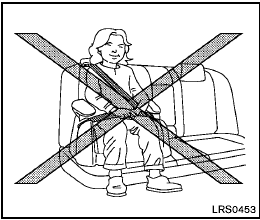
If a booster seat and seat belt are not
used properly, the risk of a child being
injured in a sudden stop or collision
greatly increases:
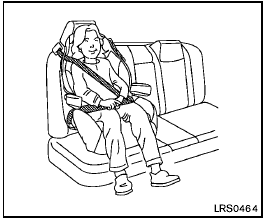
- Make sure the shoulder portion of
the belt is away from the child’s face
and neck and the lap portion of the
belt does not cross the stomach.
- Make sure the shoulder belt is not behind the child or under the child’s arm.
- A booster seat must only be installed in a seating position that has a lap/shoulder belt.
Booster seats of various sizes are offered by
several manufacturers. When selecting any
booster seat, keep the following points in mind:
- Choose only a booster seat with a label
certifying that it complies with Federal Motor
Vehicle Safety Standard 213 or Canadian
Motor Vehicle Safety Standard 213.
- Check the booster seat in your vehicle to be sure it is compatible with the vehicle’s seat and seat belt system.
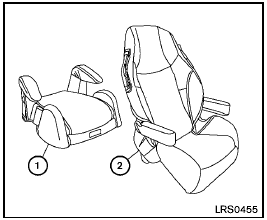
- Make sure the child’s head will be properly supported by the booster seat or vehicle seat. The seatback must be at or above the center of the child’s ears. For example, if a low back booster seat 1 is chosen, the vehicle seatback must be at or above the center of the child’s ears. If the seatback is lower than the center of the child’s ears, a high back booster seat 2 should be used.
- If the booster seat is compatible with your vehicle, place your child in the booster seat and check the various adjustments to be sure the booster seat is compatible with your child. Always follow all recommended procedures.
All U.S. states and Canadian provinces or territories require that infants and small children be restrained in an approved child restraint at all times while the vehicle is being operated.
The instructions in this section apply to booster seat installation in the rear seats or the front passenger seat.
See also:
Locking with power door lock switch
To lock all the doors without a key, push the door
lock switch (drivers or front passengers side) to
the lock position (1) . When locking the door this
way, be certain not to leave the key ins ...
Fan control dial
The fan control dial turns the fan on and off, and
controls fan speed. ...
Compass display
Press the button when the
ignition switch
is placed in the ON position. The direction will be
displayed. ...