
Vehicle information display
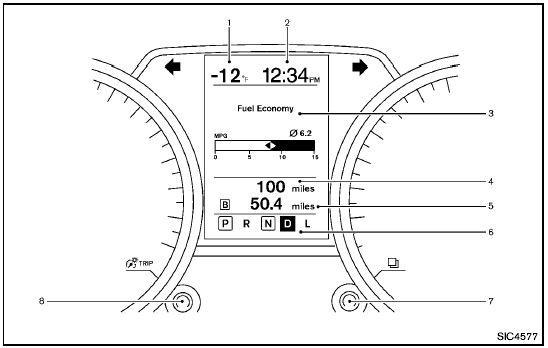
1. Outside temperature
2. Clock
3. Operation indicators and warnings
— Trip computer
— Cruise control
— Settings menu
— Intelligent Key operation*
4. Odometer
5. Twin trip odometer
6. Continuously Variable Transmission (CVT) position indicator
7. switch (settings control and trip computer control)
8. switch (twin trip odometer control and brightness control)
*: if so equipped
See also:
2011 Nissan Frontier review
Full-size trucks are a chore to drive in the city — we know; we've done it —
so we wanted to see how Nissan's midsize Frontier would handle an urban
environment, as well as a junkyard run to g ...
Seat belt maintenance
- To clean the seat belt webbing, apply a
mild soap solution or any solution recommended
for cleaning upholstery or carpets.
Then wipe with a cloth and allow the seat
belts to dry in the shade. ...
Break-in schedule
During the first 1,200 miles (2,000 km),
follow these recommendations to obtain
maximum engine performance and ensure
the future reliability and economy of
your new vehicle. Failure to fol ...