
Turn signal switch
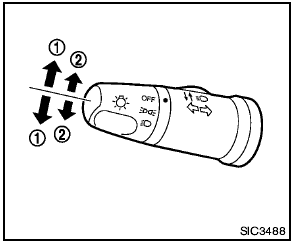
1 Turn signal
Move the lever up or down to signal the turning direction. When the turn is completed, the turn signals cancel automatically.
2 Lane change signal
To indicate a lane change, move the lever up or down to the point where lights begin flashing.
See also:
Environmental factors influence the rate of corrosion
Moisture
Accumulation of sand, dirt and water on the vehicle
body underside can accelerate corrosion.
Wet floor coverings will not dry completely inside
the vehicle and should be removed for dry ...
Wet brakes
When the vehicle is washed or driven through
water, the brakes may get wet. As a result, your
braking distance will be longer and the vehicle
may pull to one side during braking.
To dry brakes, ...
Event Data Recorders (EDR)
GUID-D562961D-9AFE-4754-8C59-8C01CE2FEDDB
This vehicle is equipped with an Event Data
Recorder (EDR). The main purpose of an EDR is
to record, in certain crash or near crash-like
situations, s ...