
Console box
Console box
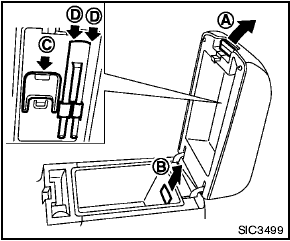
To open the console boxes, push up the knob A and pull up the lid.
To close, push the lid down until latched.
To remove the inner box (if so equipped) for cleaning or storing a large object, pull it up as illustrated B .
The inside of the console box lid is designed to be used as a card holder C and pen holders D .
See also:
Pre-towing tips
● Be certain your vehicle maintains a level
position when a loaded and/or unloaded
trailer is hitched. Do not drive the vehicle if it
has an abnormal nose-up or nose-down
condition; check fo ...
Out, Damned (Blind) Spot
The Rogue's sight lines are its biggest problem. With bulky D-pillars, fixed
rear head restraints and an undersized rear window, it ranked as the worst of 10
small crossovers — eight of which ar ...
Off-road recovery
If the right side or left side wheels unintentionally
leave the road surface, maintain control of the
vehicle by following the procedure below. Please
note that this procedure is only a general ...