
Main power window switch (driver’s side)
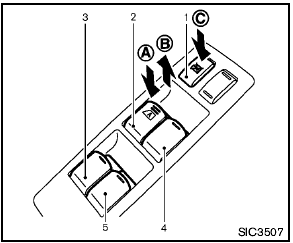
Main power window switch (driver’s side)
1. Window lock button
2. Driver side window
3. Rear left passenger side window
4. Front passenger side window
5. Rear right passenger side window
To open or close the window, push down A or pull up B the switch and hold it. The main switch (driver side switches) will open or close all the windows.
See also:
Spare tire
When a spare tire is mounted (TEMPORARY
USE ONLY or conventional), the TPMS will not
function.
Observe the following precautions if the TEMPORARY
USE ONLY spare tire must be used,
otherwise y ...
Using the panic alarm
If you are near your vehicle and feel threatened,
you may activate the panic alarm to call attention
by pressing and holding the button
on the
Intelligent Key for longer than 0.5 seconds.
The ...
FCC Regulatory information
- CAUTION: To maintain compliance with
FCC’s RF exposure guidelines, use only
the supplied antenna. Unauthorized antenna,
modification, or attachments could damage
the transmitter and may vi ...