
Locking with power door lock switch
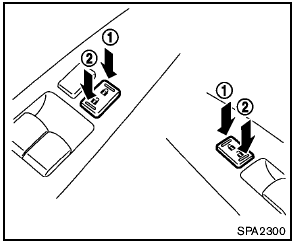
Locking with power door lock switch
Operating the power door lock switch will lock or unlock all the doors. The switches are located on the driver’s and front passenger’s door armrests.
To lock the doors, push the power door lock switch to the lock position 1 with the driver’s or front passenger’s door open, then close the door.
When locking the door this way, be sure not to leave the key inside the vehicle.
To unlock the doors, push the power door lock switch to the unlock position 2 .
Lockout protection
When the power door lock switch (driver or front passenger) is moved to the lock position with the key in the ignition switch or the Intelligent Key in the vehicle and any door open, all doors will lock and unlock automatically.
This function helps to prevent the keys from being accidentally locked inside the vehicle.
See also:
Meters and gauges
Meters and gauges
1. Tachometer
2. Vehicle information display
3. Speedometer
4. Warning/indicator lights
5. Engine coolant temperature gauge
6. switch (twin trip odometer
control and ...
Terms
It is important to familiarize yourself with
the following terms before loading your
vehicle:
- Curb Weight (actual weight of your
vehicle) - vehicle weight including:
standard and optional eq ...
Seat belts
The seat belts can be cleaned by wiping them
with a sponge dampened in a mild soap solution.
Allow the belts to dry completely in the shade
before using them. See “Seat belt maintenance”
in ...