
How to read the displayed lines
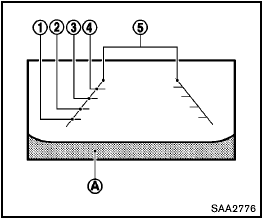
Guiding lines which indicate the vehicle width and distances to objects with reference to the bumper line A are displayed on the monitor.
Distance guide lines:
Indicate distances from the vehicle body.
- Red line 1 : approx. 1.5 ft (0.5 m)
- Yellow line 2 : approx. 3 ft (1 m)
- Green line 3 : approx. 7 ft (2 m)
- Green line 4 : approx. 10 ft (3 m)
Vehicle width guide lines 5 :
Indicate the vehicle width when backing up.
See also:
Locking doors
Locking doors
1. Move the shift selector to the P (Park) position,
place the ignition switch in the LOCK
position and make sure you carry the Intelligent
Key with you.
2. Close all doors.
3. Pus ...
Shifting
Shifting
To change gears or when upshifting or downshifting,
depress the clutch pedal fully, shift into
the appropriate gear, then release the clutch
slowly and smoothly.
To ensure smooth ge ...
Boxy Dynamics
I have no reason to believe the Cube is unstable, and it has a standard
electronic stability system, but it does feel more top-heavy than the other
boxes — and definitely more so than convention ...