
Backing up on a steep uphill
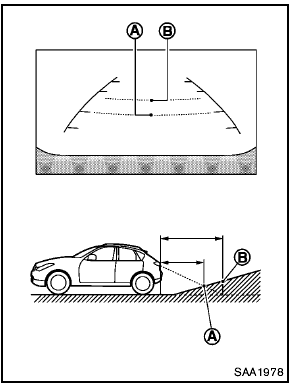
Backing up on a steep uphill
When backing up the vehicle up a hill, the distance guide lines and the vehicle width guide lines are shown closer than the actual distance.
For example, the display shows 3 ft (1.0 m) to the place A , but the actual 3 ft (1.0 m) distance on the hill is the place B . Note that any object on the hill is viewed in the monitor further than it appears.
See also:
Accelerator downshift — in D position —
For passing or hill climbing, depress the accelerator
pedal to the floor. This shifts the transmission
down into a lower gear, depending on the
vehicle speed. ...
Under the hood and vehicle
The maintenance items listed here should be
checked periodically (for example, each time you
check the engine oil or refuel).
Battery*: Check the fluid level in each cell.
It should be between t ...
Defrosting or defogging
This mode directs the air to the defrost outlets
and outboard vents to defrost/defog the windows.
1. Turn the air flow control dial to the
position.
2. Turn the fan control dial to the desired ...