
Backing up behind a projecting object
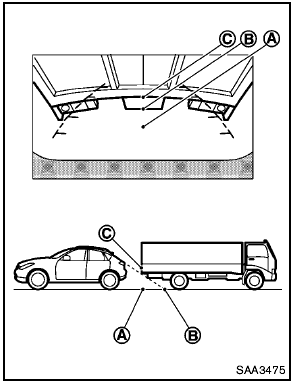
Backing up behind a projecting object
The position C is shown further than the position B in the display. However, the position C is actually at the same distance as the position A . The vehicle may hit the object when backing up to the position A if the object projects over the actual backing up course.
See also:
Locking doors
1. Place the ignition switch in the LOCK position.
2. Close all doors.
3. Press the button on the
Intelligent
Key.
4. The hazard warning lights flash twice and
the horn beeps once.
5. All d ...
Maximum Gross Vehicle Weight (GVW)/Maximum Gross Axle Weight (GAW)
The GVW of the towing vehicle must not exceed
the Gross Vehicle Weight Rating (GVWR)
shown on the F.M.V.S.S./C.M.V.S.S. certification
label. The GVW equals the combined weight of
the unloade ...
Vehicle security system
The vehicle security system provides visual and
audible alarm signals if someone opens the doors
or trunk lid when the system is armed. It is not,
however, a motion detection type system that
...