
Moving near a projecting object
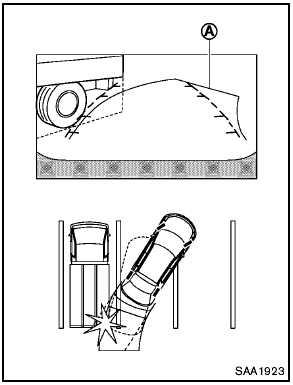
The predicted course lines A do not touch the object in the display. However, the vehicle may hit the object if it projects over the actual moving course.
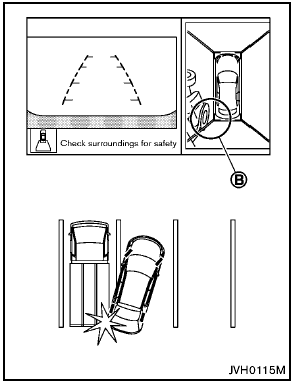
There may be a small distance visible between the vehicle and the object in the birdseye view on the display B .
See also:
Draining of coolant water
If the vehicle is to be left outside without antifreeze,
drain the cooling system, including the
engine block. Refill before operating the vehicle.
For details, see “Changing engine coolant” in ...
NISSAN Voice Recognition Standard Mode
The Standard Mode enables control of navigation,
phone and vehicle information. With this
setting active, commands that are available are
always shown on the display and announced by
the syste ...
2010 Nissan Murano review
You might think the second-generation Nissan Murano is not much different
from the first because it has a strong visual connection, but once you're behind
the wheel it's clear that the 2010 is mor ...