
Moving closer to a projecting object
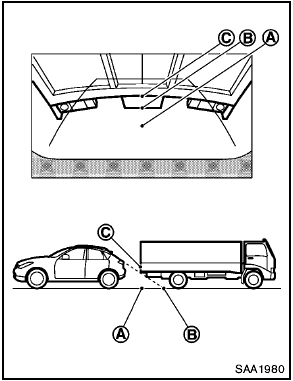
The position C is shown further than the position B in the display. However, the position C is actually at the same distance as the position A . The vehicle may hit the object when moving toward the position A if the object projects over the actual moving course.
See also:
2011 Nissan Cube review
For 2010, Nissan has added another trim level to the boxy Cube, the Krom
(with a long O, pronounced "chrome"). The Cube is otherwise unchanged for 2010
(see them compared), and Kelsey Ma ...
Tire Pressure Monitoring System (TPMS)
Each tire, including the spare (if provided),
should be checked monthly when cold and inflated
to the inflation pressure recommended by
the vehicle manufacturer on the vehicle placard
or tire infl ...
Child safety
Children need adults to help protect them.
They need to be properly restrained.
In addition to the general information in this
manual, child safety information is available from
many other sourc ...