
Installing front license plate
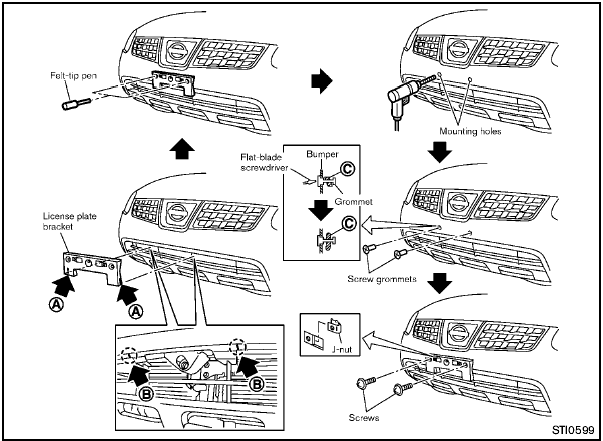
Use the following steps to mount the license
plate:
Before mounting the license plate, confirm that
the following parts are enclosed in the plastic
bag.
- License plate bracket
- J-nut 6 2
- Screw 6 2
- Screw grommet 6 2
1. Temporarily place the license plate bracket by aligning the lower part A of it with the lines B on the bumper.
2. Mark the pilot hole points with a felt-tip pen through the holes of the license plate bracket.
3. Remove the license plate bracket.
4. Carefully drill two pilot holes using a 0.39 in
(10 mm) drill bit at the marked locations. (Be
sure that the drill only goes through the
fascia, or damage to the nut may
occur.)
5. Insert grommets into the hole on the fascia.
6. Insert a flat-blade screwdriver into the grommet hole to add 908 turn onto the part C .
7. Insert a J-nut into the license plate bracket before placing the license plate bracket on the fascia.
8. Install the license plate bracket with screws.
9. Install the license plate with bolts that are no longer than 0.55 in (14 mm).
See also:
Under the Hood
Sentra 2.0 models come with one engine and two transmission choices.
Mechanical features include:
140-horsepower, 2.0-liter four-cylinder with 147 pounds-feet of torque
Six-speed manual or contin ...
Starting the vehicle
1. After starting the engine, fully depress the
foot brake pedal before moving the shift
selector out of the P (Park) position.
2. Keep the foot brake pedal depressed and
move the shift selecto ...
How to read the displayed lines
Guiding lines which indicate the vehicle width
and distances to objects with reference to the
bumper line A are displayed on the monitor.
Distance guide lines:
Indicate distances from the vehi ...