
Exterior front
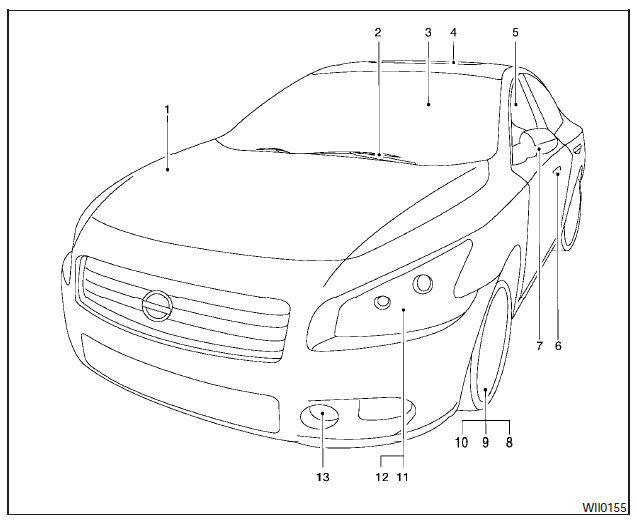
Exterior front
1. Engine hood.
2. Windshield wiper and washer switch.
3. Windshield.
4. Moonroof (if so equipped).
5. Power windows.
6. Door locks, Nissan Intelligent Key, keys, request button.
7. Mirrors.
8. Tire pressure.
9. Flat tire.
10. Tire chains.
11. Headlight and turn signal switch.
12. Replacing bulbs.
13. Fog light switch (if so equipped).
See the page number indicated in parentheses for operating details.
See also:
SE-R and SE-R Spec V
The Sentra SE-R and SE-R Spec V are sporty variants with a 2.5-liter
four-cylinder. The SE-R is built for mainstream consumers who want a sportier
feel; the Spec V is geared toward the enthusiast ...
Vehicle Dynamic Control (VDC) off switch (if so equipped)
Vehicle Dynamic Control (VDC) off switch (if so equipped)
The vehicle should be driven with the Vehicle
Dynamic Control (VDC) system on for most driving
conditions.
If the vehicle is stuck in ...
Appealing Controls
Inside, the Juke's inventive design is more impressive than its quality;
similar money will fetch richer cabin materials in other vehicles, but the Juke
does have some tricks up its sleeve. The ce ...