
Warning/indicator lights
Nissan Maxima / Nissan Maxima Owners Manual / Illustrated table of contents / Warning/indicator lights
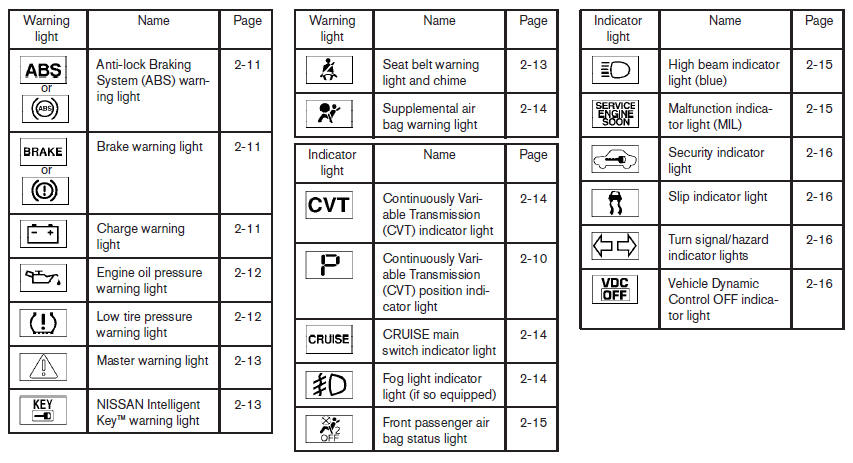
Warning/indicator lights
See also:
Special winter equipment
It is recommended that the following items be
carried in the vehicle during winter:
- A scraper and stiff-bristled brush to remove
ice and snow from the windows and wiper
blades.
- A sturdy, ...
Rear-facing child restraint installation using latch
Refer to all Warnings and Cautions in the Child
Safety and Child Restraint sections before installing
a child restraint.
Follow these steps to install a rear-facing child
restraint using the La ...
AM radio reception
AM signals, because of their low frequency, can
bend around objects and skip along the ground.
In addition, the signals can be bounced off the
ionosphere and bent back to earth. Because of
thes ...