
Locking with key
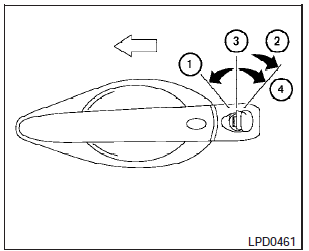
Drivers side
The power door lock system allows you to lock or unlock all doors at the same time.
Turning the key toward the front (1) of the vehicle locks all doors.
Turning the key one time toward the rear (2)- of the vehicle unlocks that door. From that position, returning the key to neutral (3)- (where the key can only be removed and inserted) and turning it toward the rear again within 60 seconds unlocks all doors (4).
Opening and closing windows
The drivers door key operation allows you to open and close windows equipped with automatic operation at the same time.
- To open the windows, turn the drivers door key toward the rear of the vehicle for longer than 1 second after the door is unlocked.
- To close the windows, turn the drivers door key toward the front of the vehicle for longer than 1 second after the door is locked.
Windows stop when the key cylinder is released.
See also:
Operating tips
- The screen displayed on the Around View
Monitor will automatically return to the
previous screen when no operation takes
place for 3 minutes after the CAMERA
button has been pushed while the ...
Emission control system warranty
Your NISSAN vehicle is covered by the following
emission warranties:
For USA
1. Emission Defects Warranty
2. Emissions Performance Warranty
Details of this warranty may be found with other
vehic ...
During a call
There are some options available during a call.
Select one of the following displayed on the
screen, if necessary:
Hang up:
Finish the call.
Use Handset:
Transfer the call to the cellular phon ...