
Troubleshooting guide
The system should respond correctly to all voice commands without difficulty. If problems are encountered, follow the solutions given in this guide for the appropriate error.
Where the solutions are listed by number, try each solution in turn, starting with number one, until the problem is resolved.
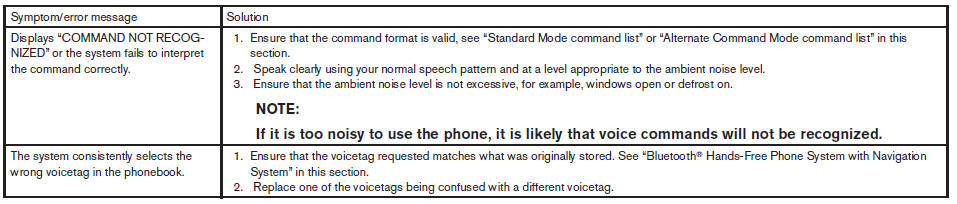 TROUBLESHOOTING GUIDE
See also:
Backing up behind a projecting object
Backing up behind a projecting object
The position C is shown further than the
position B in the display. However, the
position C is actually at the same distance
as the position A . The vehi ...
Comfort Levels
I remember finding our 2009 Cube 1.8 S' driver's seat rather uncomfortable.
The 2010's seemed better, though it doesn't appear to be different, aside from
the fabric. Another editor, who took the ...
Vacuum assisted brakes
The brake booster aids braking by using engine
vacuum. If the engine stops, you can stop the
vehicle by depressing the brake pedal. However,
greater foot pressure on the brake pedal will be
requir ...