
How to read the displayed lines
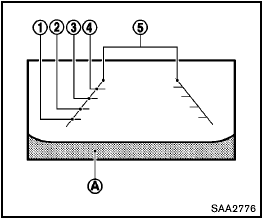
Guiding lines which indicate the vehicle width and distances to objects with reference to the bumper line A are displayed on the monitor.
Distance guide lines:
Indicate distances from the vehicle body.
- Red line 1 : approx. 1.5 ft (0.5 m)
- Yellow line 2 : approx. 3 ft (1 m)
- Green line 3 : approx. 7 ft (2 m)
- Green line 4 : approx. 10 ft (3 m)
Vehicle width guide lines 5 :
Indicate the vehicle width when backing up.
See also:
Sunglasses holder
Sunglasses holder
Keep the sunglasses holder closed
while driving to prevent an accident.
To open the sunglasses holder, push 1 .
- Do not use for anything other than
glasses.
- Do n ...
King Cab
Maximum towing capacity: 6,500 pounds (4x2 V-6), 6,300 pounds (4x4 V-6)
Maximum payload range: 899-1,547 pounds (depending on trim, engine,
transmission) ...
Glove box
Glove box
Keep glove box lid closed while driving
to help prevent injury in an accident or a
sudden stop.
To open the glove box, pull the handle.
To close, push the lid in until the lock ...