
Floor mats

To avoid potential pedal interference
that may result in a collision or injury:
- NEVER place a floor mat on top of
another floor mat in the driver front
position.
- Use only genuine NISSAN floor mats specifically designed for use in your vehicle model. See your NISSAN dealer for more information.
- Properly position the mats in the floorwell using the floor mat positioning aid. See “Floor mat positioning aid (driver’s side only)” later in this section.
The use of genuine NISSAN floor mats can extend the life of your vehicle carpet and make it easier to clean the interior. Mats should be maintained with regular cleaning and replaced if they become excessively worn.
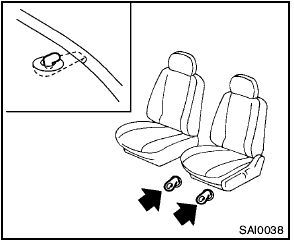
Floor mat positioning aid (driver’s side only)
This vehicle includes front floor mat brackets to act as floor mat positioning aid. NISSAN floor mats have been specially designed for your vehicle model. The driver’s side floor mat has grommet holes in it. To install, position the mat by placing the floor mat bracket hook through the floor mat grommet hole while centering the mat in the floorwell.
Periodically check to make certain that the mats are properly positioned.
See also:
Adjustable headrest (if so equipped)
WARNING:
The adjustable headrests supplement the
other vehicle safety systems. They may
provide additional protection against injury
in certain rear end collisions. Adjust
the headrests prope ...
Key positions
LOCK (0)
Except for the Intelligent Key equipped
model:
The key can only be removed from the ignition
switch at this position.
For the Intelligent Key equipped model:
PUSH OFF -
The ignition ...
Safety, Features & Pricing
The 2012 Versa sedan has not yet been tested by the Insurance Institute for
Highway Safety or the National Highway Traffic Safety Administration. Per
federal requirements, an electronic stability ...