
Locking with key
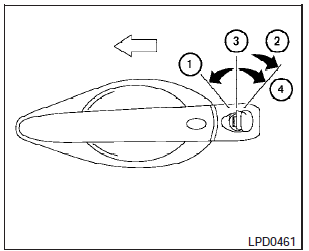
Drivers side
The power door lock system allows you to lock or unlock all doors at the same time.
Turning the key toward the front (1) of the vehicle locks all doors.
Turning the key one time toward the rear (2)- of the vehicle unlocks that door. From that position, returning the key to neutral (3)- (where the key can only be removed and inserted) and turning it toward the rear again within 60 seconds unlocks all doors (4).
Opening and closing windows
The drivers door key operation allows you to open and close windows equipped with automatic operation at the same time.
- To open the windows, turn the drivers door key toward the rear of the vehicle for longer than 1 second after the door is unlocked.
- To close the windows, turn the drivers door key toward the front of the vehicle for longer than 1 second after the door is locked.
Windows stop when the key cylinder is released.
See also:
FM/AM radio with compact disc (CD) player
(if so equipped)
1. SEEK/TRACK button
2. CD insert slot
3. TUNE/FF·REW button
4. CD eject button
5. AUDIO button (BASS, TREBLE, FADE
and BALANCE)
6. CLOCK button
7. AUX IN jack
8. SCAN button
9. RDM/RPT bu ...
Unlocking doors
Unlocking doors
Press the button on the keyfob once.
● Only the driver’s door unlocks.
● The hazard warning lights flash once if all
doors are completely closed with the ignition ...
Removing the bolt-on wheel cover (if
so equipped)
CAUTION
Do not use your hands to pry off wheel
caps or wheel covers. Doing so could result
in personal injury.
The wheel covers are held on by the wheel nuts.
The wheel cover will be removed al ...