
Ending a call
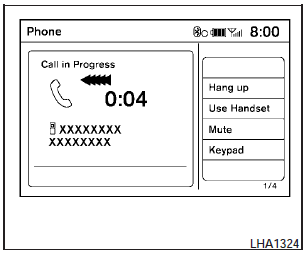
To finish the call, perform one of the following procedures:
- Select the Hang up key on the Call in Progress display.
- Push the  switch on the steering
wheel.
switch on the steering
wheel.
- When the Call in Progress screen is displayed, press the PHONE button on the instrument panel to hang up. If any other screen is currently displayed, press the PHONE button to display the Call in Progress screen first, then press the PHONE button again to hang up.
See also:
Shifting
After starting the engine, fully depress the brake
pedal and move the shift selector from P (Park) to
any of the desired shift positions.
Apply the parking brake if the shift selector
is in ...
Moisture
Accumulation of sand, dirt and water on the
vehicle body underside can accelerate corrosion.
Wet floor coverings will not dry completely
inside the vehicle, and should be removed for
drying to ...
Exhaust gas (carbon monoxide)
- Do not breathe exhaust gases; they
contain colorless and odorless carbon
monoxide. Carbon monoxide is
dangerous. It can cause unconsciousness
or death.
- If you suspect that exhaust fum ...