
Phone settings
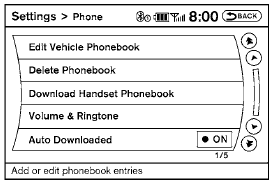
To set up the Bluetooth Hands-Free Phone System to your preferred settings, press the SETTING button on the instrument panel and select the “Phone” key on the display.
Edit Vehicle Phonebook:
See “Vehicle Phonebook” in this section for adding, editing and deleting contacts in the vehicle phonebook.
Delete Phonebook:
Delete a phonebook stored on the system. Download Handset Phonebook:
See “Handset Phonebook” in this section for adding, editing and deleting contacts in the handset phonebook.
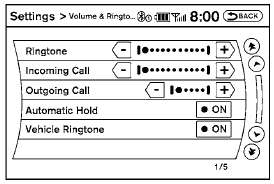
Volume & Ringtone:
Adjust the volume level of the ringtone, incoming call sound and outgoing call sound. When the “Automatic Hold” option is turned on, an incoming call will be placed on hold automatically after several rings. When the “Vehicle Ringtone” option is turned on, a specific ringtone that is different from the cellular phone’s will sound when receiving a call.
Auto Downloaded:
See “Handset Phonebook” in this section for information about automatically downloading the handset phonebook.
See also:
Opening and closing windows (if so
equipped)
The driver’s door key operation allows you to
open and close windows equipped with automatic
operation at the same time.
● To open the windows, turn the driver’s door
key toward the rear ...
Compatibility
The following models are available:
- Fifth generation iPod® (version 1.2.3 or
later)
- iPod Classic (version 1.1.1 or later)
- First generation iPod touch® (version 2.0.0
or later)
- Se ...
Engine cooling system
The engine cooling system is filled at the factory
with Genuine NISSAN Engine Coolant to provide
year-round anti-freeze and coolant protection.
The anti-freeze solution contains rust and corrosio ...