



Nissan Versa: Monitor, climate, audio, phone and voice recognition systems - Intelligent Cruise Control (ICC)
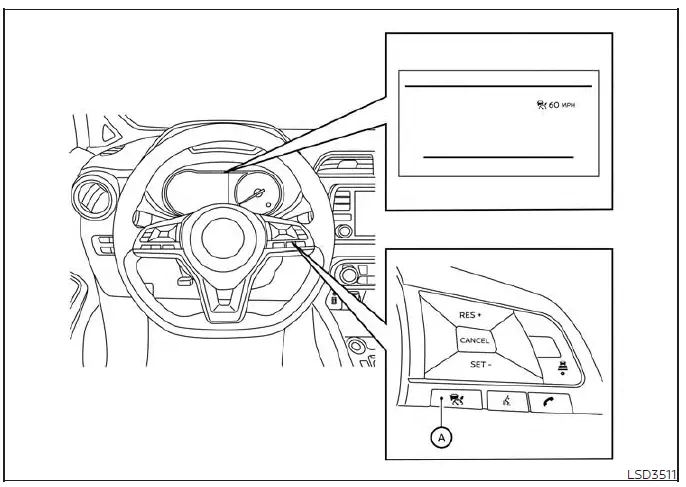
- ICC switch
WARNING
Failure to carefully follow all safety warnings and operating instructions for the proper use of the Intelligent Cruise Control (ICC) system in your Nissan Versa could result in serious personal injury or a fatal accident.
- The ICC system is engineered strictly as a driving aid to assist the operator and does not function as an active collision warning system or an automatic collision avoidance device. It remains the absolute responsibility of the driver to stay fully alert, practice safe driving habits, and maintain total physical control of the vehicle at all times.
- Always observe and obey all posted legal speed limits, and never set the cruise control velocity above those established limits.
- Always drive with extreme care, caution, and undivided attention when utilizing the ICC system.
Be sure to read, study, and understand the official Owner's Manual thoroughly before attempting to operate the ICC system. To avoid serious injury or death, never blindly rely on the system to prevent accidents or to automatically control the vehicle's speed during emergency traffic situations.
Do not engage or use the ICC system under any circumstances except when driving in appropriate, safe road and traffic conditions.
- When operating in the conventional (fixed speed) cruise control mode, an audible warning chime will not sound to alert you if you get dangerously close to the vehicle traveling ahead. Pay special attention to the exact following distance between your Nissan Versa and the vehicle in front of you, or a rear-end collision could occur.
The ICC system is designed to maintain a selected, driver-chosen following distance from the vehicle directly in front of you across a wide speed range spanning from 0 to 90 mph (0 to 144 km/h), up to your maximum preset speed. The target set cruising speed itself can be adjusted by the driver anywhere between 20 to 90 mph (32 to 144 km/h).
When the roadway directly ahead of your Nissan Versa is completely clear of traffic, the vehicle will seamlessly travel at your established set speed.
The ICC system can be configured to operate in one of two distinct cruise control modes:
- Vehicle-to-vehicle distance control mode: Designed for automatically maintaining a safe, selected following distance between your vehicle and the preceding car up to your preset speed limit.
- Conventional (fixed speed) cruise control mode: Designed for standard highway cruising at a locked, constant preset speed without automatic distance spacing.
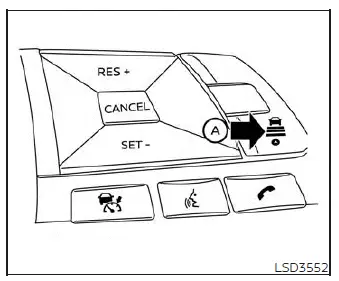
Press the ICC switch A to toggle and choose your desired cruise control mode between the advanced vehicle-to-vehicle distance control mode and the conventional (fixed speed) cruise control mode.
Once either control mode has been successfully activated and engaged, it cannot be directly switched over to the alternate mode on the fly. To change modes, you must first push the ICC switch A once to turn the system completely off. Then, press the ICC switch A again to turn the system back on and select your preferred cruise control mode.
Always visually verify and confirm your active mode setting directly within the dedicated ICC system display screen on the instrument cluster.
- How to select the cruise control mode
- Vehicle-to-vehicle distance control mode switches
- Vehicle-to-vehicle distance control mode limitations
- System temporarily unavailable
- System maintenance
- Conventional (fixed speed) cruise control mode
How to select the cruise control mode Nissan Versa 2020
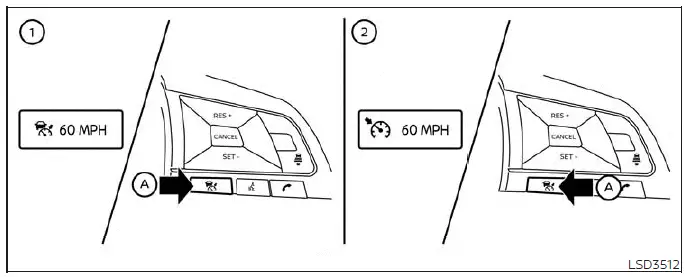
- ICC switch
Selecting the vehicle-to-vehicle distance control mode: To choose the advanced vehicle-to-vehicle distance control mode 1, quickly press and release the ICC switch A on your Nissan Versa steering wheel.
Selecting the conventional (fixed speed) cruise control mode: To choose the traditional conventional (fixed speed) cruise control mode 2, press and hold down the ICC switch A for longer than approximately 1.5 seconds.
Vehicle-to-vehicle distance control mode
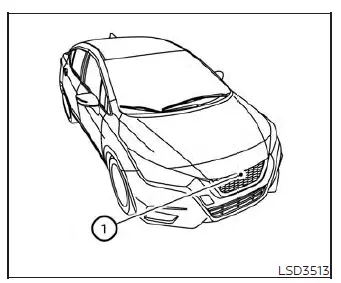
When operating in the vehicle-to-vehicle distance control mode, the Intelligent Cruise Control system on your Nissan Versa automatically maintains a secure, selected following distance from the vehicle traveling directly in front of you, scaling your speed according to that vehicle's velocity up to your preset speed limit, or maintaining your exact set speed when the roadway ahead is completely clear.
The ICC system is specifically engineered to enhance driving convenience and reduce driver fatigue when following another motor vehicle traveling in the exact same lane and direction.
If the front radar sensor 1 detects a slower-moving vehicle ahead, the smart system will automatically reduce your vehicle's speed so that your Nissan Versa closely follows the preceding vehicle at your chosen distance interval.
To achieve this, the system seamlessly controls the electronic throttle and automatically applies the vehicle brakes—utilizing up to approximately 40% of the total available vehicle braking power—whenever necessary.
The advanced detection range of the front radar sensor spans approximately 650 feet (200 meters) straight ahead.
Vehicle-to-vehicle distance control mode operation
The vehicle-to-vehicle distance control mode is carefully designed to maintain a consistent, selected following distance from the car in front of you, with the capability to reduce your speed to match a slower vehicle. The system will actively decelerate your Nissan Versa as necessary, and if the vehicle ahead comes to a complete halt, your car will also decelerate down to a full standstill. However, it is vital to remember that the ICC system can only supply up to 40% of the vehicle's total maximum braking power.
This sophisticated technology should only be engaged when traffic flow conditions allow your driving speeds to remain reasonably constant or when surrounding speeds change in a gradual manner. If another motorist abruptly cuts into your traveling lane or if the vehicle directly ahead of you decelerates rapidly and heavily, the distance between your vehicles may close too quickly because the ICC system cannot apply emergency deceleration fast enough on its own.
Should this hazardous situation occur, the ICC system will immediately sound an urgent warning chime and flash the instrument cluster system display to alert the driver to take immediate corrective action.
The Intelligent Cruise Control system on your Nissan Versa will automatically cancel its operation and emit a distinct warning chime if your driving speed drops below approximately 15 mph (24 km/h) and a preceding vehicle is no longer detected ahead in your lane. Furthermore, the system will disengage automatically whenever your vehicle accelerates beyond the maximum allowable set speed limit.
The following core functions and operational parameters are actively controlled when operating in the vehicle-to-vehicle distance control mode:
- When there are no other motor vehicles traveling ahead of your Nissan Versa, the vehicle-to-vehicle distance control mode smoothly maintains the exact cruising speed previously set by the driver. The allowable set speed range spans between approximately 20 and 90 mph (32 and 144 km/h).
- When there is another vehicle traveling ahead in your lane, the vehicle-to-vehicle distance control mode automatically modulates your speed to maintain the precise following distance selected by the driver. If the vehicle ahead comes to a complete halt, your Nissan Versa will decelerate down to a full standstill within the physical limits of the system.
Once the system detects and judges that a complete standstill has been reached, it will disengage while sounding an audible warning chime to notify you.
- When the vehicle traveling directly ahead moves out of your lane of travel, the vehicle-to-vehicle distance control mode automatically accelerates your Nissan Versa and restores your vehicle speed up to the previously established set limit.
It is crucial to note that the ICC system does not control vehicle speed or issue warnings when you approach stationary or extremely slow-moving objects and vehicles. You must always pay close attention to vehicle operation to maintain a safe and proper distance from traffic ahead when approaching toll booths, construction zones, or heavy traffic congestion.
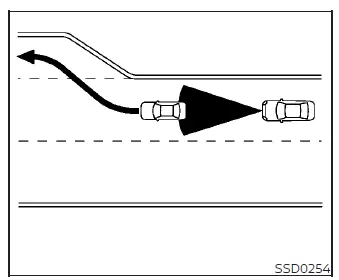
When cruising down the freeway at a locked set speed and approaching a slower-moving vehicle ahead, the ICC system on your Nissan Versa will actively adjust your speed to maintain the driver-selected distance from that vehicle. If the preceding car changes lanes or exits the freeway, the ICC system will accelerate and maintain your speed back up to the set limit. Always stay attentive to your driving operations to retain full control of the vehicle as it accelerates back to your set cruising speed.
Keep in mind that your Nissan Versa may struggle to maintain its exact set speed when navigating winding roads, sharp curves, or steep hilly terrain. If this occurs, you will need to take over and manually control the vehicle speed.
Under normal driving conditions when managing the distance to a car ahead, this advanced system automatically handles the acceleration and deceleration of your Nissan Versa in response to the velocity of the vehicle in front of you.
Depress the accelerator pedal manually to properly boost your vehicle's speed when rapid acceleration is required for a lane change or passing maneuver. Conversely, firmly depress the brake pedal whenever deceleration is required to maintain a safe safety margin due to sudden braking from the vehicle ahead or if another motorist cuts abruptly into your lane. Always stay alert and focused when utilizing the ICC system.
Vehicle-to-vehicle distance control mode switches Nissan Versa sedan
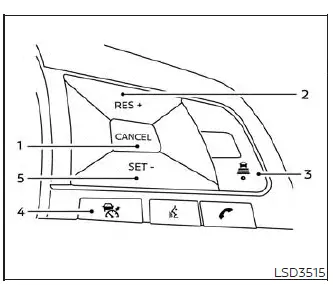
The system is seamlessly operated by the master ICC switch and four dedicated control switches, all of which are conveniently mounted right on the steering wheel of your Nissan Versa.
1. CANCEL switch:
Deactivates and disengages the system immediately without erasing your previously stored set cruising speed from memory.
2. RES+ switch:
Resumes your previously memorized set speed or increases your cruising velocity incrementally with each tap.
3. DISTANCE switch:
Changes and adjusts your vehicle's following distance gap to suit traffic density:
- Long
- Middle
- Short
4. ICC Switch:
The primary master switch used to turn the system on or off.
5. SET- switch:
Sets your desired target cruise speed or reduces your vehicle speed incrementally with each press.
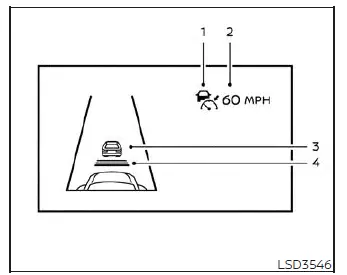
Vehicle-to-vehicle distance control mode display and indicators
The high-visibility instrument cluster display is positioned centrally between the speedometer and the tachometer.
1. This dynamic indicator displays the operational status of the ICC system based on its color scheme:
- ICC system ON indicator (gray): Indicates that the ICC system is powered on and standing by.
- ICC system SET indicator (green): Indicates that the target cruising speed has been successfully set and locked in.
- ICC system warning (yellow): Indicates that there is an active malfunction detected within the ICC system.
2. Set vehicle speed indicator:
Indicates your currently programmed set vehicle speed.
For Canadian specification models, the vehicle speed is displayed clearly in km/h.
3. Vehicle ahead detection indicator:
Indicates whether the system successfully detects a preceding motor vehicle traveling in front of you.
4. Set distance indicator:
Visually displays the selected following distance interval between vehicles configured using the steering wheel distance switch.
Operating vehicle-to-vehicle distance control mode
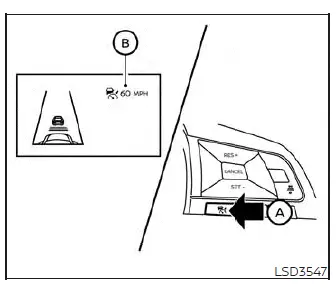
To turn on the cruise control system, quickly press and release the master ICC switch A. The gray ICC system ON indicator, the set distance indicator, and the set vehicle speed indicator B will all illuminate to show that the system is now in a standby state ready for speed setting.
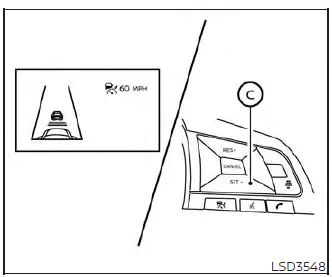
To set your desired cruising speed, accelerate your Nissan Versa up to your chosen target velocity, press the SET- switch C down, and then release it. The green ICC system set indicator, vehicle ahead detection indicator, set distance indicator, and set vehicle speed indicator B will light up simultaneously.
Take your foot fully off the accelerator pedal.
Your Nissan Versa will now automatically maintain the locked-in set speed.
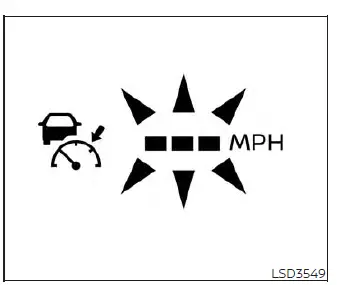
When the SET- switch is pressed under any of the following restricted conditions, the system cannot be engaged, and the ICC indicators will flash continuously for approximately 2 seconds:
- When traveling below 20 mph (32 km/h) and a preceding vehicle is not detected ahead in your lane
- When the transmission shift lever is positioned outside of the D (Drive) or Manual mode slot
- When the mechanical or electronic parking brake is currently applied
- When the vehicle brakes are being actively operated by the driver
Furthermore, when the SET- switch is pushed under the following specific operational conditions, the system cannot be set.
An audible warning chime will sound and an informative message will pop up on the screen:
When the Vehicle Dynamic Control (VDC) system is turned off (To use the ICC system, you must first turn on the VDC system. Then, press the ICC switch to turn off the ICC system, and reset the system by pushing the ICC switch again.)
- When the VDC system is actively operating to correct traction
- When a tire or wheel is slipping (To use the ICC system, make sure the wheels have regained traction and are no longer slipping.)
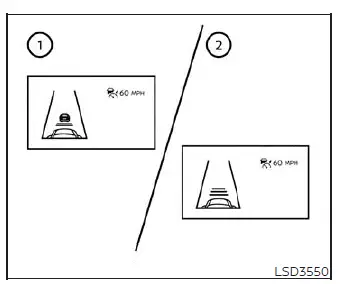
- System set display with vehicle ahead
- System set display without vehicle ahead
The driver sets the desired vehicle speed for their Nissan Versa based on prevailing road and traffic conditions. The Intelligent Cruise Control system maintains your chosen set vehicle speed, working similarly to a standard cruise control setup, as long as no preceding vehicle is detected within your lane ahead. The ICC system clearly displays your active set speed on the instrument cluster.
Vehicle detected ahead
When another motor vehicle is detected directly in the lane ahead, the ICC system actively decelerates your Nissan Versa by controlling the electronic throttle and applying the vehicle brakes to match the slower speed of the traffic in front of you. The system then dynamically regulates your vehicle speed based on the pace of the preceding vehicle to maintain your chosen driver-selected distance.
NOTE:
- The exterior brake lights of your vehicle will automatically illuminate whenever braking is performed actively by the ICC system.
- When the automated braking system operates, a faint mechanical operating noise may occasionally be heard. Rest assured that this is completely normal and is not a sign of a system malfunction.
When a vehicle ahead is successfully detected, the dedicated vehicle ahead detection indicator light comes on.
The ICC system will also continuously display both your active set speed and your chosen following distance.
Vehicle ahead not detected
When a slower vehicle is no longer detected ahead in your path, the ICC system will gradually accelerate your Nissan Versa to safely resume your previously established set vehicle speed. The system then maintains that locked-in speed.
When a lead vehicle is no longer detected, the vehicle ahead detection indicator turns off.
If another vehicle happens to appear ahead while your car is still accelerating back up to the set speed or at any other time while the ICC system is fully engaged, the system will instantly resume controlling the following distance to that vehicle.
When a preceding vehicle is no longer detected while traveling at slow speeds under approximately 15 mph (24 km/h), the system will automatically cancel itself.
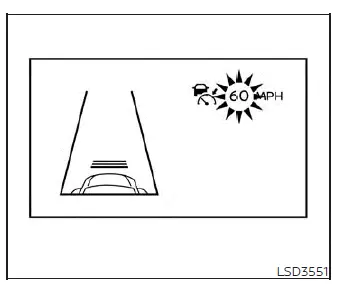
When passing another slower vehicle, the set speed indicator will flash if your vehicle speed temporarily exceeds your established set limit. The vehicle detection indicator will turn off once the road area directly ahead of your Nissan Versa is completely open and clear. Once you release the accelerator pedal, your car will smoothly return to your previously set speed.
Even though your cruising speed is actively managed by the ICC system, you can still manually depress the accelerator pedal whenever it is necessary to accelerate your Nissan Versa rapidly for passing maneuvers.
How to change the set vehicle speed
To cancel your preset cruising speed, utilize any of the following three convenient methods:
- Push the CANCEL switch on the steering wheel. The set vehicle speed indicator on the display will go out.
- Lightly tap the brake pedal with your foot. The set vehicle speed indicator will go out.
- Turn the master ICC
 switch off. All ICC indicators will go out.
To reset your cruising speed to a faster velocity, utilize any of the following three methods:
- Manually depress the accelerator pedal. When your Nissan Versa attains your desired speed, press and release the SET- switch.
- Press and hold down the RES+ switch. Your set vehicle speed will increase continuously by approximately 5 mph (5 km/h for Canadian models).
- Press and then quickly release the RES+ switch. Each individual tap you make will increase your set speed by approximately 1 mph (1 km/h for Canadian models).
To reset your cruising speed to a slower velocity, utilize any of the following three methods:
- Lightly tap the brake pedal to slow down. When your Nissan Versa attains your desired speed, press and release the SET- switch.
- Press and hold down the SET- switch. Your set vehicle speed will decrease continuously by approximately 5 mph (5 km/h for Canadian models).
- Press and then quickly release the SET- switch. Each individual tap you make will decrease your set speed by approximately 1 mph (1 km/h for Canadian models).
To quickly resume your previous preset cruising speed after a temporary slowdown, press and release the RES+ switch. Your Nissan Versa will smoothly return to your last set cruising speed as long as the vehicle is traveling at a speed above 20 mph (32 km/h).
How to change the set distance to the vehicle ahead
The following distance separating your Nissan Versa from the traffic ahead can be adjusted and selected at any time, depending on prevailing road conditions, weather, and traffic density.
Each time the distance  switch A is pressed, your active set distance will cycle through long, middle, short, and back around to long again, repeating in that exact sequence.
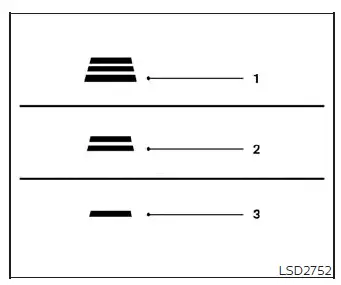
Distance / Approximate distance at 60 mph (100 km/h) [ft (m) ]
- Long 200 (60)
- Middle 150 (45)
- Short 90 (30)
- The actual physical distance maintained between your Nissan Versa and the vehicle ahead will adjust dynamically according to your current vehicle driving speed.
The higher your vehicle speed climbs, the greater the following distance interval becomes to ensure safety.
- Your chosen distance preference will be securely memorized and remain at the current setting even if the vehicle engine is turned off and subsequently restarted.
Approach warning
If your Nissan Versa closes in too rapidly on the vehicle ahead due to sudden deceleration by that vehicle or if another motorist cuts abruptly into your lane, the system will warn the driver using an audible warning chime and flashing alerts on the ICC system display. You must immediately decelerate by depressing the brake pedal to maintain a safe vehicle distance if:
- The warning chime sounds in the cabin.
- The vehicle ahead detection indicator on the display begins to blink.
Please note that the approach warning chime may not sound in certain scenarios where the closing distance between vehicles remains steady. Some examples include:
- When both vehicles are traveling at the exact same speed and the distance between them is not changing.
- When the vehicle ahead is traveling faster than you and the gap distance is actively increasing.
- When another vehicle cuts closely into your lane of travel right near your vehicle.
Furthermore, the warning chime will not sound when:
- Your vehicle approaches other vehicles that are parked completely still or moving very slowly.
- The accelerator pedal is depressed by the driver, which temporarily overrides the system's automatic speed control.
NOTE:
The approach warning chime may occasionally sound and the system display may blink when the ICC sensor detects stationary objects situated on the side of the vehicle or along the edge of the road. This may cause the Intelligent Cruise Control system to subtly decelerate or accelerate your Nissan Versa. The ICC sensor can pick up these peripheral objects when driving on winding roads, narrow streets, hilly terrain, or when entering and exiting sharp curves. In these situations, you will need to take over and manually control the proper distance ahead of your vehicle.
Additionally, overall sensor sensitivity can be influenced by specific driving actions (such as sharp steering maneuvers or your positioning within the lane) or external vehicle conditions (for example, if the vehicle is being driven with minor body damage near the sensor zones).
Automatic cancellation
An audible chime will sound under the following operational conditions, and system control will be automatically canceled:
- When a preceding vehicle is no longer detected ahead and your Nissan Versa drops below a speed of approximately 15 mph (24 km/h)
- When the system determines that the vehicle has come to a complete standstill
- When the transmission shift lever is moved out of the D (Drive) position or Manual mode slot
- When the electronic or manual parking brake system is applied
- When the Vehicle Dynamic Control (VDC) system is turned off by the driver
- When the VDC system is actively operating to correct traction loss
- When distance measurement becomes impaired due to the accumulation of heavy dirt, snow, or obstructions blocking the sensor face
- When a drive wheel experiences slippage
- When the radar signal is temporarily interrupted by external environmental factors
Vehicle-to-vehicle distance control mode limitations Nissan Versa 2026
WARNING
Listed below are the critical system limitations for the Intelligent Cruise Control system on your Nissan Versa. Failure to operate the vehicle in strict accordance with these system limitations could result in serious personal injury or a fatal accident.
- The ICC system is primarily designed and intended for use on straight, dry, open freeways and highways with light, steady traffic flow. It is strongly advised not to use the ICC system in heavy city traffic, stop-and-go driving, or congested metropolitan areas.
- The ICC system will not adapt automatically to sudden changes in road conditions or environmental hazards. This advanced driving aid should only be used in evenly flowing traffic conditions. Never use the system on roads featuring sharp curves or hairpin turns, nor on icy, snow-covered roads, during heavy downpours of rain, or in thick fog.
- As there is a strict performance limit to the automated distance control function, you must never rely solely or blindly on the ICC system. This technology cannot correct careless, inattentive, or absentminded driving habits, nor can it overcome poor visibility caused by torrential rain, dense fog, or other severe weather conditions. Always decelerate your Nissan Versa by manually depressing the brake pedal, adjusting your speed depending on the exact distance to the vehicle ahead and surrounding traffic circumstances in order to maintain a safe separation gap between vehicles.
- If the vehicle traveling ahead comes to a complete halt, your Nissan Versa will decelerate down to a standstill within the operational limitations of the system.
The system will automatically cancel once it judges that the vehicle has come to a complete standstill and will sound an audible warning chime. To prevent the vehicle from creeping or moving forward, the driver must firmly depress and hold the brake pedal.
- Always pay close attention to the operation of your vehicle and remain fully prepared to manually control the proper following distance at a moment's notice. The ICC system may fail to maintain the selected following distance or your set vehicle speed under certain challenging circumstances.
- The system may fail to detect the motor vehicle directly in front of you under certain adverse road or weather conditions. To avoid severe accidents, never use the ICC system under any of the following restricted conditions:
- On roads where traffic is extremely heavy or features sharp, winding curves
- On slippery road surfaces coated with black ice, packed snow, or sleet
- During severe weather events (heavy rain, dense fog, or blinding snow)
- When rain, slush, snow, or thick dirt adheres to the front bumper area around the radar distance sensor
- On steep downhill grades (your Nissan Versa may exceed your set speed limit, and frequent automatic or manual braking may result in dangerous brake overheating)
- On roads characterized by repeated, rolling uphill and downhill slopes
- When traffic conditions make it impossible to maintain a proper inter-vehicle distance because of erratic, frequent acceleration or deceleration
- When experiencing electromagnetic or signal interference originating from other external radar sources
- Do not use the ICC system under any circumstances if you are towing a trailer with your Nissan Versa. The system may fail to accurately detect vehicles traveling ahead when a trailer is attached.
- Under certain road or traffic conditions, another vehicle or foreign object can unexpectedly dart into the sensor detection zone, triggering abrupt automatic braking. Always stay alert and avoid engaging the ICC system anywhere outside of its recommended usage guidelines outlined in this warning section.
The front radar sensor will fail to detect the following types of objects and obstacles:
- Stationary, parked, or extremely slow-moving vehicles
- Pedestrians, stray animals, or physical debris lying in the roadway
- Oncoming vehicles traveling toward you in the same lane
- Motorcycles traveling in an offset position within your travel lane
The radar sensor operates fundamentally by detecting radio signals reflected back from the vehicle traveling ahead. Consequently, if the sensor cannot capture a clear reflection from the lead vehicle, the ICC system may fail to maintain your selected following distance.
The following represent typical environmental conditions in which the radar sensor cannot properly detect a leading vehicle, potentially causing the system to operate incorrectly:
- When heavy snow accumulation, slush, or road spray kicked up from other vehicles severely degrades the sensor's detection clarity.
- When your Nissan Versa is towing a trailer or hauling heavy towed equipment.
- When excessively heavy luggage, cargo, or passengers are loaded into the rear seat area or trunk of your vehicle, altering its ride height.
The ICC system is programmed to automatically monitor the operational health of the radar sensor within its standard functional limitations.
Whenever the sensor face is entirely covered with thick dirt or obstructed by foreign matter, the system will automatically disengage and cancel itself. If the sensor is covered by a layer of ice, a transparent or translucent vinyl wrapping, or plastic bags, the ICC system may fail to detect the obstruction.
In these specific instances, the vehicle-to-vehicle distance control mode may fail to cancel itself proactively and may consequently be unable to maintain the proper selected following distance from the vehicle ahead.
Make sure to routinely inspect and clean the radar sensor area on your Nissan Versa regularly.
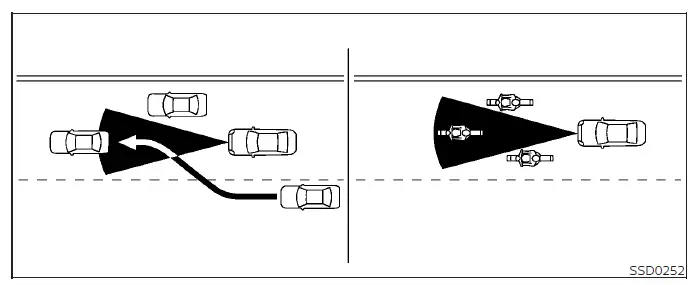
The effective detection zone of the front radar sensor is physically limited in width and range. A lead vehicle must remain squarely within this precise detection zone for the vehicle-to-vehicle distance detection mode to maintain your chosen gap.
A vehicle ahead may drift out of the detection zone due to its lateral position within the same travel lane. Similarly, motorcycles may not be detected if they are traveling offset from the exact center line of the lane. A vehicle cutting into your lane from the side may not be detected until it has completely transitioned into your lane of travel.
If this occurs, the ICC system may warn you by flashing the instrument cluster system indicator and sounding an audible chime. The driver must take immediate control and manually manage the proper safe distance away from the vehicle traveling ahead.
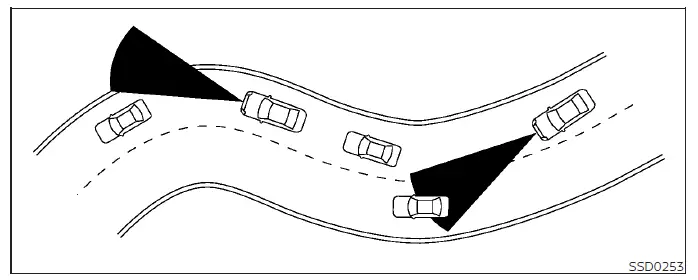
When driving on challenging roadways—such as winding mountain passes, hilly grades, sharp curves, narrow streets, or active construction zones—the radar sensor may mistakenly detect vehicles traveling in an adjacent lane or temporarily lose track of the vehicle directly ahead. This interference may cause the radar system to unnecessarily decelerate or accelerate your Nissan Versa.
Furthermore, reliable vehicle detection can be influenced by unique driving inputs (such as aggressive steering maneuvers or your lateral positioning within the lane) as well as overall vehicle load conditions.
If this occurs, the ICC system may issue a warning by flashing the system indicator lights and sounding an unexpected chime. You will need to take over manually to control the proper safety distance away from the vehicle traveling ahead.
System temporarily unavailable Nissan Versa third generation
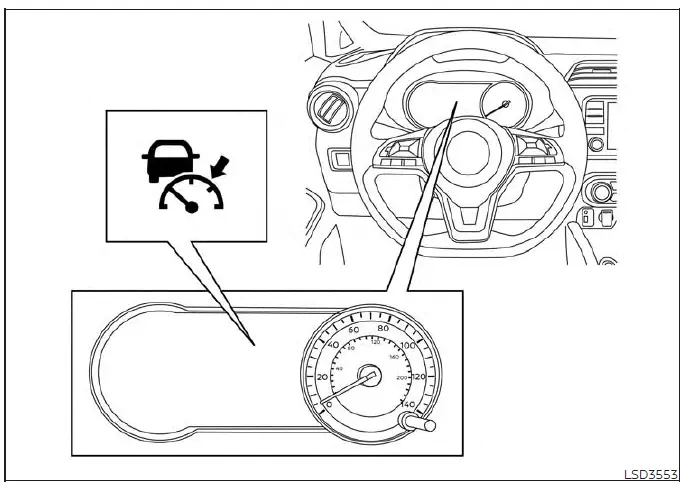
The following are specific environmental and operational conditions in which the Intelligent Cruise Control system on your Nissan Versa may become temporarily unavailable.
In these specific instances, the ICC system may not cancel automatically and may fail to maintain your selected following distance from any vehicle traveling ahead.
Condition A
Under the following operational conditions, the ICC system is automatically canceled. An audible chime will sound and the system will temporarily be unable to be set:
- When the Vehicle Dynamic Control (VDC) system is turned off by the operator
- When the VDC system is actively operating to manage traction
- When a preceding vehicle is no longer detected and your Nissan Versa is traveling below a speed of 15 mph (24 km/h)
- When the system determines that the vehicle has reached a complete standstill
- When the transmission shift lever is positioned outside of the D (Drive) or Manual mode selection
- When the mechanical or electronic parking brake is currently engaged
- When a drive wheel experiences slippage
- When the front radar signal is temporarily disrupted or interrupted
Action to take
When the conditions listed above are no longer present, turn the system off completely using the master ICC switch. Then, turn the ICC system back on to resume normal operation.
Condition B
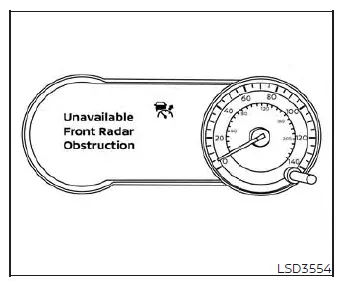
When severe inclement weather (such as heavy rain, dense fog, or blinding snow) blocks or interferes with the front radar sensor, the ICC system will automatically cancel, an audible chime will sound, and the "Unavailable: Front Radar Obstruction" warning message will appear directly within the vehicle information display screen.
Action to take
When the weather conditions listed above clear up, the warning message will automatically disappear from the vehicle information display and the system will return to normal operation. If the "Unavailable: Front Radar Obstruction" warning message continues to be displayed persistently, you should have the system inspected.
It is recommended that you visit an authorized NISSAN dealer for this professional service.
Condition C
When the radar sensor area integrated into the front bumper is covered with thick mud, road dirt, packed snow, ice, or any other physical obstruction, the ICC system will automatically disengage and cancel.
An audible chime will sound and the "Unavailable: Front Radar Obstruction" warning message will pop up in the vehicle information display.
Action to take
If this warning message appears, safely pull over and stop your Nissan Versa in a secure location, move the transmission shift lever into the P (Park) position, and turn off the engine. Carefully clean away any dirt or ice from the sensor area on the front bumper and restart the engine. If the "Unavailable: Front Radar Obstruction" warning message continues to be displayed, have the system checked. It is recommended that you visit an authorized NISSAN dealer for this service.
Condition D
When driving on expansive roadways characterized by limited surrounding structures and reflective surfaces (for example, long bridges, open deserts, vast snowfields, or driving directly alongside extended concrete walls), the system may illuminate the master system warning light and display the "Unavailable: Front Radar Obstruction" message.
Action to take
When the challenging driving environment and road conditions no longer exist, simply turn the system back on.
Condition E
When the ICC system encounters an internal fault and is not operating properly, an audible chime sounds and the dedicated ICC system warning light (illuminated in orange) will come on.
NOTE:
Even if the advanced Intelligent Cruise Control system is temporarily unavailable, the traditional conventional fixed-speed cruise control mode can still be used safely.
System maintenance Nissan Versa 2026
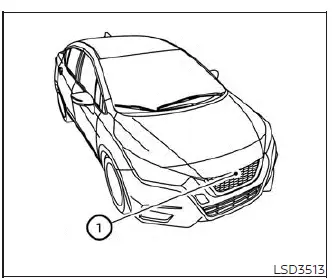
The primary radar sensor for the Intelligent Cruise Control system 1 is conveniently located right on the front grille area of your Nissan Versa.
To ensure that the ICC system on your vehicle continues operating properly and reliably over time, be sure to observe and follow the essential maintenance guidelines below:
- Always keep the delicate sensor area impeccably clean and free from dirt, mud, snow, and debris.
- Do not strike, knock, or physically damage the surrounding body panels and grille areas situated directly around the sensor.
- Do not attach any type of sticker (including transparent protective films or decorative decals) or install any aftermarket accessory near the sensor face. Doing so could cause system failure or operational malfunction.
- Do not attach or mount any metallic objects or hardware near the front sensor area, such as custom brush guards or protective metal plates, as this could lead to serious sensor failure or system malfunction.
- Do not alter, remove, paint over, or modify the front bumper assembly of your Nissan Versa. Before undertaking any custom modifications, repairs, or body restorations involving the front bumper, it is strongly recommended that you consult and visit an authorized NISSAN dealer.
Radio frequency statement
For USA
Radiofrequency radiation exposure Information: This sensitive electronic equipment complies fully with established FCC radiation exposure limits set forth for an uncontrolled environment. This equipment should always be installed, maintained, and operated while maintaining a strict minimum safe distance of at least 30 cm between the radio radiator source and your body. Furthermore, the internal transmitter must never be co-located or operated simultaneously in conjunction with any other separate antenna or wireless transmitter.
FCC Notice:
Any unauthorized changes or modifications made to this hardware not expressly approved by the party responsible for overall compliance could completely void and revoke the user's legal authority to operate the equipment.
For Canada
This advanced device complies fully with Part 15 of the Federal Communications Commission (FCC) Rules and aligns with Industry Canada licence-exempt RSS standard(s). Operation of this equipment is subject to the following two distinct regulatory conditions:
1. This device must not cause harmful radio interference, and 2. This device must accept any interference received, including any stray interference that may potentially cause undesired or erratic operation.
Le présent appareil est conforme aux CNR d'Industrie Canada applicables aux appareils radio exempts de licence. L'exploitation est autorisée aux deux conditions suivantes:
1. L'appareil ne doit pas produire de brouillage, et
2. L'utilisateur de l'appareil doit accepter tout brouillage radioélectrique subi, même si le brouillage est susceptible d'en compromettre le fonctionnement.
Radio Frequency Radiation Exposure Information: This equipment complies with FCC radiation exposure limits set forth for an uncontrolled environment.
This equipment should be installed and operated with a minimum distance of 30 cm maintained between the radiator and your body.
The transmitter must not be co-located or operating in conjunction with any other external antenna or transmitter.
Cet équipement est conforme aux limites d'exposition aux rayonnements IC établies pour un environnement non contrôlé. Cet équipement doit être installé et utilisé avec un minimum de 30 cm de distance entre la source de rayonnement et votre corps.
FCC Notice
Changes or modifications not expressly approved by the party responsible for compliance could void the user's authority to operate the equipment.
Conventional (fixed speed) cruise control mode Nissan Versa sedan
This conventional cruising mode allows you to drive your Nissan Versa smoothly at a steady, locked speed ranging between 25 to 90 mph (40 to 144 km/h) without needing to keep your foot continuously pressed down on the accelerator pedal.
WARNING
- When operating in the conventional (fixed speed) cruise control mode, an audible warning chime will not sound to alert you if you get dangerously close to the vehicle traveling ahead, because neither the presence of a lead vehicle nor the inter-vehicle spacing is monitored or detected by the system.
- Always pay special attention and maintain visual awareness of the exact physical distance between your Nissan Versa and the vehicle directly ahead of you, or a severe rear-end collision could occur.
- Always verify and confirm your active mode and speed settings directly within the vehicle information display screen.
- Do not use the conventional (fixed speed) cruise control mode when driving under any of the following challenging conditions:
- When it is physically impossible to keep your Nissan Versa moving at a stable, set cruising speed
- In heavy, dense urban traffic or in erratic traffic flow that varies constantly in speed
- On winding mountain roads, sharp curves, or steep hilly grades
- On slippery road surfaces coated with rain, snow, slush, or black ice
- In areas characterized by very strong, gusty crosswinds
- Failing to heed these warnings could cause a sudden loss of vehicle control and result in a serious accident.
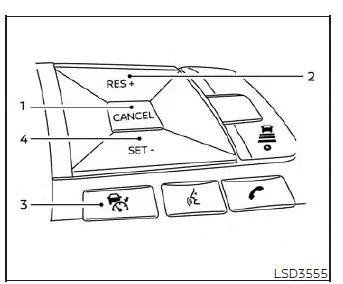
Conventional (fixed speed) cruise control switches
1. CANCEL switch:
Deactivates and disengages the cruise system immediately without erasing your stored target set speed from memory
2. RES+ switch:
Resumes your previous set speed or increases your cruising velocity incrementally with each touch
3. ICC switch:
The primary master switch used to turn the system on or off
4. SET- switch:
Sets your desired target cruise speed or reduces your vehicle speed incrementally with each press
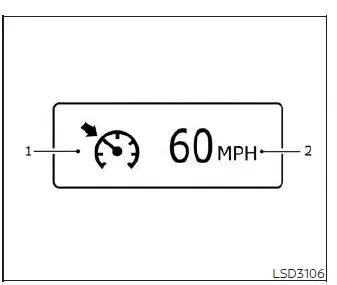
Conventional (fixed speed) cruise control mode display and indicators
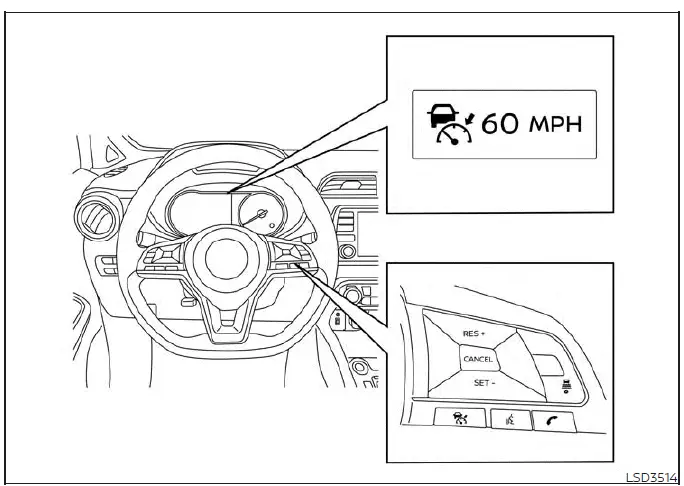
The clear indicator display is positioned directly within the vehicle information display screen on the instrument cluster.
1. Cruise indicator:
This dynamic indicator shows the operational condition of the ICC system based on its color scheme:
- Cruise control ON indicator (gray): Indicates that the master ICC switch is powered on
- Cruise control SET indicator (green): Indicates that your target cruising speed has been successfully set
- Cruise control warning (yellow): Indicates that there is an active technical malfunction within the ICC system
2. Set vehicle speed indicator:
This clear readout indicates your programmed set vehicle speed. For Canadian specification models, the vehicle speed is displayed in km/h.
Operating conventional (fixed speed) cruise control mode
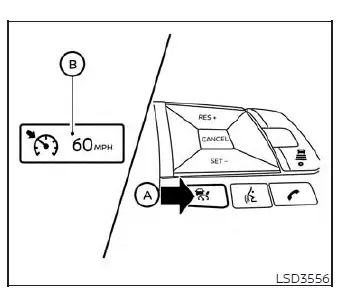
To turn on the conventional (fixed speed) cruise control mode, press and hold down the master ICC switch A for longer than approximately 1.5 seconds.
When pushing the ICC switch on, the conventional cruise control mode display and indicators B appear temporarily within the vehicle information display. After you hold the ICC switch down for longer than about 1.5 seconds, the initial system display turns off and the active cruise indicator appears. You can now set your desired cruising speed. Pushing the ICC switch again will turn the system completely off. When the ignition switch is placed in the OFF position, the system is also automatically turned off.
To use the system again later, quickly push and release the ICC switch (for vehicle-to-vehicle distance control mode) or push and hold it down (for conventional fixed-speed cruise control mode) once more to turn it back on.
CAUTION
To avoid accidentally engaging cruise control functions unexpectedly, make sure to always turn the master ICC switch off when you are not actively using the system on your Nissan Versa.
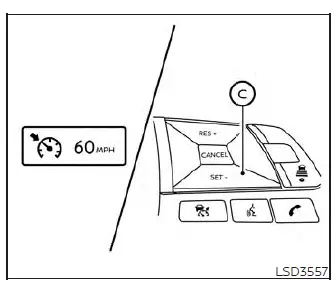
To set your desired cruising speed, accelerate your Nissan Versa up to your target velocity, press the SET- switch C down, and then release it. (The color of the cruise indicator changes to green and the set vehicle speed indicator illuminates on the display.) Take your foot off the accelerator pedal. Your vehicle will smoothly maintain the locked-in set speed.
- To pass another slower vehicle on the highway, depress the accelerator pedal manually. When you release the pedal after passing, your Nissan Versa will return to the previously set speed.
- Your vehicle may struggle to maintain its exact set cruising speed when traveling up or down steep hills.
If this happens, you will need to manually control and adjust the vehicle speed using the pedals.
To cancel your preset cruising speed, utilize any of the following three convenient methods:
1. Push the CANCEL switch on the steering wheel. The vehicle speed indicator on the display will turn off.
2. Lightly tap the brake pedal with your foot. The vehicle speed indicator will turn off.
3. Turn the master ICC switch off. Both the cruise indicator and the vehicle speed indicator will turn off completely.
To reset your system at a faster cruising speed, utilize one of the following three methods:
1. Depress the accelerator pedal to speed up. When your Nissan Versa attains your desired speed, press and release the SET- switch.
2. Press and hold down the RES+ switch. When the vehicle attains your desired target speed, release the switch.
3. Press and then quickly release the RES+ switch. Each individual tap you make will increase your set speed by about 1 mph (1.6 km/h).
To reset your system at a slower cruising speed, utilize one of the following three methods:
1. Lightly tap the brake pedal to slow down. When your Nissan Versa attains the desired speed, press the SET- switch and release it.
2. Press and hold down the SET- switch. Release the switch when the vehicle slows down to your desired speed.
3. Press and then quickly release the SET- switch.
Each individual tap you make will decrease your set cruising speed by about 1 mph (1.6 km/h).
To resume your previous preset speed after a temporary slowdown, push and release the RES+ switch. Your Nissan Versa will resume its last set cruising speed as long as the vehicle is traveling at a speed over 25 mph (40 km/h).
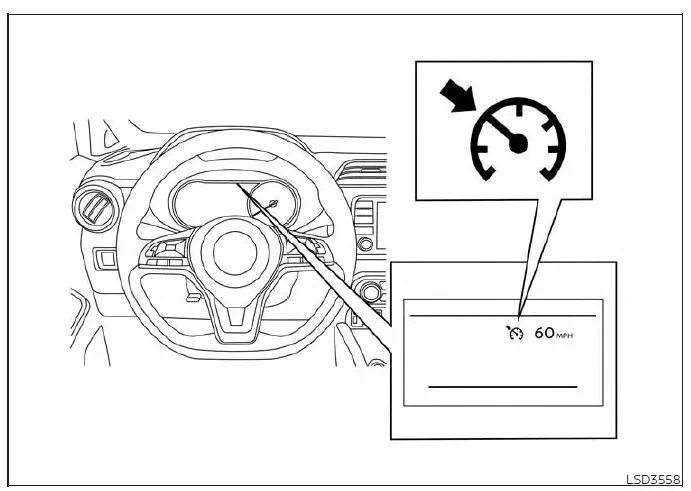
System temporarily unavailable
An audible chime will sound under the following operational conditions, and system control will be automatically canceled:
- When your vehicle slows down more than 8 mph (13 km/h) below your established set speed
- When the transmission shift lever is positioned outside of the D (Drive) or manual shift mode slots
- When the parking brake is currently applied
- When the Vehicle Dynamic Control (VDC) system is operating (including the traction control system)
- When a drive wheel experiences slippage
When the system is not operating properly, an audible chime sounds and the color of the cruise indicator will change to orange.
Action to take
If the color of the cruise indicator changes to orange, safely pull over and stop your Nissan Versa in a secure location and place the transmission shift lever into the P (Park) position.
Turn the engine off, restart the engine, resume driving, and then attempt to perform your cruise setting procedure again.
If it remains impossible to set the speed or if the warning indicator stays illuminated, it may indicate an active system malfunction. Although your Nissan Versa is still fully drivable under normal conditions, you should have the vehicle inspected. It is recommended that you visit an authorized NISSAN dealer for this professional service.