



Nissan Versa: Monitor, climate, audio, phone and voice recognition systems - Cruise control
Precautions on cruise control
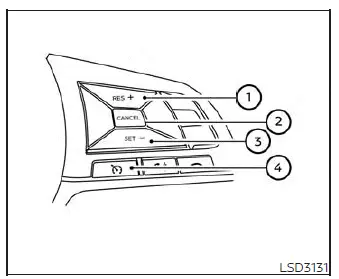
- RES+ switch
- CANCEL switch
- SET- switch
- CRUISE ON/OFF switch
- If an electronic or mechanical fault occurs, the cruise control system will deactivate and cancel automatically for safety reasons.
- To correctly and securely set up the cruise control system on your vehicle, always follow the recommended operating procedures outlined below.
WARNING
Do not engage or use the cruise control system when driving your Nissan Versa under any of the following hazardous conditions:
- When it is physically impossible to maintain a steady, consistent vehicle speed due to road conditions or traffic flow.
- In heavy, congested traffic or during driving conditions where the speed of surrounding traffic constantly varies.
- When navigating winding, curvy, steep, or hilly roadways.
- On slick or slippery road surfaces affected by rain, heavy standing water, snow, ice, or sleet.
- When driving through exceptionally high wind areas where vehicle stability could be compromised.
Failure to observe these precautions could cause a sudden loss of vehicle control, potentially resulting in a severe accident and serious personal injury.
CAUTION
On manual transmission models, do not shift the gear lever into N (Neutral) without first fully depressing the clutch pedal while the cruise control system is active and set. Should this accidental situation occur, immediately depress the clutch pedal and turn the CRUISE ON/OFF switch off.
Failure to take this corrective action immediately may cause severe mechanical damage to the engine.
Cruise control operations
The cruise control system built into your Nissan Versa allows you to comfortably maintain a steady driving speed between 25 and 89 mph (40 to 144 km/h) without needing to keep your foot resting on the accelerator pedal during long highway journeys.
To turn on the cruise control system, press the CRUISE ON/OFF switch. The primary CRUISE indicator light or
 indicator located in the instrument panel cluster will illuminate.
To set your desired cruising speed, accelerate your Nissan Versa up to the target velocity, press the SET- switch briefly, and then release it. The SET indicator light or
 indicator on the instrument panel will light up. You can now safely remove your foot from the accelerator pedal, and your vehicle will automatically maintain the locked-in speed.
- If you need to pass another slower-moving vehicle temporarily, simply depress the accelerator pedal to accelerate past them. Once you release the accelerator pedal, your Nissan Versa will smoothly return to the previously memorized cruising speed.
- Keep in mind that the vehicle may struggle to maintain its exact set speed when climbing up steep hills or descending down steep grades.
If this occurs, it is recommended that you temporarily disconnect and drive without the cruise control system.
To cancel the preset cruising speed, use any of the following three convenient methods:
- Press the CANCEL switch on the steering wheel; the CRUISE indicator light or
 indicator light in the instrument panel will turn off.
 - Lightly tap the brake pedal with your foot; the CRUISE indicator light or
 indicator will extinguish immediately.
 - Press the main CRUISE ON/OFF switch. The master CRUISE indicator light or
 indicator in the instrument panel will go out.
Furthermore, the cruise control system will automatically cancel itself, causing the CRUISE indicator light or
 indicator in the instrument panel to switch off, if:
- You depress the brake pedal at the exact same time you are pressing the RES+ or SET- switch. When this happens, your previously stored preset speed is entirely erased from system memory.
- The vehicle speed drops significantly—more than 8 mph (13 km/h) below your established set cruising speed.
- You move the transmission shift lever into the N (Neutral) position.
To reset and increase your cruising speed to a faster velocity, utilize any of these three methods:
- Depress the accelerator pedal manually. Once your Nissan Versa reaches the new desired speed, press and release the SET- switch.
- Press and hold down the RES+ switch. When the vehicle accelerates up to your target speed, release the switch.
- Press and quickly release the RES+ switch multiple times. Each individual tap will incrementally increase your set speed by approximately 1 mph (1.6 km/h).
To reset and decrease your cruising speed to a slower velocity, utilize any of these three methods:
- Lightly tap the brake pedal to slow down. When the vehicle hits your target speed, press and release the SET- switch.
- Press and hold down the SET- switch. Release the switch once the vehicle decelerates to the desired speed level.
- Press and quickly release the SET- switch multiple times. Each individual tap will incrementally decrease your set speed by approximately 1 mph (1.6 km/h).
To quickly resume your last preset cruising speed after a temporary slowdown, press and release the RES+ switch. Your Nissan Versa will smoothly return to the previously stored cruising speed as long as the vehicle is traveling at a speed above 25 mph (40 km/h).