



Nissan Versa: Pre-driving checks and adjustments - Keys
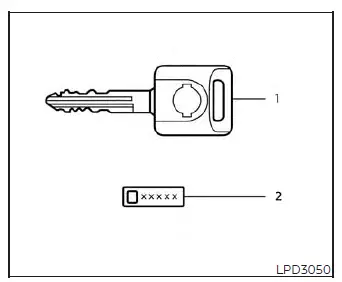
- Master key (two sets provided with your vehicle)
- Key number plate
A dedicated key number plate is supplied directly with your new Nissan Versa keys. It is highly recommended to record this unique key number immediately and store it in a secure, accessible location (such as your wallet or a digital password manager), rather than leaving it inside the vehicle itself. In the unfortunate event that you lose your keys, you can visit an authorized NISSAN dealer to quickly obtain precision-cut duplicates by providing this key number.
Please be aware that NISSAN does not maintain a central database of individual key numbers. Therefore, keeping a secure record of your key number plate is absolutely essential for your peace of mind and long-term vehicle security.
Your specific key number is only required if you have lost all physical keys to your Nissan Versa. If you still have at least one functional key in your possession, an authorized service center can easily duplicate it for you without needing the original key number.
NISSAN Intelligent Key
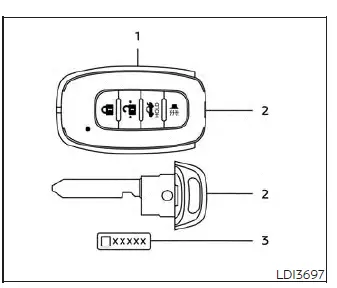
Type A (if so equipped)
- Intelligent Keys (two complete sets)
- Mechanical keys (stored inside the fob)
- Key number plate (one plate)
To ensure maximum vehicle security, your Nissan Versa can only be started and driven using Intelligent Keys that have been officially registered to your vehicle's onboard Intelligent Key System components and the NISSAN Vehicle Immobilizer System.
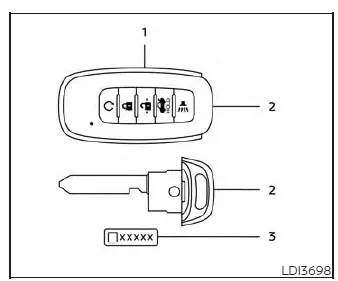
Type B (if so equipped)
Never leave these electronic keys inside the vehicle when exiting.
For your convenience, as many as four individual Intelligent Keys can be actively registered to and used with a single Nissan Versa. Any new or replacement key fobs must be digitally programmed and registered by an authorized dealer prior to operating with your vehicle's Intelligent Key System and NISSAN Vehicle Immobilizer System.
Because the programming process requires completely erasing and resetting the memory chip in the Intelligent Key components to register new devices, please make sure to bring all existing Intelligent Keys you own to the NISSAN dealer when having a new one programmed.
Just like standard keys, a key number plate is supplied with your Intelligent Key set. Be sure to write down this key number and keep it in a safe place outside of your Nissan Versa. If you ever lose your fobs, presenting this number at an authorized NISSAN dealership will streamline the process of getting replacements.
Remember that NISSAN does not record these key numbers for you, making it critical that you retain and track the key number plate yourself.
This key number is only necessary when you have lost all available keys and have no physical key left to copy. If you still have one working key, duplicates can be made successfully without knowing the original key number.
CAUTION
To prevent malfunctions and ensure the longevity of your Nissan Versa Intelligent Key, please avoid the conditions listed below, which can cause permanent damage to the internal electronics:
- Do not allow the Intelligent Key, which contains sensitive electrical components, to come into contact with water, saltwater, or high humidity. Exposure to moisture can severely affect the wireless system functions and circuit board.
- Do not drop the Intelligent Key onto hard surfaces, as internal connections may break.
- Do not strike the Intelligent Key sharply against other hard objects or carry it loose with heavy metal items.
- Do not attempt to change, modify, or disassemble the Intelligent Key casing.
- Wetting the device may cause permanent damage. If the Intelligent Key accidentally gets wet, immediately wipe it with a soft cloth until it is completely dry.
- Do not store or leave the Intelligent Key for an extended period in any area where temperatures exceed 140ºF (60ºC), such as on the dashboard of your Nissan Versa on a hot day.
- Do not attach the Intelligent Key to a key holder, ring, or lanyard that contains a magnet.
- Do not place the Intelligent Key in close proximity to household or office equipment that produces strong magnetic fields, such as televisions, audio systems, microwave ovens, or personal computers.
In the unfortunate event that your Nissan Versa Intelligent Key is lost or stolen, NISSAN strongly recommends immediately erasing its unique ID code from your vehicle's onboard computer. Proactively deauthorizing the missing fob is a critical security measure that effectively prevents unauthorized individuals from accessing or starting your car. To carry out this electronic erasure and keep your Nissan Versa secure, please schedule an appointment with an authorized NISSAN dealership, where certified technicians can safely reconfigure your vehicle's access system.
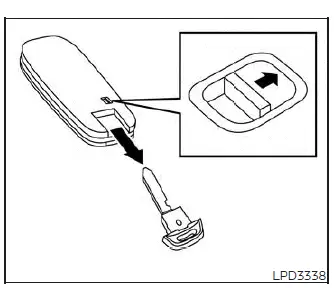
Mechanical key
For backup access, your Nissan Versa Intelligent Key houses a fully functional, integrated mechanical key concealed within its sleek housing.
To slide the mechanical key out of its housing, simply slide and hold the spring-loaded lock knob located on the back panel of the Intelligent Key, then pull the key ring end outward.
To slide the mechanical key back into place, firmly push it into the slot on the Intelligent Key body until you hear a distinct click and the lock knob snaps securely back into its default locked position.
This physical mechanical key can be used manually to lock or unlock the driver's side door, as well as the trunk lid (depending on your specific Nissan Versa trim level and equipment configuration).
CAUTION
For your safety and convenience, always keep the mechanical key fully installed inside its slot within the Intelligent Key casing so that you are never left without manual backup access.
NISSAN Vehicle Immobilizer System keys
Additional or replacement keys:
If you require spare keys for your Nissan Versa and still have at least one functioning key in your possession, knowing the original key number is not necessary. An authorized technician can easily duplicate your existing key's electronic profile to create new NISSAN Vehicle Immobilizer System keys. Please note that a single Nissan Versa vehicle can support a maximum of four registered immobilizer keys simultaneously. When programming new keys, it is essential to bring every single physical key you own to the NISSAN dealership. The registration procedure completely flushes the vehicle's memory of all previously saved key codes; only the physical keys present and reprogrammed during this service session will remain active. Any virtual key smartphone accessories or digital links (if equipped) must also undergo this reregistration process. Any physical key left at home or not handed to the dealer during this programming session will be permanently deactivated and will no longer be able to start the vehicle's engine.
CAUTION
Your immobilizer system key is embedded with a sensitive electrical transponder chip. Do not expose this key to fresh water, salt water, or excessive moisture, as liquid penetration can permanently damage the internal electronics and disable your Nissan Versa.