



Nissan Versa: Monitor, climate, audio, phone and voice recognition systems - Lane Departure Warning (LDW)
WARNING
Failure to carefully follow all safety warnings and operating instructions for the proper use of the Lane Departure Warning (LDW) system in your Nissan Versa could result in serious personal injury or fatal accidents.
- This active safety feature is designed strictly as a supplementary warning device to inform the driver of a potential unintended drift or departure from the travel lane. It will not automatically steer the vehicle or prevent a loss of control on its own. It remains the absolute responsibility of the driver to stay fully alert, drive safely at all times, keep the Nissan Versa centered within the traveling lane, and maintain full control of the vehicle under all driving conditions.
The LDW system on your Nissan Versa will automatically become operational when the vehicle is driven at speeds of approximately 37 mph (60 km/h) and above, provided that the lane markings on the road surface are clearly visible and well-defined.
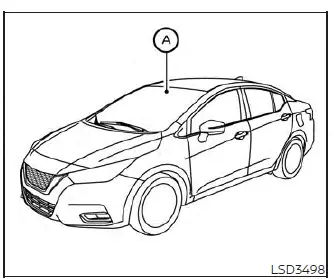
The LDW system continuously monitors the painted lane markers on both sides of the traveling lane by utilizing an advanced camera unit A positioned securely above the interior rearview mirror.
Whenever the system detects that your Nissan Versa is beginning to drift and leave the designated driving lane unintentionally, it alerts the driver using both a visual instrument cluster indicator and a distinct steering wheel vibration.
LDW system operation Nissan Versa 2026
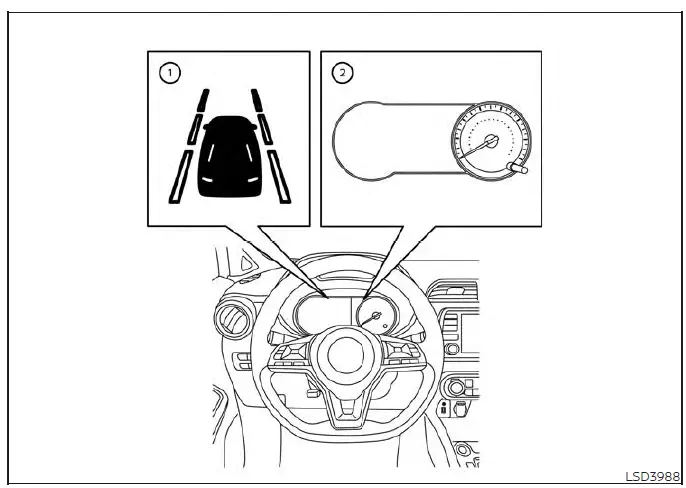
Vehicle Information Display
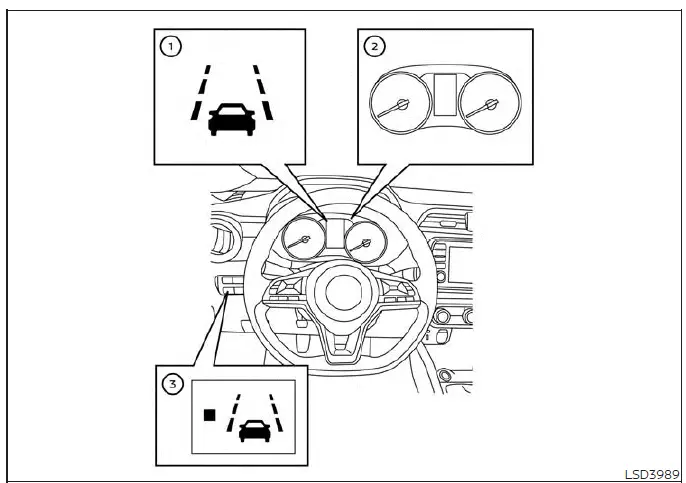
Trip Computer
- Lane Departure Warning (LDW) indicator icon or dedicated Lane Departure Warning (LDW) indicator light
- Vehicle Information Display screen or Trip Computer readout
- Dedicated LDW Switch (if so equipped on the dashboard)
The Lane Departure Warning system provides a reliable lane drifting alert function whenever your Nissan Versa travels at speeds of approximately 37 mph (60 km/h) and higher with clear lane stripes present. As the vehicle drifts closer toward either the left or the right side boundary of the current lane, the steering wheel will vibrate noticeably and the LDW indicator light (if so equipped) located on the instrument panel will begin blinking to capture the driver's immediate attention.
This active warning alert function will automatically cease the moment the vehicle steers back safely inside the lane markers.
How to enable/disable the LDW system Nissan Versa 3rd Gen
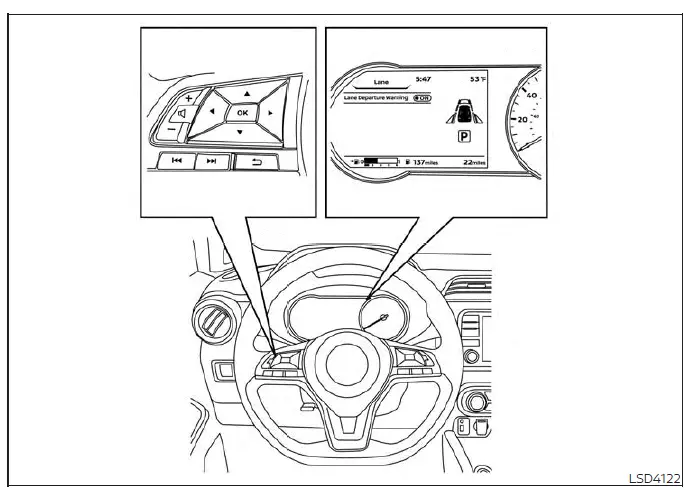
Perform the following simple navigation steps to manually enable or disable the LDW system on your Nissan Versa.
For vehicles equipped with the vehicle information display (if so equipped):
1. Press the
 button repeatedly until the "Settings" menu option displays clearly on the vehicle information display screen.
Use the directional
 button to highlight and select "Driver Assistance." Then press the central OK button to confirm.
2. Scroll down and select "Lane," then press the OK button.
3. Select "Lane Departure Warning" from the menu list and press the OK button to toggle the system either on or off.
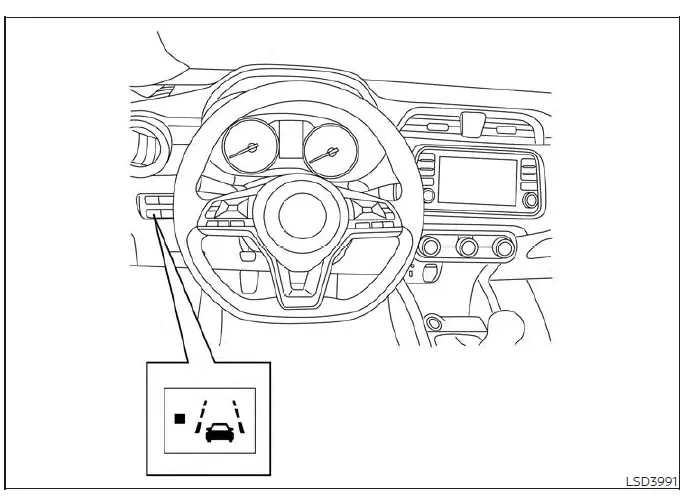
For vehicles equipped with a physical LDW switch (if so equipped):
1. Push the physical Lane Departure Warning (LDW) dash switch once to turn the LDW system on.
2. Push the LDW switch a second time to turn the LDW system completely off.
When the LDW system is actively turned on, the built-in indicator light directly on the LDW switch will illuminate.
NOTE:
When enabling or disabling the safety system, the Nissan Versa will intelligently retain your current preference settings even if the engine is subsequently turned off and restarted.
LDW system limitations Nissan Versa third generation
WARNING
The technical limitations associated with the Lane Departure Warning (LDW) system built into your Nissan Versa are detailed below. Failure to thoroughly understand and follow these critical safety warnings and usage instructions could result in severe personal injury or a fatal accident.
- The automated LDW system will not operate or provide alerts when your Nissan Versa is driven at speeds below approximately 37 mph (60 km/h), or whenever the windshield camera is unable to clearly detect painted road lane markers.
- Do not rely upon or use the LDW system under any of the following operating conditions, as the technology may fail to function properly:
- During severe or adverse weather conditions, such as heavy rain, dense fog, blizzard conditions, or accumulating snow.
- When driving on slippery, icy, or snow-covered road surfaces where tire grip is compromised.
- When navigating winding, curvy, or heavily uneven roadways.
- When regular traffic lanes are closed or altered due to active road construction and repair zones.
- When driving through makeshift, temporary, or redirected work-zone lanes.
- When driving on roads where the physical lane width is too narrow for standard sensor tracking.
- When operating your Nissan Versa without proper tire conditions—such as excessive tread wear, critically low tire pressure, the installation of a temporary spare tire, tire snow chains, or non-standard aftermarket wheels.
- When the vehicle is modified or equipped with non-original, non-factory brake parts or suspension components.
- When you are towing a trailer, camper, or any other vehicle behind your Nissan Versa.
- Furthermore, the LDW system may not function reliably or operate properly under the following specific situations:
- On roadways featuring multiple parallel lane markings; lane markers that are heavily faded, worn, or poorly painted; yellow-painted road lines; non-standard lane markers; or lane lines that are completely obscured or covered by water puddles, dirt, grime, or snow.
- On roads where old, discontinued, or sandblasted lane markers are still faintly detectable underneath new paint.
- On roads characterized by sharp, severe curves or sudden directional changes.
- On roads where there are sharply contrasting visual elements and patterns, such as harsh shadows, patches of melting snow, standing water, deep wheel ruts, or lingering tar seams and lines remaining after road patch repairs. (The LDW system camera could mistakenly detect these items as official lane markers.)
- On roadways where the traveling lanes abruptly merge, split, or separate.
- When the current traveling direction of your Nissan Versa does not properly align parallel with the road lane marker.
- When traveling extremely close behind a large vehicle, which physically obstructs the field of view and forward detection range of the windshield lane camera unit.
- When heavy rain, snow, mud splatter, or any physical foreign object adheres directly to the exterior glass of the windshield right in front of the lane camera sensor module.
- When the vehicle headlights are dim or not providing adequate illumination due to dirt accumulated on the lens covers or because the headlight beam aiming is improperly adjusted.
- When intense, blinding light enters directly into the lane camera lens unit (such as when low-angle sunlight shines straight onto the front of your Nissan Versa during sunrise or sunset).
- When sudden, dramatic changes in ambient brightness occur (such as the abrupt flash of light experienced when your vehicle rapidly enters or exits a dark highway tunnel or passes underneath a low bridge).
System temporarily unavailable
If your Nissan Versa is parked directly under intense sunlight in high ambient temperature conditions—exceeding approximately 104ºF (40ºC)—and is subsequently started up, the Lane Departure Warning (LDW) system may temporarily deactivate itself automatically. When this happens, a specific warning message will appear on the vehicle information display screen (if so equipped), reading: "Unavailable: High Cabin Temperature." Once the interior cabin temperature cools down and is sufficiently reduced through climate control or ventilation, the LDW system will automatically resume normal operation without requiring any manual reset.
Furthermore, the LDW system is intelligently designed not to trigger or issue warnings under the following intentional driving conditions:
- When you deliberately operate the turn signal lever and execute a proper lane change in the indicated direction. (The LDW system will automatically reactivate and become fully operable again approximately 2 seconds after the turn signal stalk is turned off.)
- When the overall driving speed of your Nissan Versa drops lower than approximately 37 mph (60 km/h).
As soon as these temporary conditions have passed and all required operating parameters—such as speed and clear lane markings—are once again satisfied, the full functionality of the LDW system will automatically resume.
System malfunction
If a technical fault or internal error occurs within the LDW system of your Nissan Versa, it will automatically cancel its operation. When this occurs, the orange LDW indicator icon or the dedicated LDW indicator warning light will illuminate on the instrument panel cluster. If the orange LDW warning light lights up while you are traveling, safely pull off the road into a secure location and bring the vehicle to a complete stop. Turn the engine off and restart it to clear the electronic cycle. If the orange LDW indicator light remains illuminated and refuses to go out after restarting, have the LDW system thoroughly inspected. It is strongly recommended that you visit an authorized NISSAN dealer to perform this professional diagnostic service.
System maintenance
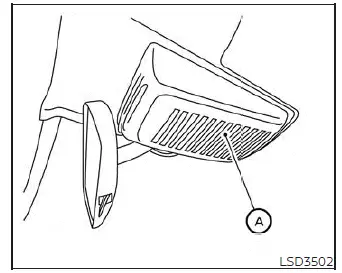
The windshield lane camera unit A responsible for powering the LDW system in your Nissan Versa is precisely mounted directly above the interior rearview mirror. To maintain proper, flawless operation of the LDW system and actively prevent any unexpected system malfunctions, be sure to observe the following maintenance rules:
- Always keep the exterior and interior glass surfaces of the windshield clean, clear, and free from heavy grime or obstruction.
- Do not attach any stickers, decals, toll tags, or transparent protective films anywhere near the sensitive camera unit housing on the glass.
- Do not place any highly reflective items—such as sheets of white paper, reflective sunshades, or decorative mirrors—on top of the instrument panel dashboard. The intense reflection of sunlight off these objects can blind the sensor and adversely affect the camera unit's optical capability to accurately detect road lane markers.
- Never strike, hit, or physically damage the structural areas surrounding the camera mounting unit. Do not touch the delicate camera lens or attempt to remove the calibration adjustment screw located on the unit. If the camera module suffers physical damage due to a collision or accident, it is recommended that you visit an authorized NISSAN dealer for expert replacement and alignment.