



Nissan Versa: Monitor, climate, audio, phone and voice recognition systems - Push-button ignition switch
WARNING
Never attempt to operate the electronic push-button ignition switch while your Nissan Versa is in motion on the road, except under emergency circumstances. (The running engine will abruptly shut off and stall if the ignition switch button is pushed three consecutive times in quick succession or if the switch is pressed and held continuously for more than 2 seconds.) If the engine cuts out while the vehicle is being driven, it could lead to an unexpected loss of power steering, brake vacuum assistance, and control, resulting in a dangerous crash and serious personal injury.
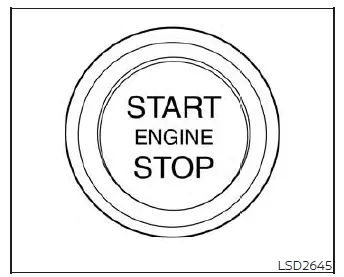
When the push-button ignition switch is pressed without depressing the foot brake pedal or pushing the clutch pedal down on manual transmission (M/T) models, the illumination state of the ignition switch will cycle through modes as follows: Push the center switch:
- Once to transition the vehicle electrical system to the ON position.
- Two times to switch the system back to the OFF position.
The push-button ignition switch will automatically reset and return to the secure LOCK position whenever any vehicle door is either opened or closed while the switch is currently set in the OFF position.
The gear shift lever can only be moved out of the P (Park) position if the push-button ignition switch is active in the ON position and the foot brake pedal is firmly depressed.
If the 12V vehicle battery happens to be completely discharged or critically low on power, the push-button ignition switch cannot be unlocked or moved out of the LOCK position. Various operational indicator lights and active warning messages for drivers are clearly displayed within the instrument meter cluster of your Nissan Versa.
Operating range
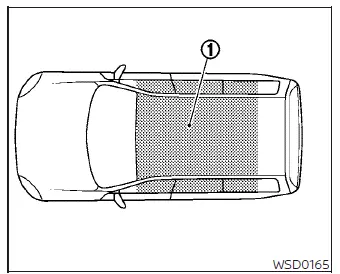
The advanced Intelligent Key wireless functions on your Nissan Versa can only be detected and utilized when the physical Intelligent Key fob is located strictly within the specified operational proximity range.
When the internal coin battery of the Intelligent Key is nearly depleted, or if strong external radio frequency interference or power transmitters are present near your parking location, the effective operating range of the Intelligent Key system becomes significantly narrower and may fail to function reliably.
Please remember that as long as the valid Intelligent Key is detected anywhere within the internal operating range, it is technically possible for anyone sitting inside—even someone who is not personally carrying the key fob—to press the push-button ignition switch and start the engine of your Nissan Versa.
The core operating range of the engine start function is strictly confined inside the passenger cabin of the vehicle 1.
- If the Intelligent Key is carelessly left resting directly on top of the instrument panel, on the rear parcel shelf, deep inside the glove box, within a center console storage bin, or tucked into a side door pocket, the signal may be blocked, causing the Intelligent Key to malfunction or fail to be recognized.
- If the Intelligent Key is placed immediately adjacent to an exterior door or window on the outside of the vehicle, the signal may bleed through, causing the system to mistakenly detect the key as being inside.
Push-button ignition switch positions
LOCK (Normal parking position)
The ignition switch mechanism can only be safely locked in this designated parking position.
The ignition switch unlocks automatically when it is pushed to the ON position while you are carrying the authorized Intelligent Key on your person or with the Intelligent Key securely inserted into the dedicated dashboard port.
The push-button ignition switch will automatically lock whenever any door of your Nissan Versa is opened or closed after the ignition has been switched off.
OFF
The push-button ignition switch rests in the OFF position immediately after the engine is shut down using the control switch. No indicator lights will remain illuminated on the surface of the ignition button in this state.
AUTO ACC
To enter accessory mode, ensure your Nissan Versa is completely stationary in the P (Park) position and verify that you have the Intelligent Key with you. Transition the push-button ignition switch directly from the ON position to the OFF position.
Your vehicle will then enter the convenient AUTO ACC mode, allowing the premium audio system and other electrical accessories to remain functional for a designated period under the following conditions:
The driver's door has not yet been opened since turning off the ignition.
The designated accessory time-out period has not yet expired.
ON (Without cranking)
If the electrical system of your Nissan Versa is left active in the ON position without running the engine, it features an integrated intelligent battery saver mechanism designed to automatically transition the ignition switch back to the OFF state after a continuous period of 10 minutes.
The built-in battery saver countdown timer will be instantly reset and restarted if any of the following user actions occur:
- The ignition switch position is manually changed or toggled.
- The exterior hazard warning lamps are switched on and operated.
ON (Normal operating position)
This primary operating position fully energizes the vehicle ignition system, onboard computers, and all essential electrical accessory circuits.
CAUTION
Never leave your Nissan Versa unattended with the push-button ignition switch left in the ON position when the engine is not actively running for an extended duration of time. Doing so will draw continuous current and can quickly discharge or drain the 12V vehicle battery.
Emergency engine shut off
If you encounter a rare emergency situation where you need to forcefully shut off the running engine while your Nissan Versa is still moving down the road, execute the following emergency override procedure immediately:
- Rapidly push the dash-mounted push-button ignition switch three consecutive times in quick succession within a window of less than 1.5 seconds, or
- Press and hold the push-button ignition switch continuously for more than 2 seconds.
NISSAN Intelligent Key battery discharge
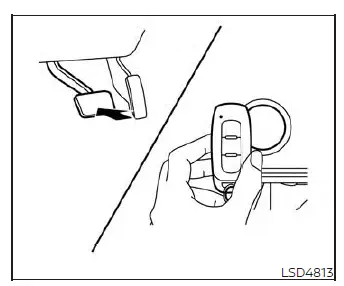
If the internal coin battery of your NISSAN Intelligent Key is completely discharged, or if heavy localized radio frequency interference is disrupting wireless communication around the vehicle, you can still successfully start the engine of your Nissan Versa by following this manual backup procedure:
1. Shift the transmission gear lever firmly into the P (Park) or N (Neutral) position.
2. Firmly depress and hold the foot brake pedal down.
3. Physically touch the push-button ignition switch directly with the front tip of your NISSAN Intelligent Key fob exactly as illustrated. (An audible confirmation chime will sound.)
4. Push the ignition switch while keeping the brake pedal depressed within a 10-second window after hearing the chime. The engine will fire up and start.
After step 3 has been completed, if you push the ignition switch without keeping the brake pedal depressed, the electrical system state of your Nissan Versa will cycle directly to the ON position.
NOTE:
- When the push-button ignition switch is pressed into the ON position or the engine is successfully started using the emergency backup procedure outlined above, the NISSAN Intelligent Key warning indicator light may flash in yellow on the instrument cluster meter display even though the valid NISSAN Intelligent Key fob is safely inside the vehicle cabin. This is completely normal behavior and does not indicate a system malfunction.
To stop the warning indicator light from blinking, simply touch the push-button ignition switch with your NISSAN Intelligent Key fob one more time.
- If the NISSAN Intelligent Key warning light located within the meter cluster begins blinking continuously in green, it serves as a direct notice that you should replace the fob battery as soon as possible.
NISSAN Vehicle Immobilizer System
The advanced NISSAN Vehicle Immobilizer System built into every Nissan Versa acts as a high-security electronic safeguard that will strictly prevent the engine from cranking or starting unless an officially registered and authenticated key is detected.
If the engine unexpectedly fails to start using your registered key—which can occasionally happen if wireless signal interference is being generated by another nearby registered key, an electronic automated toll road transponder, or an automatic payment tag attached to the same key ring—you can successfully clear the fault and restart the engine using the following recovery steps:
1. Leave the push-button ignition switch in the ON position for approximately 5 steady seconds.
2. Transition the ignition switch over to the OFF or LOCK position, and wait approximately 10 seconds for the system buffers to clear.
3. Repeat steps 1 and 2 in sequence.
4. Attempt to restart the engine of your Nissan Versa while holding any suspected electronic interference device completely separate and away from your registered key fob.
If this engine no-start condition happens to re-occur during your daily travels, Nissan recommends keeping your registered key on a separate, dedicated key ring to permanently avoid unwanted signal interference from external electronic accessories.