



Nissan Versa: Monitor, climate, audio, phone and voice recognition systems - Rear Cross Traffic Alert (RCTA)
WARNING
Failure to carefully follow all safety warnings and instructions for the proper use of the Rear Cross Traffic Alert (RCTA) system in your Nissan Versa could result in serious personal injury or fatal accidents.
- The RCTA system is never a substitute for proper, attentive driving procedures and is not designed to physically prevent contact or collisions with other vehicles or stationary objects. When backing out of a tight parking space or driveway, always thoroughly check your side and rear mirrors, and physically turn your head to look around in the direction your Nissan Versa will move to ensure the path is completely clear. Never rely solely on the RCTA system.
The RCTA system is designed to provide active assistance when you are backing out from a parking space. When your vehicle transmission is shifted into reverse, the system actively monitors for other motor vehicles approaching from either the right or the left side. If cross traffic is detected, the system issues an immediate alert.
RCTA system operation Nissan Versa 2020
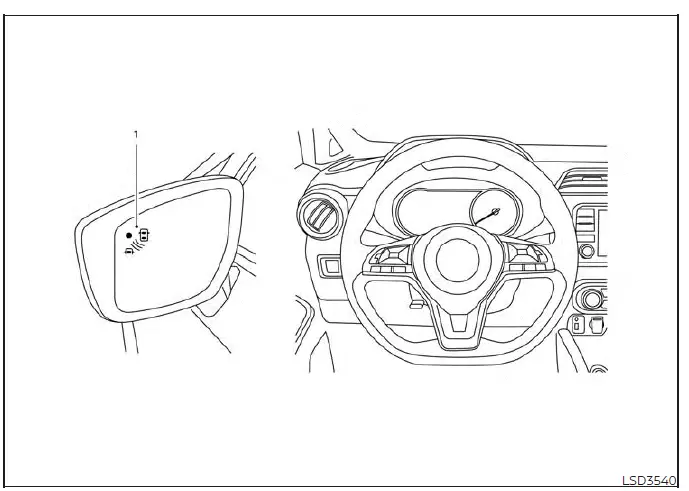
- Side BSW/RCTA Indicator Light
The RCTA system helps alert the driver of an approaching vehicle when backing your Nissan Versa out of a parking bay.
When the gear shift position is engaged in R (Reverse) and the vehicle traveling speed is kept below approximately 5 mph (8 km/h), the RCTA system becomes fully operational.
If the rear radar sensors detect another vehicle approaching from either side, the system sounds an audible chime once, and the side BSW/RCTA indicator light begins flashing on the specific side from which the vehicle is approaching.
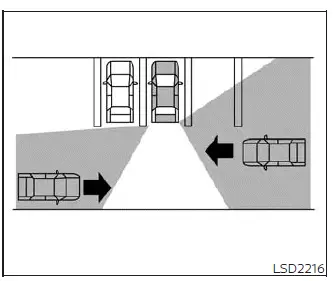
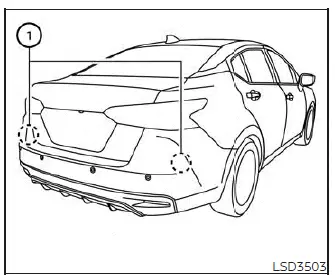
The RCTA system utilizes advanced radar sensors 1 installed securely on both sides near the rear bumper of your Nissan Versa to detect approaching cross traffic.
These rear radar sensors 1 are capable of detecting an oncoming vehicle from a distance of up to approximately 66 feet (20 meters) away.
How to enable/disable the RCTA system
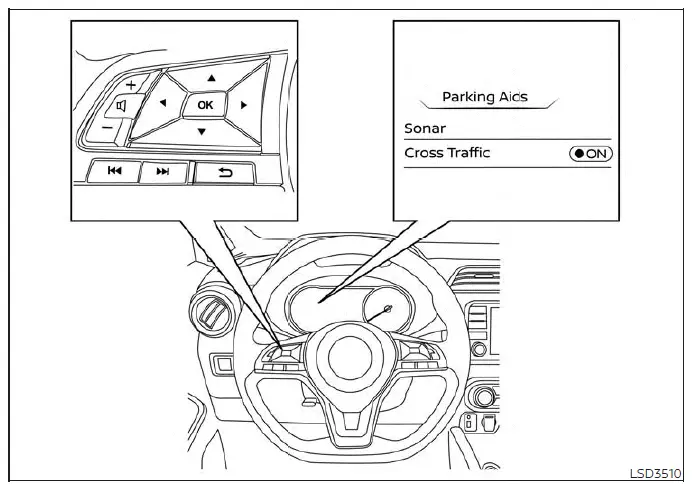
Perform the following simple steps to manually enable or disable the RCTA system on your Nissan Versa.
1. Press the menu button repeatedly until "Settings" displays clearly on the vehicle information display screen.
Use the directional arrow buttons to select "Driver Assistance." Then press the central OK button to confirm.
2. Scroll down to select "Parking Aids" and press the OK button.
3. Select "Cross Traffic" and press the OK button to toggle the system either on or off.
NOTE:
When enabling or disabling the system, your Nissan Versa will intelligently retain your current preference settings even if the engine is subsequently turned off and restarted.
RCTA system limitations Nissan Versa N18
WARNING
The technical limitations associated with the RCTA system on your Nissan Versa are outlined below. Failure to operate the vehicle in strict accordance with these system limitations could result in serious personal injury or a fatal accident.
Always visually check your surroundings and turn around to look directly behind you before backing up. The rear radar sensors are engineered to detect moving vehicles; however, they cannot detect every type of object, such as:
- Vulnerable road users and small items, including pedestrians, bicycles, motorcycles, animals, or child-operated toy vehicles.
- Another vehicle passing by at high speeds greater than approximately 19 mph (30 km/h).
- Another vehicle crawling past at extremely slow speeds lower than approximately 5 mph (8 km/h).
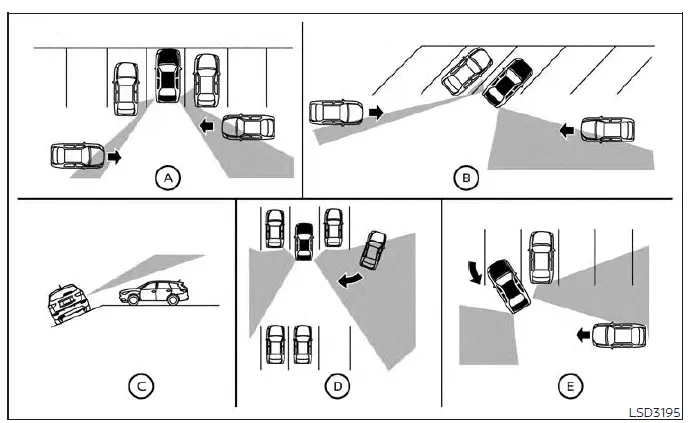
- Furthermore, the rear radar sensors may fail to detect approaching vehicles in certain challenging situations:
- Illustration A: When an oversized vehicle parked right next to you physically obstructs the transmission beam of the radar sensor.
- Illustration B: When your Nissan Versa is parked at an angle within an angled parking space layout.
- Illustration C: When the vehicle is parked on steep or inclined ground.
- Illustration D: When an approaching vehicle makes a sharp turn into your parking lot aisle.
- Illustration E: When the intersecting angle formed between your Nissan Versa and the approaching vehicle is too narrow.
- The following environmental and physical conditions may significantly reduce the operational capability of the radar to detect other vehicles:
- Severe or inclement weather.
- Heavy road spray from wet pavement.
- The heavy build-up of ice, frost, accumulated snow, or thick dirt directly on the vehicle body near the sensors.
- Never attach stickers (including transparent protective films), install aftermarket accessories, or apply additional coats of paint anywhere near the rear radar sensors on your Nissan Versa. These obstructions may severely diminish the radar's performance and reduce its ability to detect surrounding vehicles.
- Excessively high cabin noise levels—such as playing the audio system at maximum volume or driving with multiple vehicle windows rolled down—will interfere with the audible warning chime, meaning the sound may not be heard by the driver.
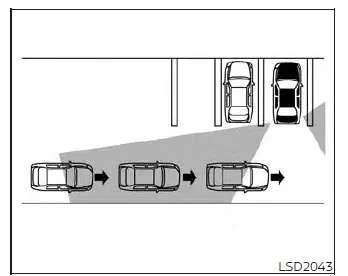
Illustration 1
NOTE:
In situations where several vehicles are approaching consecutively in a row (Illustration 1) or coming from the opposite direction (Illustration 2), an additional alert chime may not be sounded by the RCTA system on your Nissan Versa after the very first vehicle passes by the sensors.
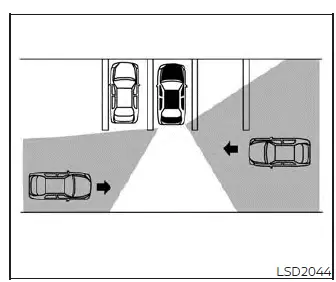
Illustration 2
System temporarily unavailable Nissan Versa sedan
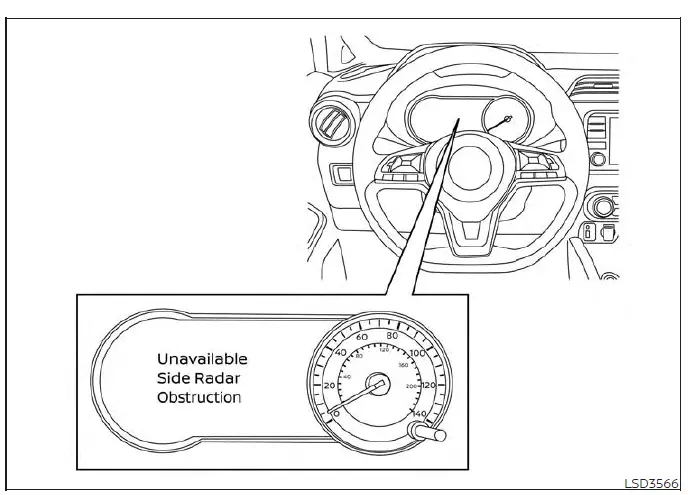
Whenever a temporary radar blockage or sensor obstruction is detected around your Nissan Versa, the system will automatically deactivate itself for safety reasons. When this happens, a clear warning message reading "Unavailable: Side Radar Obstruction" will pop up directly on the vehicle information display screen.
These safety systems will remain unavailable and offline until the blocking environmental conditions completely clear away.
The rear radar sensors can occasionally become temporarily blocked and blinded by transient ambient conditions, such as heavy splashing water kicked up from wet asphalt, thick mist, or low-hanging fog.
This blocked condition may similarly be triggered by surface accumulations of ice, packed snow, stubborn frost, or heavy dirt layers obstructing the radar transmission zone.
NOTE:
If the BSW system on your Nissan Versa stops working, the companion RCTA system (if so equipped) will also automatically stop working concurrently.
Action to take
As soon as these temporary weather or environmental conditions no longer exist and the sensor path is clear, the system will automatically resume its normal operations.
Malfunction If an internal system error or hardware fault occurs within the RCTA system, it will automatically shut down and turn off. A system malfunction warning notification will appear directly on the vehicle information display screen.
NOTE:
If the BSW system stops working due to a fault, the RCTA system (if so equipped) will also stop working.
Action to take
Safely pull over and stop your Nissan Versa in a secure location, shift the transmission cleanly into the P (Park) position, turn off the engine completely, and then restart the ignition cycle. If the warning message continues to persist upon restart, have the safety system thoroughly checked. It is highly recommended that you visit an authorized NISSAN dealer to perform this professional service.
System maintenance
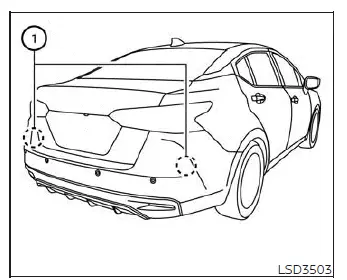
The two dual radar sensors 1 responsible for powering both the BSW and RCTA systems are mounted securely near the rear bumper of your Nissan Versa. Always keep the exterior painted body area immediately surrounding the radar sensors clean and unobstructed.
The radar sensors can be temporarily blinded or blocked by fleeting ambient environmental conditions such as heavy water spray, rolling mist, or low fog.
This blocked condition may also be caused by physical objects such as packed ice, stubborn frost, or dried dirt clinging to and obstructing the radar sensors.
Regularly check for and promptly remove any foreign objects or buildup obstructing the area around the rear radar sensors.
Never attach physical stickers (including transparent protective films), install aftermarket exterior accessories, or apply additional coats of paint anywhere near the rear radar sensors.
Do not strike, kick, or physically damage the structural body area surrounding the radar sensors. If the bumper area housing the radar sensors suffers impact damage from a minor collision or accident, it is recommended that you visit an authorized NISSAN dealer for expert repair and recalibration.
Radio frequency statement
For USA
This device complies with part 15 of the FCC Rules.
Operation is subject to the following two conditions:
1. This device may not cause harmful interference, and 2. this device must accept any interference received, including interference that may cause undesired operation.
FCC Warning
Changes or modifications not expressly approved by the party responsible for compliance could void the user's authority to operate the equipment
For Canada
This device contains licence-exempt transmitter(s)/receiver(s) that comply with Innovation, Science and Economic Development Canada's licence-exempt RSS(s).
Operation is subject to the following two conditions:
1. This device may not cause interference.
2. This device must accept any interference, including interference that may cause undesired operation of the device.
Radio frequency radiation exposure information:
This equipment complies with radiation exposure limits set forth for an uncontrolled environment. This equipment should be installed and operated with minimum distance of 20 cm between the radiator and the body of any persons, user or bystander."
L'émetteur/récepteur exempt de licence contenu dans le présent appareil est conforme aux CNR d'Innovation, Sciences et Développement économique Canada applicables aux appareils radio exempts de licence. L'exploitation est autorisée aux deux conditions suivantes :
1. L'appareil ne doit pas produire de brouillage;
2. L'appareil doit accepter tout brouillage radioélectrique subi, même si le brouillage est susceptible d'en compromettre le fonctionnement.
Cet équipement est conforme aux limites d'exposition aux rayonnements établies pour un environnement non contrôlé. Cet équipement doit être installé et utilisé avec un minimum de 20 cm de distance entre la source de rayonnement et votre corps.