



Nissan Versa: Monitor, climate, audio, phone and voice recognition systems - Rear Sonar System (RSS)
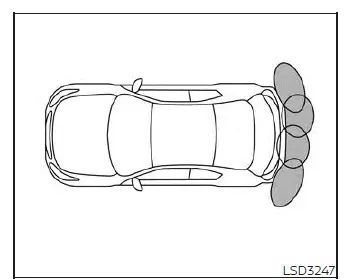
The Rear Sonar System (RSS) on your Nissan Versa emits an audible warning tone to inform the driver of detected obstacles located in close proximity to the rear bumper.
When the "DISPLAY" key function is active, the dedicated sonar view will automatically appear on the central touch-screen display screen. Additionally, an auxiliary view reflecting the current sonar status will appear in the vehicle information display cluster for convenient reference.
WARNING
- The Rear Sonar System is a helpful parking convenience feature, but it is never a substitute for cautious, proper parking techniques and direct visual checks.
- The driver always remains entirely responsible for safety during parking maneuvers and backing up operations.
Always look around carefully and verify visually that the area is completely safe before attempting to park your Nissan Versa.
- Read, understand, and adhere strictly to the operational limitations of the RSS as outlined in this section.
The varying colors of the corner sonar indicators and the distance guide lines shown in the rearview display represent different approximate distances to nearby objects.
- Severe inclement weather conditions or external ultrasonic noise sources—such as an automatic car wash facility, a large truck's compressed-air brakes, or a pneumatic construction drill—may adversely interfere with system performance; this interference can lead to reduced sonar performance or false activation warnings.
- This function is engineered strictly as a driving aid to assist the driver in detecting large, stationary objects in order to help avoid damaging the body of your Nissan Versa.
- The system is not designed or intended to prevent contact with small objects or moving pedestrians and vehicles. Always move at a slow, crawl speed. The RSS will not detect small objects located below the bumper line and may fail to detect objects that are positioned extremely close to the bumper face or lying flat on the ground.
- The sonar system may fail to detect certain challenging objects, including: soft or fluffy items like fresh snow, wool cloth, cotton, or glass fiber; thin, narrow objects like ropes, thin wires, and metal chains; or sharply angled wedge-shaped objects.
If your Nissan Versa sustains an impact or physical damage to the rear bumper fascia—leaving the components misaligned, pushed in, or bent—the effective sensing zone can be altered, leading to inaccurate obstacle distance measurements or annoying false alarm tones.
CAUTION
- Excessive ambient noise inside the cabin—such as a high audio system volume setting or driving with an open vehicle window—will interfere with your ability to hear the warning tone, meaning the alert may not be heard in time.
- Always keep the sonar sensors, which are neatly embedded across the rear bumper fascia, clean and free from packed snow, heavy ice accumulation, and thick layers of dirt or mud.
Never clean or scrape the delicate sensors using sharp metal tools. If the sensors become obstructed or covered, the accuracy and reliability of the sonar function will be significantly diminished.
System operation Nissan Versa 2026
The intelligent rear sonar system on your Nissan Versa keeps you fully informed of rear obstacles by providing both clear visual indicators and audible warning alerts whenever the transmission shift lever is placed into the R (Reverse) position.
To prevent unnecessary alerts during normal driving, the system automatically deactivates itself once your vehicle exceeds speeds above 6 mph (10 km/h). It will automatically reactivate when you slow down again.
The intermittent warning tone will automatically stop after 3 seconds if an obstacle is detected exclusively by the corner sensor and the distance between the vehicle and the object remains completely unchanged. Similarly, the tone stops entirely as soon as the obstacle moves away from your Nissan Versa.
When an object is initially detected, a green visual indicator appears and begins blinking while the warning tone sounds intermittently. As your vehicle moves closer to the object, the color of the indicator changes to yellow and the rate of blinking increases noticeably. When your Nissan Versa gets very close to the object, the indicator stops blinking and turns solid red, and the warning tone sounds continuously to alert you.
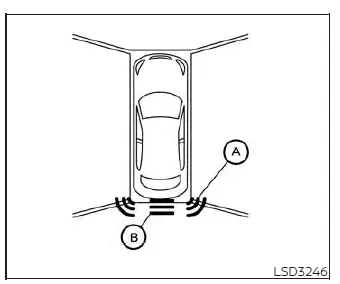
When the outer corner of your Nissan Versa moves closer to an obstacle, corner sonar indicator A appears on the screen. When the center section of the vehicle moves close to an object, center sonar indicator B appears.
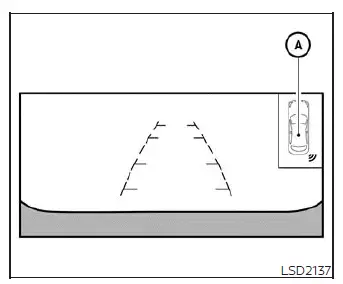
The system indicators A will appear clearly as the vehicle moves closer to an object in your backing path.
How to enable/disable the sonar system
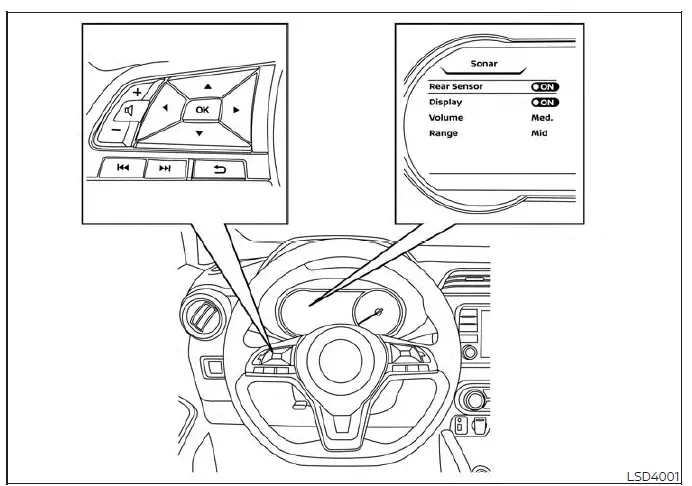
The rear sonar system is automatically activated whenever the ignition switch is turned to the ON position and the transmission shift lever is moved into the R (Reverse) position.
If you wish to configure the settings, perform the following step-by-step instructions to enable or disable the sonar system:
For vehicles with the vehicle information display (if so equipped):
1. Press the
 button repeatedly until the "Settings" menu displays clearly in the vehicle information display.
Use the
 directional button to highlight and select "Driver Assistance."
Then press the OK button to confirm.
directional button to highlight and select "Driver Assistance."
Then press the OK button to confirm.
2. Scroll down and select "Parking Aids," then press the OK button.
3. Select "Sonar" and press the OK button to access the configuration submenu.
- Select "Rear Sensor" and press the OK button to toggle the rear sonar system completely on or off.
- Select "Display" to configure whether the parking sensor graphic appears automatically in the vehicle information display whenever the sonar system activates.
- Select "Range" to adjust the sonar system distance sensitivity threshold to "Far," "Mid," or "Near."
- Select "Volume" to modify the audible alert speaker volume to "High," "Med," or "Low."
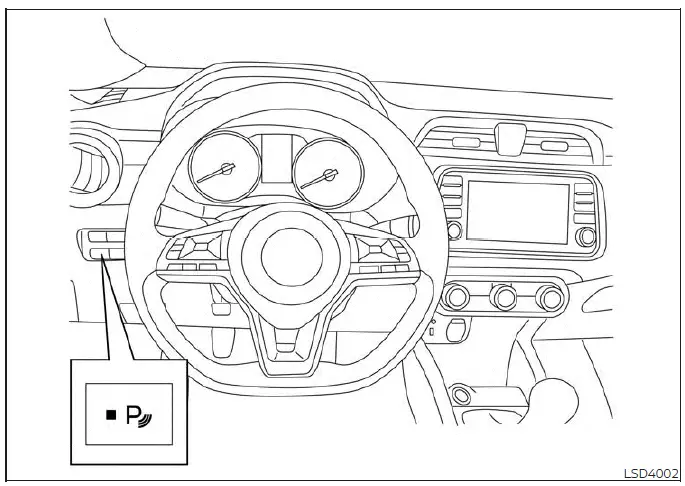
For vehicles with the RSS OFF switch (if so equipped):
1. The Rear Sonar System is automatically enabled every time the ignition switch is placed into the ON position and the transmission shift lever is shifted into R (Reverse).
2. Push the physical RSS OFF switch once if you wish to temporarily disable the RSS. The indicator light located on the RSS switch will turn off.
Please note that the RSS will conveniently retain your current custom settings even after the engine is turned off and restarted.
Sonar limitations Nissan Versa 3rd Gen
WARNING
Listed below are the important technical limitations for the sonar system on your Nissan Versa. Failure to operate the vehicle in accordance with these system limitations could result in serious personal injury or fatal accidents.
- Read and understand thoroughly the limitations of the sonar system as outlined in this section. Severe inclement weather conditions may adversely affect the function of the sonar system; this can include reduced detection performance or annoying false activation warnings.
- The system is automatically deactivated at vehicle speeds above 6 mph (10 km/h). It will be reactivated once you slow down to lower speeds.
- Inclement weather or external high-frequency ultrasonic sources—such as an automatic car wash facility, a large truck's compressed-air brakes, or a pneumatic construction drill—may interfere with the operation of the system; this may cause reduced performance or a false activation.
- The system is never designed to prevent physical contact with small, low-lying, or moving objects. Always move at a slow, careful speed. The system will not detect small objects located below the bumper fascia or lying flat on the ground.
- The sonar system may fail to detect certain challenging objects, including: soft or fluffy objects such as fresh snow, cloth, cotton, or glass-wool insulation; thin, narrow objects like ropes, thin wires, and metal chains; or sharply angled wedge-shaped objects.
- The system may fail to detect objects when driving at speeds above 3 mph (5 km/h) and may not catch certain fast-moving or acutely angled objects.
- Never attach stickers (including clear, transparent protective films), install aftermarket accessories, or apply thick materials that block the face of the sensors. These conditions will severely reduce the performance and capability of the system.
System temporarily unavailable
When an obstruction or sonar blockage is detected across the sensors, the system will be deactivated automatically to prevent erroneous readings.
The system will remain unavailable until the blocking conditions no longer exist.
The sonar sensors may become blocked by temporary ambient conditions such as heavy splashing water, thick mist, or dense fog. This blocked condition may also be triggered by physical accumulations of ice, frost, or dried dirt obstructing the sonar faces.
Action to take:
When the above-mentioned blocking conditions clear up and no longer exist, the system will resume normal operation automatically.
System maintenance
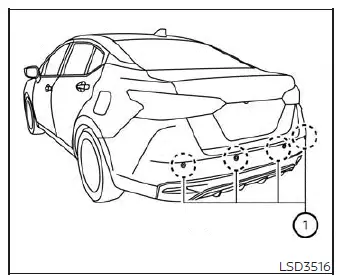
The sonar sensors 1 are strategically embedded directly into the rear bumper of your Nissan Versa. Always keep the area surrounding the sonar sensors clean and unobstructed.
The sonar sensors can occasionally be blocked by temporary ambient elements such as splashing water, heavy mist, or morning fog.
This blocked condition may also be caused by stubborn objects such as ice sheets, frost layers, or packed dirt obstructing the sonar transducer faces.
Regularly check for and carefully remove any foreign objects obstructing the area around the sonar sensors.
Do not attach decorative stickers (including transparent protective films), install bumper accessories, or spray additional layers of paint near the sonar sensors.
Do not strike, dent, or damage the bumper area around the sonar sensors. It is recommended that you visit an authorized NISSAN dealer if the area around the sonar sensors suffers physical damage due to a parking collision or minor accident.