



Nissan Versa: Monitor, climate, audio, phone and voice recognition systems - Blind Spot Warning (BSW)
WARNING
Failure to carefully follow all safety warnings and operating instructions for the proper use of the Blind Spot Warning (BSW) system in your Nissan Versa could result in serious personal injury or a fatal accident.
- The BSW system is never a substitute for proper, attentive driving procedures and is not designed to physically prevent contact or collisions with other vehicles or stationary objects. When preparing to change lanes, always physically check your side and rear mirrors, and turn your head to look directly in the direction your Nissan Versa will move to ensure it is completely safe before executing the maneuver. Never rely solely on the BSW system.
The Blind Spot Warning system is engineered to help alert the driver of the presence of other surrounding motor vehicles traveling in adjacent lanes when executing a lane change.
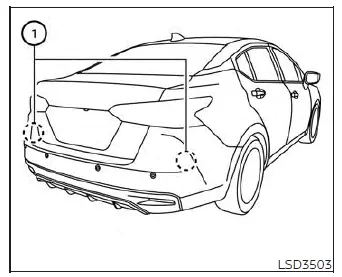
The BSW system utilizes advanced radar sensors 1 mounted strategically near the rear bumper fascia to detect other vehicles occupying adjacent blind spot zones.
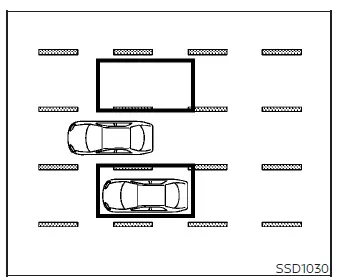
Detection zone
The radar sensors can reliably detect vehicles traveling on either side of your Nissan Versa within the specific coverage detection zone shown in the illustration. This active detection zone begins from the outside rearview mirror of your vehicle, extends backward approximately 10 feet (3.0 meters) past the rear bumper, and reaches outward approximately 10 feet (3.0 meters) sideways into the adjacent lane.
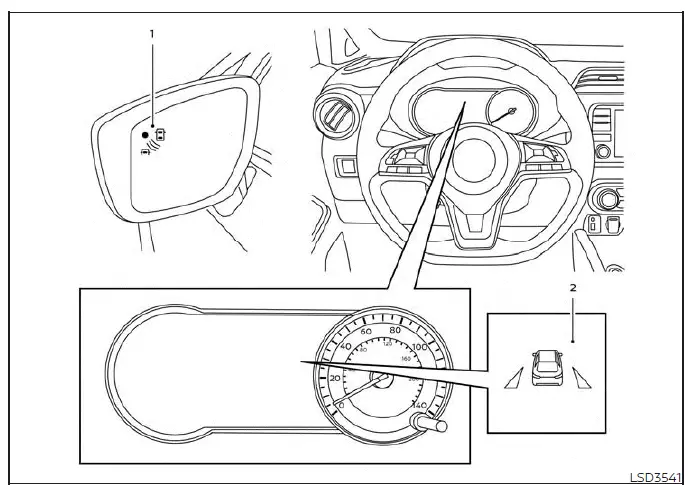
- Side BSW/RCTA Indicator Light mounted on the door pillar or mirror housing
- BSW indicator icon located within the instrument cluster display
BSW system operation Nissan Versa 2020
The Blind Spot Warning system becomes fully operational when your Nissan Versa is driven at speeds above approximately 20 mph (32 km/h).
If the rear radar sensors detect another vehicle lingering inside the monitored detection zone, the side BSW/RCTA indicator light (1) will illuminate steadily. If you then activate your turn signal indicator in the direction of the detected vehicle, the system will issue an audible chime twice, the side BSW/RCTA indicator light will begin flashing rapidly, and the yellow BSW indicator will illuminate on the vehicle information display screen. The side BSW/RCTA indicator light will continue flashing until the detected vehicle completely exits out of the blind spot detection zone.
The side BSW/RCTA indicator light will also briefly illuminate for a few seconds as a bulb check when the ignition switch is first placed into the ON position.
The display brightness of the side BSW/RCTA indicator light is adjusted automatically depending on the ambient lighting conditions outside the vehicle.
If another vehicle happens to drive directly into the detection zone after you have already activated your turn signal, only the side BSW/RCTA indicator light will flash, and no audible warning chime will sound.
The BSW system automatically turns on and activates every time the engine of your Nissan Versa is started, provided that it was left enabled within the settings menu on the vehicle information display.
How to enable/disable the BSW system
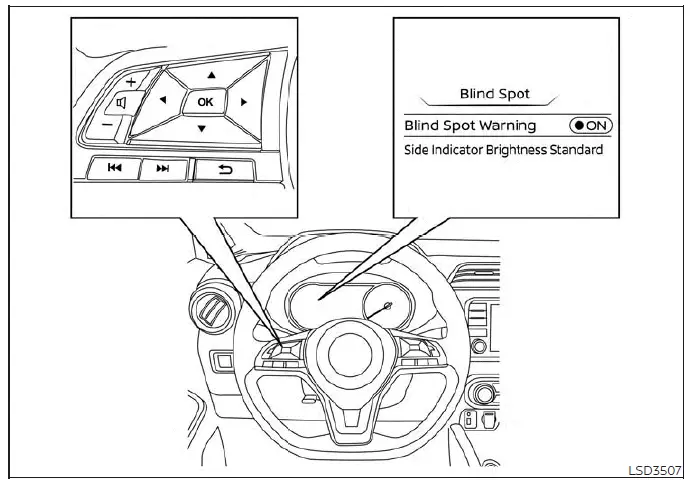
Perform the following simple steps to manually enable or disable the BSW system on your Nissan Versa.
1. Press the
 button repeatedly until "Settings" is clearly displayed on the vehicle information display screen.
Use the directional
 button to highlight and select "Driver Assistance." Then press the central OK button to confirm.
2. Scroll through the list, select "Blind Spot," and press the OK button.
3. Select "Blind Spot Warning" and press the OK button to toggle the system either on or off.
NOTE:
- When enabling or disabling the safety feature, your Nissan Versa will intelligently retain your current preference settings even if the engine is subsequently turned off and restarted.
- When the BSW system is successfully turned on, a white BSW indicator icon in the vehicle information display will illuminate.
BSW system limitations Nissan Versa
WARNING
The technical operating limitations associated with the Blind Spot Warning (BSW) system on your Nissan Versa are outlined below. Failure to operate your vehicle in strict accordance with these system limitations could result in serious personal injury or a fatal accident.
- The automated BSW system is inherently incapable of detecting every single surrounding vehicle under all possible driving conditions and environments.
- The rear-mounted radar sensors may occasionally fail to detect objects and activate the BSW alerts when specific entities or traffic conditions are present, such as:
- Vulnerable road users, including pedestrians, bicyclists, and animals.
- Non-standard vehicles, such as motorcycles, extremely low-profile cars, or high-clearance trucks.
- Oncoming vehicles traveling in the opposite direction.
- Other vehicles that remain continuously parked or stationary within the blind spot detection zone when you accelerate forward from a complete stop.
- A vehicle that is merging into your adjacent lane at approximately the exact same speed as your Nissan Versa.
- Another motor vehicle approaching exceptionally fast and rapidly from behind.
- A vehicle that your Nissan Versa overtakes and passes at a high rate of speed.
- A vehicle that flashes or passes straight through the active radar detection zone too quickly.
- When you are actively overtaking multiple vehicles in a quick row; vehicles positioned after the very first car may not be picked up if they are traveling tightly bunched together.
- The radar sensor detection coverage zone is mathematically calibrated based on standard highway lane widths. When you are driving your Nissan Versa on an unusually wide roadway lane, the radar sensors may fail to detect vehicles occupying an adjacent lane. Conversely, when driving down a narrow street or lane, the radar sensors might mistakenly detect and flag vehicles driving two lanes completely away.
- The radar sensors are intelligently programmed to ignore most stationary roadside objects; however, rigid structures such as metal guardrails, concrete walls, dense foliage, and parked vehicles may occasionally trigger a detection signal. This is considered a completely normal operating condition for the system.
- The following environmental and physical conditions may significantly reduce the operational capability of the radar sensors to accurately detect other vehicles:
- Severe or inclement weather conditions.
- Heavy road spray thrown up from wet pavement.
- The physical build-up of ice, frost, accumulated snow, or thick dirt directly on the vehicle body near the sensors.
- Never attach physical stickers (including transparent protective films), install aftermarket exterior accessories, or apply extra coats of paint anywhere near the rear radar sensors on your Nissan Versa. These material obstructions can severely diminish the radar's performance and reduce its ability to detect surrounding vehicles.
- Excessively high ambient noise levels inside the cabin—such as a loud car audio system playing at maximum volume or having multiple vehicle windows rolled down—will interfere with the audible warning chime, meaning the sound may not be clearly heard by the driver.
BSW driving situations
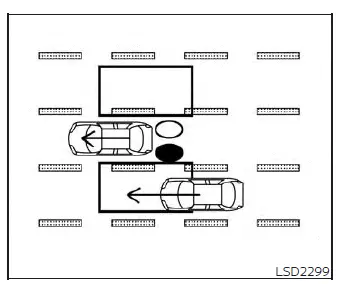
Indicator on

Indicator off

Indicator flashing

Another vehicle approaching from behind
Illustration 1: The side BSW/RCTA indicator light illuminates steadily if another vehicle enters the active detection zone from behind while traveling in an adjacent lane.
NOTE:
- Under certain velocity dynamics, the rear radar sensors may occasionally fail to detect vehicles that are approaching exceptionally fast and aggressively from behind your Nissan Versa.
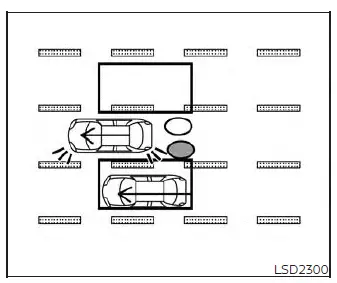
Illustration 2 - Approaching from
behind
Illustration 2: If the driver of your Nissan Versa activates the turn signal indicator while another vehicle is already lingering inside the monitored blind spot detection zone, the safety system will immediately issue two audible chimes, while both the side BSW/RCTA indicator light and the dashboard BSW indicator begin flashing concurrently to draw your attention.
NOTE:
- The rear radar sensors integrated into your Nissan Versa may occasionally fail to detect other vehicles that are approaching exceptionally fast and aggressively from directly behind.
- If you activate your turn signal stalk before another vehicle has actually entered the detection zone, the side BSW/RCTA indicator light and the instrument cluster BSW indicator will flash once the vehicle is detected, but no audio chime will sound.
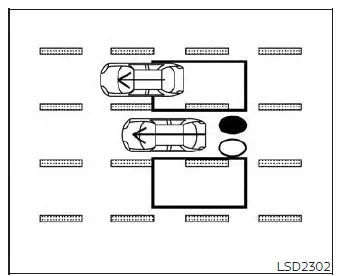
Illustration 3 - Overtaking another
vehicle
Overtaking another vehicle
Illustration 3: The side BSW/RCTA indicator light will illuminate steadily if you pass and overtake another vehicle on the highway, and that vehicle remains lingering continuously within the radar detection zone for approximately 2 seconds.
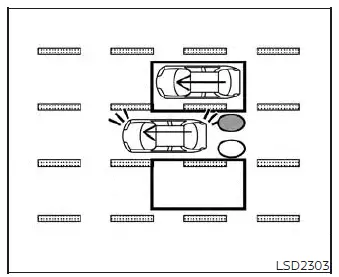
Illustration 4 - Overtaking another
vehicle
Illustration 4: If the driver activates the turn signal while another vehicle is positioned inside the detection zone during an overtaking maneuver, the Blind Spot Warning system on your Nissan Versa will sound two distinct audio chimes, and both the side BSW/RCTA indicator light and the BSW indicator will flash.
NOTE:
- When you are actively passing several cars in a consecutive row, any vehicles positioned directly after the very first car may fail to be detected if they are traveling tightly bunched together.
- The rear radar sensors may fail to pick up slower-moving vehicles if you fly past them at a high rate of speed.
- If you activate the turn signal before another car enters the detection zone, the side BSW/RCTA indicator light and BSW indicator will flash upon detection, but no warning chime will sound.
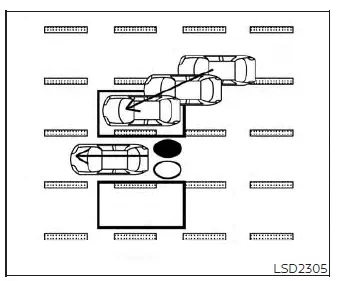
Illustration 5 - Entering from the side
Entering from the side
Illustration 5: The side BSW/RCTA indicator light will illuminate brightly if another vehicle merges and enters the active radar detection zone from either the left or the right side of your Nissan Versa.
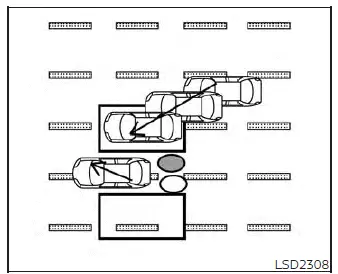
Illustration 6 - Entering from the side
Illustration 6: If the driver activates the turn signal indicator while another vehicle is already present in the side detection zone, the system will trigger two audio chimes, while the side BSW/RCTA indicator light and BSW indicator begin flashing.
NOTE:
- If you activate your turn signal prior to a vehicle entering the detection zone, the side BSW/RCTA indicator light and BSW indicator will flash when the vehicle is finally registered, but no alert chime will sound.
- The radar sensors may occasionally fail to detect a vehicle that is traveling at precisely the exact same speed as your Nissan Versa when it drifts into the detection zone.
System temporarily unavailable Nissan Versa
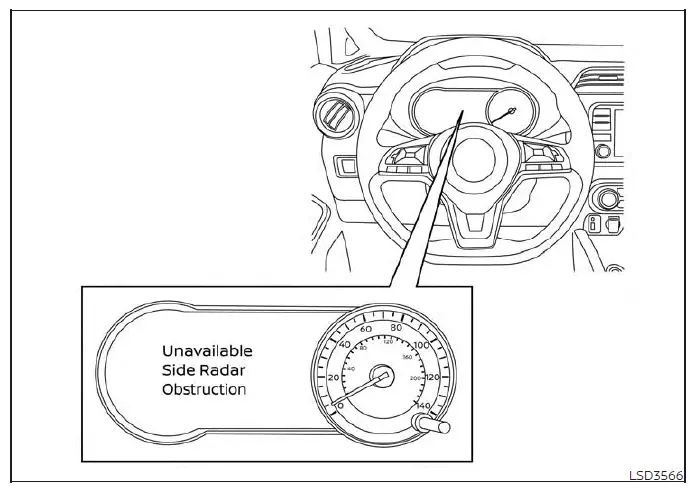
Whenever a temporary radar blockage or sensor obstruction is detected around your Nissan Versa, the safety system will automatically deactivate itself for security purposes. When this occurs, a distinct warning message reading "Unavailable: Side Radar Obstruction" will pop up directly within the vehicle information display screen.
The system will remain unavailable and offline until these blocking environmental conditions completely clear up.
The rear radar sensors can occasionally become temporarily obstructed and blocked by various ambient environmental conditions, such as heavy splashing water from wet asphalt, thick mist, or rolling fog. This blocked status may also be triggered by physical surface accumulations of ice, hard frost, or heavy layers of mud and dirt clinging to the rear bumper area.
Action to take:
As soon as these temporary weather or physical obstructions no longer exist and the sensor path is clear, the system will automatically resume its normal functions.
NOTE:
If the BSW system on your Nissan Versa stops working due to an obstruction or fault, the Rear Cross Traffic Alert (RCTA) system (if so equipped) will also automatically stop working concurrently.
Malfunction
If an internal hardware or software malfunction occurs within the BSW system, it will automatically shut down and turn off. A system malfunction warning notification accompanied by an illuminating orange BSW indicator light will appear on the instrument cluster vehicle information display.
NOTE:
If the BSW system stops working due to a malfunction, the associated RCTA system (if so equipped) will also stop working.
Action to take:
Safely pull over and stop your Nissan Versa in a secure location, shift the transmission cleanly into the P (Park) position, turn off the engine completely, and then restart the ignition cycle. If the warning message continues to persist upon restart, have the safety system thoroughly inspected. It is highly recommended that you visit an authorized NISSAN dealer to perform this professional service.
System maintenance
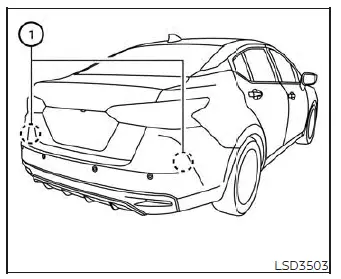
The two dual radar sensors 1 responsible for powering both the BSW and RCTA systems are mounted securely behind the fascia near the rear bumper of your Nissan Versa. Always keep the exterior painted body surface area immediately surrounding the radar sensors completely clean and unobstructed.
The radar sensors can be temporarily blinded or blocked by fleeting ambient environmental conditions such as heavy water spray, rolling mist, or low-hanging fog.
This blocked condition may similarly be caused by physical elements like packed ice, stubborn frost, or dried dirt layers obstructing the radar transmission zone.
Regularly check the area around the rear radar sensors, and promptly clear away any foreign objects, debris, or buildup.
Never attach physical stickers, apply transparent protective films, install aftermarket accessories, or paint over the bumper surface near the radar sensors.
Do not strike, kick, or physically damage the structural body area surrounding the rear radar sensors. If the bumper area housing the radar sensors suffers impact damage from a minor collision or accident, it is recommended that you visit an authorized NISSAN dealer for expert repair and recalibration.
Radio frequency statement
For USA
This device complies with part 15 of the FCC Rules. Operation is subject to the following two conditions:
(1) This device may not cause harmful interference, and (2) this device must accept any interference received, including interference that may cause undesired operation.
FCC Warning
Changes or modifications not expressly approved by the party responsible for compliance could void the user's authority to operate the equipment
For Canada
This device contains licence-exempt transmitter(s)/receiver(s) that comply with Innovation, Science and Economic Development Canada's licence-exempt RSS(s). Operation is subject to the following two conditions:
1. This device may not cause interference.
2. This device must accept any interference, including interference that may cause undesired operation of the device.
Radio frequency radiation exposure information:
This equipment complies with radiation exposure limits set forth for an uncontrolled environment. This equipment should be installed and operated with minimum distance of 20cm between the radiator and the body of any persons, user or bystander.
L'émetteur/récepteur exempt de licence contenu dans le présent appareil est conforme aux CNR d'Innovation, Sciences et Développement économique Canada applicables aux appareils radio exempts de licence. L'exploitation est autorisée aux deux conditions suivantes :
1. L'appareil ne doit pas produire de brouillage; 2. L'appareil doit accepter tout brouillage radioélectrique subi, même si le brouillage est susceptible d'en compromettre le fonctionnement.
Cet équipement est conforme aux limites d'exposition aux rayonnements établies pour un environnement non contrôlé. Cet équipement doit être installé et utilisé avec un minimum de 20cm de distance entre la source de rayonnement et votre corps.