



Nissan Versa: Instruments and controls - Windows
Power windows
WARNING
- Always make sure that all passengers, especially children, have their hands, arms, and heads safely inside the vehicle cabin while it is in motion and before you attempt to close any of the windows. Use the electronic window lock button to prevent unexpected or unsafe use of the power windows by rear seat passengers.
- To help avoid the terrible risk of serious injury or death through the unintended operation of the vehicle and/or its electrical systems, including dangerous entrapment in closing windows or inadvertent door lock activation, never leave children, individuals who require the assistance of others, or pets completely unattended in your vehicle. Additionally, the interior temperature inside a closed Nissan Versa parked on a warm, sunny day can quickly become high enough to cause heatstroke, resulting in a significant risk of severe injury or death to both people and pets.
The power windows will operate smoothly when the ignition switch of your Nissan Versa is placed in the active ON position, or for a brief period of time (approximately 45 seconds) after the ignition switch is turned to the OFF position. However, if the driver's or front passenger's door is opened during this brief shut-off period, the retained power to the window motors is instantly canceled.
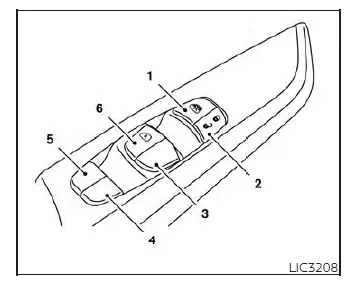
- Window lock switch button
- Master power door lock switch
- Front passenger side window switch
- Right rear passenger side window switch
- Left rear passenger side window switch
- Driver's side automatic one-touch switch
Driver's side power window switch
The master control panel located on the driver's side door armrest is equipped with individual switches to independently open or close all of the passenger windows in the Nissan Versa.
To open a specific window, push the corresponding switch down to the first detent and continue to hold it down until the glass reaches your desired open position. To close a window, pull the switch upward to the detent and continue to hold it up until the window glass seals firmly at the top.
Locking passengers' windows
When the main window lock button is depressed by the driver, power is cut to the passenger doors, and only the driver's side window can be opened or closed from the master panel. Press the button a second time to release it and cancel the window lock function, restoring control to the passenger doors.
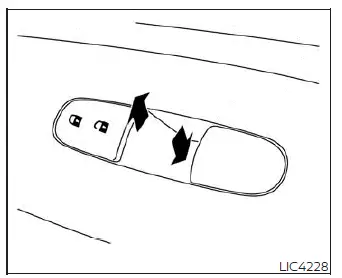
Front passenger's power window switch
The individual passenger's window switch, located on the front passenger door armrest, operates only the corresponding front passenger's window glass.
To open the window partially to let in fresh air, push the switch down lightly and hold it until the desired window position is reached. To close the window, pull the switch up steadily until the desired window position is reached or it seals completely.
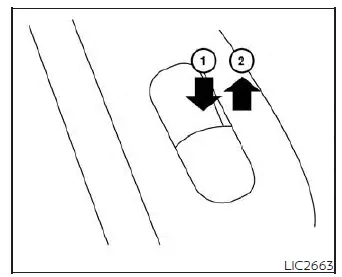
Rear power window switch
The dedicated rear power window switches open or close only their corresponding rear door windows. To open the rear window, push the front of the switch and hold it down securely 1. To close the window and secure the cabin, pull the front of the switch up 2.
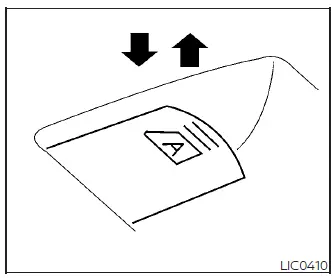
Automatic operation
To fully open a window equipped with the automatic one-touch operation (usually the driver's window), push the window switch down firmly past the first stop to the second detent and completely release it; it does not need to be held down. The window motor will automatically open the glass all the way down. If you want to stop the window midway during its automatic descent, simply lift the switch up briefly while the window is opening.
Auto-reverse function (if so equipped)
As a crucial safety measure, if the window control unit detects an obstacle or something caught in the window frame as it is automatically closing, the motor will instantly reverse, and the window will be immediately lowered back down.
The auto-reverse safety function is armed and ready to be activated whenever the window is being closed using the automatic one-touch up operation, provided the ignition switch is placed in the ON position or during the retained power period after the ignition switch is placed in the OFF position.
Depending on the surrounding environment or rough driving conditions, the sensitive auto-reverse function may be inadvertently activated if a severe physical impact, deep pothole, or sudden heavy load similar to something being caught in the window frame occurs while the glass is moving.
WARNING
There are some very small distances right at the top seal immediately before the window reaches the fully closed position where an obstruction cannot be mechanically detected by the sensor. Make absolutely sure that all passengers, especially young children, have their hands, fingers, and arms completely inside the vehicle before closing the window automatically.
When power window switch does not operate
If the power window's automatic one-touch function (specifically the closing operation) loses calibration or does not operate properly after a battery disconnect, you can easily perform the following reset procedure to initialize the power window system of your Nissan Versa:
1. Place the ignition switch in the active ON position.
2. Roll the window down manually so it is opened more than halfway by holding the power window switch.
3. Pull the power window switch all the way up and hold it to close the window completely, and then continue to hold the switch up firmly for more than 3 seconds after the window is fully closed into the top seal.
4. Release the power window switch. Operate the window using the one-touch automatic function to confirm the motor initialization is successful and complete. The power window should now automatically open or close fully without needing to hold the switch.
5. If your vehicle is equipped with automatic features on other windows, perform steps 2 through 4 above for each of the other windows.
If the power window automatic function still does not operate properly after carefully performing the above initialization procedure, there may be a fault in the master switch or motor. Have the electrical system checked and repaired; it is recommended that you visit an authorized NISSAN dealer for this technical service.