
Exterior rear
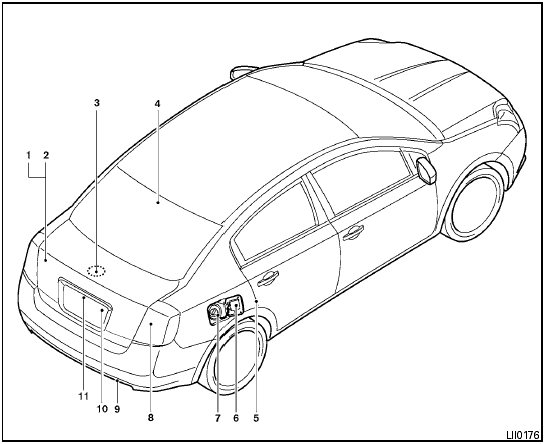
1. Trunk lid
2. Vehicle loading
3. Interior trunk lid release
4. Rear window defroster switch
5. Child safety locks
6. Fuel-filler door
7. Fuel-filler cap, fuel recommendation
8. Replacing bulbs
9. Rear tie down hook (if so equipped)
10. Exterior trunk lid release/request button
11. RearView monitor (if so equipped)
See also:
If your vehicle is stolen
If your vehicle is stolen, you should change the
codes of any non-rolling code device that has
been programmed into HomeLink. Consult the
Owners Manual of each device or call the manufacturer
...
Vehicle load capacity
Do not exceed the load limit of your vehicle
shown as “The combined weight of
occupants and cargo” on the Tire and
Loading Information label. Do not exceed
the number of occupants shown as ...
2012 Nissan Versa review
The 2012 Nissan Versa sedan is about as compelling as an old dishwasher, but
its fuel efficiency, roominess and unrivaled value will get a lot of shoppers to
overlook that.
Economy cars boast sh ...