
Backing up on a steep downhill
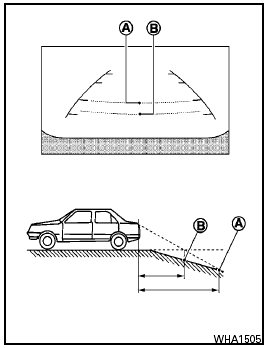
Backing up on a steep downhill
When backing up the vehicle down a hill, the distance guide lines and the vehicle width guide lines are shown farther than the actual distance.
For example, the display shows 3 ft (1.0 m) to the place A , but the actual 3 ft (1.0 m) distance on the hill is the place B . Note that any object on the hill is closer than it appears on the monitor.
See also:
Rear-facing child restraint installation using latch
Refer to all Warnings and Cautions in the Child
Safety and Child Restraint sections before installing
a child restraint.
Follow these steps to install a rear-facing child
restraint using the La ...
Jump starting
To start your engine with a booster battery, the
instructions and precautions below must be
followed.
- If done incorrectly, jump starting
can lead to a battery explosion,
resulting in se ...
2009 Nissan Cube review
Scion's quasi-iconic xB has finally encountered some lookalikes in the 2010
Kia Soul and 2009 Nissan Cube. Both cars hit the market last spring. I've spent
considerable time in all three, and am r ...