
Map lights
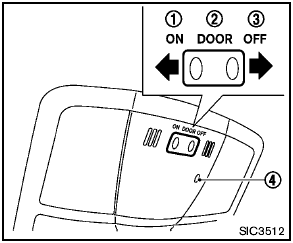
Map lights
Push the light lens to turn the map light on or off.
The map light control switch has three positions:
ON 1 , DOOR 2 and OFF 3 .
The light 4 (if so equipped) will illuminate
when the headlight switch is turned to the
 or
or  position.
See also:
Security systems
Security systems
Your vehicle has two types of security systems:
- Vehicle security system.
- NISSAN Vehicle Immobilizer System. ...
Turn signal/hazard indicator
lights
The appropriate light flashes when the turn signal
switch is activated.
Both lights flash when the hazard switch is turned
on. ...
Off-road recovery
While driving, the right side or left side wheels
may unintentionally leave the road surface. If this
occurs, maintain control of the vehicle by following
the procedure below. Please note that t ...