
FM/AM radio with compact disc (CD) player (Type A) (if so equipped)
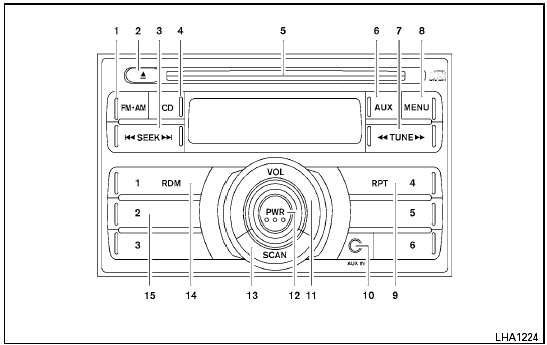
Type A
1. FM-AM button
2.  CD eject button
3. SEEK button
4. CD button
5. CD insert slot
6. AUX button
7. TUNE button
8. MENU button
9. RPT button
10. AUX IN jack
11. VOLUME control knob
12. PWR button
13. SCAN button
14. RDM button
15. Station select (1 - 6) buttons
For all operation precautions, see “Audio operation precautions” in this section.
See also:
Securing the load
There are tie down hooks located in the cargo
area as shown. The tie down hooks can be used
to secure cargo with ropes or other types of
straps.
Do not apply a total load of more than 22
lb ...
Wet brakes
When the vehicle is washed or driven through
water, the brakes may get wet. As a result, your
braking distance will be longer and the vehicle
may pull to one side during braking.
To dry the bra ...
Connecting procedure
NOTE:
The connecting procedure must be performed
when the vehicle is stationary. If the
vehicle starts moving during the procedure,
the procedure will be cancelled.
1. Press the button on the ...