
“Recent Calls”
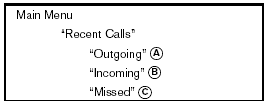
Use the Recent Calls command to access outgoing, incoming or missed calls.
“Outgoing” A
Use the Outgoing command to list the outgoing calls made from the vehicle.
“Incoming” B
Use the Incoming command to list the incoming calls made to the vehicle.
“Missed” C
Use the Missed command to list the calls made to the vehicle that were not answered.
See also:
Seats, seat belts and Supplemental Restraint System
(SRS)
Seats, seat belts and Supplemental Restraint System
(SRS)
1. Supplemental front-impact air bags
2. Front seat-mounted side-impact supplemental air bags
3. Seat belts
4. Head restraints
†...
Brakes
If the brakes do not operate properly, have the
brakes checked by a NISSAN dealer.
Self-adjusting brakes
Your vehicle is equipped with self-adjusting
brakes.
The front and rear disc-type brakes ...
Dehumidified defogging
This mode is used to defog the windows and
dehumidify the air.
1. Turn the air flow control dial to the
position.
2. Turn the fan control dial to the desired position.
3. Push the button. The ...