
List of voice commands
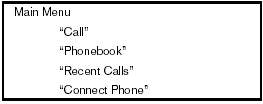
When you press and release the
 button on
the steering wheel, you can choose from the
commands on the Main Menu. The following
pages describe these commands and the commands
in each sub-menu.
button on
the steering wheel, you can choose from the
commands on the Main Menu. The following
pages describe these commands and the commands
in each sub-menu.
Remember to wait for the tone before speaking.
After the main menu, you can say “Help” to hear the list of commands currently available any time the system is waiting for a response.
If you want to end an action without completing it, you can say “Cancel” or “Quit” at any time the system is waiting for a response. The system will end the VR session. Whenever the VR session is cancelled, a double beep is played to indicate you have exited the system.
If you want to go back to the previous command, you can say “Go back” or “Correction” any time the system is waiting for a response.
“Call”
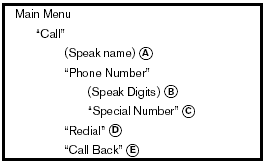
(Speak name) A
If you have stored entries in the phonebook, you can dial a number associated with a name and location.
See “Phonebook” in this section to learn how to store entries.
When prompted by the system, say the name of the phone book entry you wish to call. The system acknowledges the name.
If there are multiple locations associated with the name, the system asks you to choose the location.
Once you have confirmed the name and location, the system begins the call.
(Speak Digits) B
When prompted by the system, say the number you wish to call. Refer to “How to say numbers” and “Making a call by entering a phone number” in this section for more details.
“Special Number” C
For dialing more than 10 digits or any special characters, say “Special Number”. When the system acknowledges the command, the system will prompt you to speak the number.
“Redial” D
Use the Redial command to call the last number that was dialed.
The system acknowledges the command, repeats the number and begins dialing.
If a redial number does not exist, the system announces, “There is no number to redial” and ends the VR session.
“Call Back” E
Use the Call Back command to dial the number of the last incoming call within the vehicle.
The system acknowledges the command, repeats the number and begins dialing.
If a call back number does not exist, the system announces, “There is no number to call back” and ends the VR session.
During a call
During a call there are several command options
available. Press the button
on the steering
wheel to mute the receiving voice and enter commands.
● “Help” — The system announces the available commands.
● “Go back/Correction” — The system announces “Go back,” ends the VR session and returns to the call.
● “Cancel/Quit” — The system announces “Cancel,” ends the VR session and returns to the call.
● “Send/Enter/Call/Dial” — Use the Send command to enter numbers, “*” or “#” during a call. For example, if you were directed to dial an extension by an automated system.
Say: “Send one two three four.” The system acknowledges the command and sends the tones associated with the numbers. The system then ends the VR session and returns to the call. Say “star” for “*”, Say “pound” for “#”.
● “Transfer call”— Use the Transfer Call command to transfer the call from the Bluetooth Hands-Free Phone System to the cellular phone when privacy is desired.
The system announces, “Transfer call. Call transferred to privacy mode.” The system then ends the VR session.
To reconnect the call from the cellular phone
to the Bluetooth Hands-Free System,
press the button.
● “Mute” — Use the Mute command to mute your voice so the other party cannot hear it.
Use the mute command again to unmute your voice.
NOTE:
If a call is ended or the cellular phone
network connection is lost while the Mute
feature is on, the Mute feature will be reset
to “off” for the next call so the other party
can hear your voice.
See also:
Selecting the correct oil
It is essential to choose the correct grade, quality
and viscosity engine oil to ensure satisfactory
engine life and performance. See “Capacities
and recommended fuel/lubricants” earlier in thi ...
Locking doors
Locking doors
1. Close all windows.
2. Remove the key from the ignition switch.
3. Close the hood, trunk lid, and all doors.
4. Press the button on the keyfob. All
the doors lock. The hazard ...
Rapid air pressure loss
Rapid air pressure loss or a “blow-out” can
occur if the tire is punctured or is damaged due
to hitting a curb or pothole. Rapid air pressure
loss can also be caused by driving on underinfla ...