
NISSAN Intelligent Key™ (if so equipped)
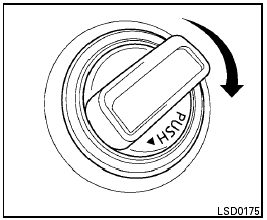
NISSAN Intelligent Key™ (if so equipped)
The Intelligent Key can operate the ignition switch without taking the key out from your pocket or purse. The operating environment and/or conditions may affect the Intelligent Key operation.

● Be sure to carry the Intelligent Key with you when operating the vehicle.
● Never leave the Intelligent Key inside the vehicle when you leave the vehicle.
● If the vehicle battery is discharged the ignition switch cannot be moved from the “LOCK” position and if the steering lock is engaged, the steering wheel may not be able to be moved. Charge the battery as soon as possible. (See “JUMP STARTING” in the “In case of emergency” section of this manual.)
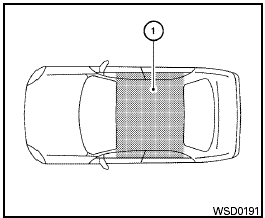
Operating range
The Intelligent Key functions can only be used when the Intelligent Key is within the specified operating range.
When the Intelligent Key battery is almost discharged or strong radio waves are present near the operating location, the Intelligent Key system’s operating range becomes narrower and may not function properly.
If the Intelligent Key is within the operating range, it is possible for anyone, even someone who does not carry the Intelligent Key, to turn the ignition switch to start the engine.
The operating range of the engine start function is inside of the vehicle 1 .
● If the Intelligent Key is placed on the instrument panel, rear parcel shelf, inside the glove box, storage bin or door pocket, the Intelligent Key may not function.
● If the Intelligent Key is placed near the door or window outside the vehicle, the Intelligent Key may function.
See also:
Grocery hooks (if so equipped)
Grocery hooks (if so equipped)
The grocery hooks are located in the trunk and
can be used to hang a standard size plastic
grocery bag.
Do not apply a total load of more than 20
lbs (9 kg ...
Around viewTM monitor (if equipped)
The CAMERA button is located on the center
console.
When you push the CAMERA button or shift the
selector lever into the “R” (Reverse) position
while the ignition switch is in the ON posi ...
Outside mirrors
Objects viewed in the outside mirror on
the passenger side are closer than they
appear. Be careful when moving to the
right. Using only this mirror could cause
an accident. Use the inside ...