
Towing recommended by NISSAN
NISSAN recommends that your vehicle be towed with the driving (front) wheels off the ground or place the vehicle on a flat bed truck as illustrated.
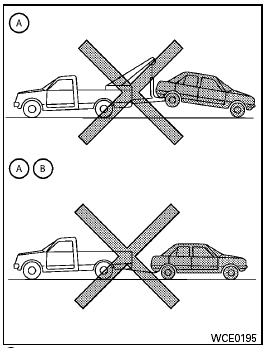
A (CVT) Continuously Variable Transmission<> B (M/T) Manual transmission

● Never tow Continuously Variable Transmission (CVT) models with the front wheels on the ground or four wheels on the ground (forward or backward), as this may cause serious and expensive damage to the transmission. If it is necessary to tow the vehicle with the rear wheels raised always use towing dollies under the front wheels.
● When towing Continuously Variable Transmission (CVT) models with the front wheels on towing dollies, or when towing manual transmission (M/T) models with the front wheels on the ground.
– Turn the ignition switch to the OFF position, and secure the steering wheel in a straight-ahead position with a rope or similar device. Never secure the steering wheel by turning the ignition switch to the LOCK position.
This may damage the steering lock mechanism (for models equipped with steering lock mechanism).
– Move the shift selector to the N (Neutral) position.
● When towing Continuously Variable Transmission (CVT) or manual transmission (M/T) models with the rear wheels on the ground (if you do not use towing dollies): Always release the parking brake.
● Observe the following restricted towing speeds and distances for manual transmission (M/T) models only.
– Speed: Below 50 MPH (80 km/h) – Distance: Less than 50 miles (80 km)
See also:
2011 Nissan Rogue review
I've got nothing but respect for people who look forward to spending a
Saturday testing out crossovers that cost more than 20 grand; the segment has
more players than a baseball team, and most ble ...
Seat belts
The seat belts can be cleaned by wiping them
with a sponge dampened in a mild soap solution.
Allow the belts to dry completely in the shade
before using them. See “Seat belt maintenance”
in ...
Removing spots
Remove tar and oil spots, industrial dust, insects,
and tree sap as quickly as possible from the
surface of the paint to avoid lasting damage or
staining. Special cleaning products are available ...