
Exterior and interior lights
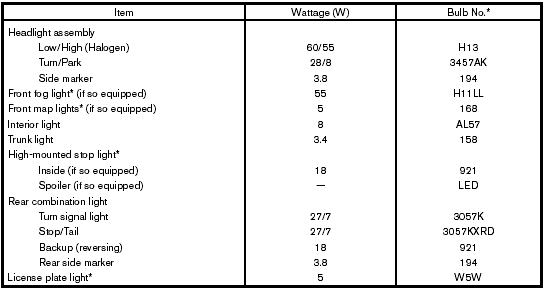
* Always check with the Parts Department at a NISSAN dealer for the latest parts information.
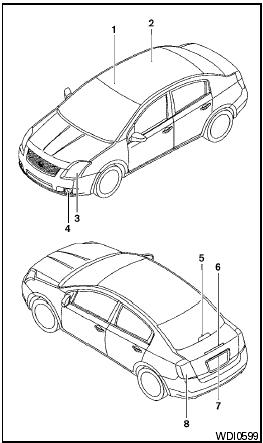
1. Front map lights (if so equipped)
2. Interior light
3. Headlight assembly
4. Front fog light (if so equipped)
5. High-mounted stop light (if so equipped)
6. Spoiler-mounted stop light (if so equipped)
7. License plate light
8. Rear combination light
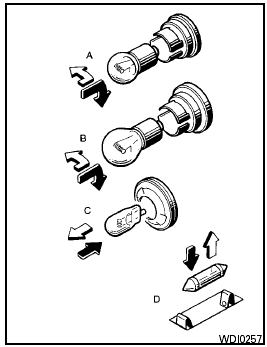
 Indicates
bulb removal
Indicates
bulb removal
 Indicates
bulb replacement
Indicates
bulb replacement
Replacement procedures
All other lights are either type A, B, C or D. When replacing a bulb, first remove the lens and/or cover.
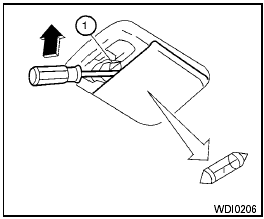
Interior light
Use a cloth 1 to protect the interior light housing.
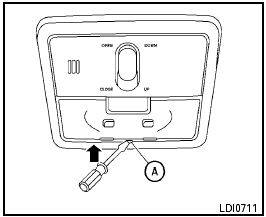
Map light (if so equipped)
Use a cloth A to protect the light housing.
See also:
Supplemental air bag warning labels
Warning labels about the supplemental frontimpact
air bag systems are placed in the vehicle
as shown in the illustration.
1 SRS air bag
The warning labels are located on the surface of
the s ...
All-Wheel Drive (AWD) models
- Always use tires of the same type,
size, brand, construction (bias, biasbelted
or radial), and tread pattern
on all four wheels. Failure to do so
may result in a circumference difference ...
Front manual seat adjustment
Forward and backward
Pull the center of the bar up and hold it while you
slide the seat forward or backward to the desired
position. Release the bar to lock the seat in
position.
Reclining
T ...