
Installing front license plate
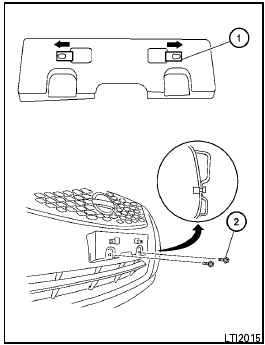
Use the following steps to mount the front license plate.
1 Slide the metal mounting clips onto the license plate holder as indicated.
2 Attach the license plate bracket on the plastic finisher at the location mark (small dimple) using the two 6mm screws provided.
See also:
Interior light
Type A
The interior light has a three-position switch and
operates regardless of ignition switch position.
● When the switch is in the ON position 1 ,
the interior light illuminates, regar ...
USB memory operation
Audio main operation:
The USB outlet connector is located in the
center console. Open the lid and connect a USB
memory as illustrated. Then, switch to the USB
memory mode automatically.
If t ...
Brake and clutch (if so equipped) fluid
For further brake and clutch fluid specification
information, refer to “Capacities and recommended
fuel/lubricants” in the “Technical and
consumer information” section of this manual.
...