
Instrument panel
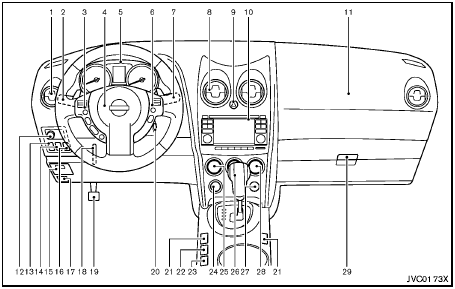
Instrument panel
1. Side ventilator
2. Headlight, fog light* and turn signal switch
3. Steering-wheel-mounted controls (left side)*
— Audio control*
— Bluetooth® Hands-Free Phone System control*
4. Steering wheel
— Horn
— Driver supplemental air bag
— Electric power steering system
5. Meters and gauges
6. Steering-wheel-mounted controls (right side)
— Cruise control switches
7. Wiper and washer switch
8. Center ventilator
9. Hazard warning flasher switch
10. Audio system/Navigation system**
— Clock
— Rear view monitor*
— Around viewTM monitor*
11. Front passenger supplemental air bag
12. Outside remote mirror control switch
13. Headlight aiming control*
14. All-Wheel Drive (AWD) LOCK switch*
15. Fuse box cover
16. Vehicle Dynamic Control (VDC) OFF switch
17. Hood release handle
18. Tilting steering wheel lever
19. Parking brake
20. Ignition switch
21. Heated seat switch*
22. “Camera” Around viewTM monitor display switch*
23. Sport mode switch
24. Power outlet
25. Heater/air conditioner control
26. Selector lever
27. Front passenger air bag status light
28. Rear window and outside mirror* defroster switch
29. Glove box
*: if so equipped
**: See a separate Navigation System Owner’s Manual (if so equipped)
See also:
Jump starting
If jump starting is necessary, see “Jump starting”
in the “In case of emergency” section of this
manual. If the engine does not start by jump
starting, the battery may have to be replace ...
Map pockets
Map pockets ...
Cruise control operations
The cruise control allows driving at a speed between
25 - 89 MPH (40 - 144 km/h) without
keeping your foot on the accelerator pedal.
To turn on the cruise control, push the
ON·OFF switch. The ...